crwdns2933423:0crwdne2933423:0
crwdns2947577:0crwdnd2947577:0crwdne2947577:0

Canon EOS 6D Analog Screen Replacement

crwdns2942213:0crwdne2942213:0

  1. Canon EOS 6D Analog Screen Replacement, Rear Body Panel: crwdns2935265:01crwdnd2935265:01crwdnd2935265:01crwdne2935265:0
    • Remove the viewfinder cover by pinching the sides and sliding it upward.

    crwdns2952109:0crwdne2952109:0

    crwdns2917038:0crwdne2917038:0

  2. Canon EOS 6D Analog Screen Replacement: crwdns2935265:02crwdnd2935265:01crwdnd2935265:01crwdne2935265:0
    • Open the battery door on the bottom of the camera.

    • Use your thumb to slide the small black tab on the inside of the battery door up and pull the door off the camera.

    crwdns2952109:0crwdne2952109:0

    crwdns2917038:0crwdne2917038:0

  3. Canon EOS 6D Analog Screen Replacement: crwdns2935265:03crwdnd2935265:01crwdnd2935265:01crwdne2935265:0
    • Slide your fingernail or the flat end of the spudger underneath the rubber covering and gently peel it off all sides of the camera.

    crwdns2952109:0crwdne2952109:0

    crwdns2917038:0crwdne2917038:0

  4. Canon EOS 6D Analog Screen Replacement: crwdns2935265:04crwdnd2935265:01crwdnd2935265:01crwdne2935265:0
    • Open the covers to the HDMI/AV/MIC ports on the side of the camera by gently pulling outward on the bottom of the covers.

    • Rotate the covers to the side so that you can see the connection ports inside.

    • Remove the following screws:

    • Two silver 5mm Phillips #00

    • One black 6mm Phillips #00

    crwdns2952109:0crwdne2952109:0

    crwdns2917038:0crwdne2917038:0

  5. Canon EOS 6D Analog Screen Replacement: crwdns2935265:05crwdnd2935265:01crwdnd2935265:01crwdne2935265:0
    • Remove the cover to the HDMI/AV/MIC ports by gently lifting the tab on the bottom edge of the camera.

    crwdns2952109:0crwdne2952109:0

    crwdns2917038:0crwdne2917038:0

  6. Canon EOS 6D Analog Screen Replacement: crwdns2935265:06crwdnd2935265:01crwdnd2935265:01crwdne2935265:0
    • Rotate your camera so the bottom side is facing you.

    • Remove the following screws:

    • One 6mm Phillips #00

    • Two 3mm Phillips #00

    crwdns2952109:0crwdne2952109:0

    crwdns2917038:0crwdne2917038:0

  7. Canon EOS 6D Analog Screen Replacement: crwdns2935265:07crwdnd2935265:01crwdnd2935265:01crwdne2935265:0
    • Rotate your camera so the back is facing you.

    • Remove the following screws:

    • Three silver 5mm Phillips #00

    • Two black 6mm Phillips #00

    • One black 4mm Phillips #00

    crwdns2952109:0crwdne2952109:0

    crwdns2917038:0crwdne2917038:0

  8. Canon EOS 6D Analog Screen Replacement: crwdns2935265:08crwdnd2935265:01crwdnd2935265:02crwdne2935265:0 Canon EOS 6D Analog Screen Replacement: crwdns2935265:08crwdnd2935265:02crwdnd2935265:02crwdne2935265:0
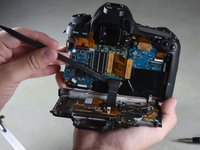
    • A black ribbon wire connects the rear panel to the inside of the camera. Breaking this wire would make your rear screen and buttons non-functional.

    • Carefully use your fingers to tilt the back panel downward to about a 90 degree angle.

    • Use the flat end of the spudger to gently pry off the ribbon wire from the inside of the camera.

    crwdns2952109:0crwdne2952109:0

    crwdns2917038:0crwdne2917038:0

  9. Canon EOS 6D Analog Screen Replacement, Front and Top Body Panels: crwdns2935265:09crwdnd2935265:01crwdnd2935265:01crwdne2935265:0
    • Remove the 8mm Phillips #00 screw from the bottom of the front of the camera.

    crwdns2952109:0crwdne2952109:0

    crwdns2917038:0crwdne2917038:0

  10. Canon EOS 6D Analog Screen Replacement: crwdns2935265:010crwdnd2935265:01crwdnd2935265:01crwdne2935265:0
    • Rotate the camera so the side with the SD card slot is facing you.

    • Remove the 4mm Phillips #00 screw from the bottom edge of this side.

    crwdns2952109:0crwdne2952109:0

    crwdns2917038:0crwdne2917038:0

  11. Canon EOS 6D Analog Screen Replacement: crwdns2935265:011crwdnd2935265:01crwdnd2935265:01crwdne2935265:0
    • Rotate the camera so the bottom is facing you.

    • Remove the following screws:

    • Two 8mm Phillips #00

    • One 4mm Phillips #00

    crwdns2952109:0crwdne2952109:0

    crwdns2917038:0crwdne2917038:0

  12. Canon EOS 6D Analog Screen Replacement: crwdns2935265:012crwdnd2935265:01crwdnd2935265:01crwdne2935265:0
    • Remove the bottom panel from the camera by using your fingers to pull outward on the tab inside the battery compartment.

    crwdns2952109:0crwdne2952109:0

    crwdns2917038:0crwdne2917038:0

  13. Canon EOS 6D Analog Screen Replacement: crwdns2935265:013crwdnd2935265:01crwdnd2935265:01crwdne2935265:0
    • Rotate the camera so the front is facing you.

    • Remove the following screws:

    • Three 5mm Phillips #00

    • Two 6mm Phillips #00

    • One 4mm Phillips #00

    crwdns2952109:0crwdne2952109:0

    crwdns2917038:0crwdne2917038:0

  14. Canon EOS 6D Analog Screen Replacement: crwdns2935265:014crwdnd2935265:01crwdnd2935265:01crwdne2935265:0
    • Rotate the camera so the side with the SD card slot is facing you.

    • Remove the following screws:

    • One 4mm fine-thread Phillips #00

    • Two 4mm coarse-thread Phillips #00

    crwdns2952109:0crwdne2952109:0

    crwdns2917038:0crwdne2917038:0

  15. Canon EOS 6D Analog Screen Replacement: crwdns2935265:015crwdnd2935265:01crwdnd2935265:01crwdne2935265:0
    • The red speaker wire is attached to the inside of the front panel. Opening the front panel forcefully may break it.

    • Slowly fold the front panel to the right without pulling it away from the right edge of the camera.

    crwdns2952109:0crwdne2952109:0

    crwdns2917038:0crwdne2917038:0

  16. Canon EOS 6D Analog Screen Replacement: crwdns2935265:016crwdnd2935265:01crwdnd2935265:01crwdne2935265:0
    • Remove the 4mm Phillips #00 screw on the inside of the front panel to separate the panel from the speaker wire.

    crwdns2952109:0crwdne2952109:0

    crwdns2917038:0crwdne2917038:0

  17. Canon EOS 6D Analog Screen Replacement: crwdns2935265:017crwdnd2935265:01crwdnd2935265:01crwdne2935265:0
    • Remove the 4mm Phillips #00 screw from the inside of the top panel, below the strap hook.

    crwdns2952109:0crwdne2952109:0

    crwdns2917038:0crwdne2917038:0

  18. Canon EOS 6D Analog Screen Replacement: crwdns2935265:018crwdnd2935265:01crwdnd2935265:01crwdne2935265:0
    • Remove the 4mm Phillips #00 screw from the inside of the top panel, below the shutter button.

    crwdns2952109:0crwdne2952109:0

    crwdns2917038:0crwdne2917038:0

  19. Canon EOS 6D Analog Screen Replacement: crwdns2935265:019crwdnd2935265:01crwdnd2935265:01crwdne2935265:0
    • Rotate the camera so the top is facing you.

    • Remove the 6mm Phillips #00 screw from next to the analog screen.

    crwdns2952109:0crwdne2952109:0

    crwdns2917038:0crwdne2917038:0

  20. Canon EOS 6D Analog Screen Replacement: crwdns2935265:020crwdnd2935265:01crwdnd2935265:01crwdne2935265:0
    • Rotate the camera so the back is facing you.

    • Remove the Phillips #00 screw from the viewfinder focus.

    crwdns2952109:0crwdne2952109:0

    crwdns2917038:0crwdne2917038:0

  21. Canon EOS 6D Analog Screen Replacement: crwdns2935265:021crwdnd2935265:01crwdnd2935265:01crwdne2935265:0
    crwdns2935267:0crwdne2935267:0
    Tweezers
    $4.99
    • Carefully detach the two light brown ribbon wires on the top panel:

    • The right ribbon by prying it out with the flat end of the spudger.

    • The left ribbon by using tweezers to gently wiggle it out toward the top.

    crwdns2952109:0crwdne2952109:0

    crwdns2917038:0crwdne2917038:0

  22. Canon EOS 6D Analog Screen Replacement: crwdns2935265:022crwdnd2935265:01crwdnd2935265:01crwdne2935265:0
    • A ribbon wire connects the inside of the top panel to the body of the camera.

    • Slowly lift the top panel to about an inch above the body of the camera.

    • Carefully use the flat end of the spudger to detach the ribbon wire from the top of the camera.

    crwdns2952109:0crwdne2952109:0

    crwdns2917038:0crwdne2917038:0

  23. Canon EOS 6D Analog Screen Replacement: crwdns2935265:023crwdnd2935265:01crwdnd2935265:01crwdne2935265:0
    • Grip the remaining side panel with your fingers and gently pop it off the camera.

    crwdns2952109:0crwdne2952109:0

    crwdns2917038:0crwdne2917038:0

  24. Canon EOS 6D Analog Screen Replacement, Analog Screen: crwdns2935265:024crwdnd2935265:01crwdnd2935265:01crwdne2935265:0
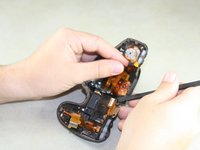
    • Use the pointed end of the spudger to flip up two silver ribbon wire latches on the inside of the top panel.

    crwdns2952109:0crwdne2952109:0

    crwdns2917038:0crwdne2917038:0

  25. Canon EOS 6D Analog Screen Replacement: crwdns2935265:025crwdnd2935265:01crwdnd2935265:01crwdne2935265:0
    • Use the pointed end of the spudger to slide out the two light brown ribbon wires.

    crwdns2952109:0crwdne2952109:0

    crwdns2917038:0crwdne2917038:0

  26. Canon EOS 6D Analog Screen Replacement: crwdns2935265:026crwdnd2935265:01crwdnd2935265:01crwdne2935265:0
    • Use the pointed end of the spudger to carefully remove the third light brown ribbon wire.

    crwdns2952109:0crwdne2952109:0

    crwdns2917038:0crwdne2917038:0

  27. Canon EOS 6D Analog Screen Replacement: crwdns2935265:027crwdnd2935265:01crwdnd2935265:01crwdne2935265:0
    • Remove four 5mm Phillips #00 screws from the inside of the top panel.

    crwdns2952109:0crwdne2952109:0

    crwdns2917038:0crwdne2917038:0

  28. Canon EOS 6D Analog Screen Replacement: crwdns2935265:028crwdnd2935265:01crwdnd2935265:02crwdne2935265:0 Canon EOS 6D Analog Screen Replacement: crwdns2935265:028crwdnd2935265:02crwdnd2935265:02crwdne2935265:0
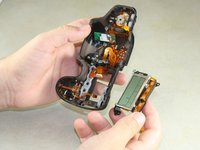
    • Carefully slide the flat end of the spudger underneath the screen and lift it out.

    crwdns2952109:0crwdne2952109:0

    crwdns2917038:0crwdne2917038:0

crwdns2915888:0crwdne2915888:0

To reassemble your device, follow these instructions in reverse order.

crwdns2935221:0crwdne2935221:0

crwdns2935229:09crwdne2935229:0

Justin Thomas

crwdns2935283:004/22/14crwdne2935283:0

2.233 crwdns2915208:0crwdne2915208:0

crwdns2935297:06crwdne2935297:0

crwdns2935287:0crwdne2935287:0

Cal Poly, Team 11-48, Amido Spring 2014 crwdns2935289:0Cal Poly, Team 11-48, Amido Spring 2014crwdne2935289:0

CPSU-AMIDO-S14S11G48

crwdns2931471:04crwdne2931471:0

crwdns2935297:020crwdne2935297:0

crwdns2947412:02crwdne2947412:0

any way to replace the sd card side panel without having to take the lcd panel off

Nate Kennedy - crwdns2934203:0crwdne2934203:0 crwdns2950251:0crwdne2950251:0

Thank you Justin! Very well done. Fixed the camera for $40 rather than replacing it for 1000+

Matt Ryan - crwdns2934203:0crwdne2934203:0 crwdns2950251:0crwdne2950251:0

crwdns2917038:0crwdne2917038:0

crwdns2936625:0crwdne2936625:0:

crwdns2936751:024crwdne2936751:0 6

crwdns2936753:07crwdne2936753:0 28

crwdns2936753:030crwdne2936753:0 79

crwdns2942667:0crwdne2942667:0 8,265