crwdns2933423:0crwdne2933423:0
crwdns2947577:0crwdnd2947577:0crwdne2947577:0

Canon EOS 40D Shutter Button Replacement

crwdns2942213:0crwdne2942213:0

  1. Canon EOS 40D Shutter Button Replacement, Battery: crwdns2935265:01crwdnd2935265:01crwdnd2935265:01crwdne2935265:0
    • Locate the battery compartment cover on the bottom of the camera below the shutter button.

    crwdns2952109:0crwdne2952109:0

    crwdns2917038:0crwdne2917038:0

  2. Canon EOS 40D Shutter Button Replacement: crwdns2935265:02crwdnd2935265:01crwdnd2935265:01crwdne2935265:0
    • Find the marked arrow on the battery compartment cover labeled "BATT. OPEN". Slide the lever following the arrow's direction and lift at the same time to release the latch.

    crwdns2952109:0crwdne2952109:0

    crwdns2917038:0crwdne2917038:0

  3. Canon EOS 40D Shutter Button Replacement: crwdns2935265:03crwdnd2935265:01crwdnd2935265:01crwdne2935265:0
    • Release the lever and allow the battery compartment cover to completely open.

    • Remove the battery.

    crwdns2952109:0crwdne2952109:0

    crwdns2917038:0crwdne2917038:0

  4. Canon EOS 40D Shutter Button Replacement, Shutter Button: crwdns2935265:04crwdnd2935265:01crwdnd2935265:01crwdne2935265:0
    • Peel off the grip material from the body of the camera, exposing the screws.

    crwdns2952109:0crwdne2952109:0

    crwdns2917038:0crwdne2917038:0

  5. Canon EOS 40D Shutter Button Replacement: crwdns2935265:05crwdnd2935265:01crwdnd2935265:01crwdne2935265:0
    • Remove the rubber eyepiece by sliding it upwards.

    crwdns2952109:0crwdne2952109:0

    crwdns2917038:0crwdne2917038:0

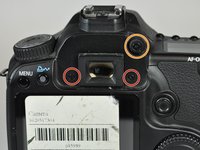
  6. Canon EOS 40D Shutter Button Replacement: crwdns2935265:06crwdnd2935265:01crwdnd2935265:02crwdne2935265:0 Canon EOS 40D Shutter Button Replacement: crwdns2935265:06crwdnd2935265:02crwdnd2935265:02crwdne2935265:0
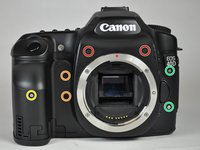
    • Remove the three 5.0 mm Phillips #000 screws.

    • Remove the single 12.0 mm Phillips #000 screw.

    crwdns2952109:0crwdne2952109:0

    crwdns2917038:0crwdne2917038:0

  7. Canon EOS 40D Shutter Button Replacement: crwdns2935265:07crwdnd2935265:01crwdnd2935265:01crwdne2935265:0
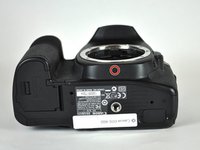
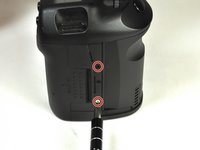
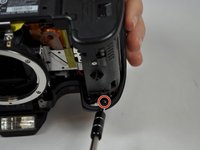
    • Remove the two 3.0 mm Phillips #000 screws on the bottom of the camera.

    crwdns2952109:0crwdne2952109:0

    crwdns2917038:0crwdne2917038:0

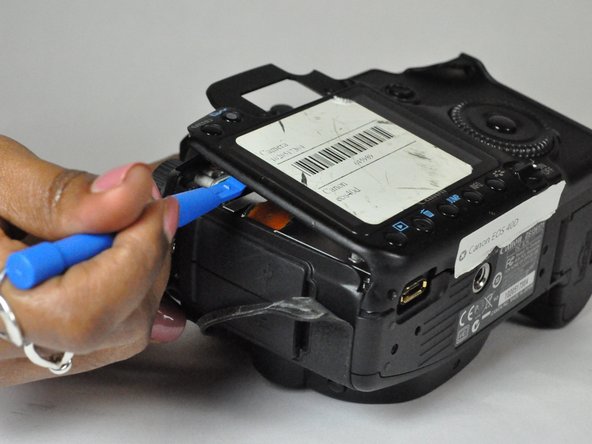
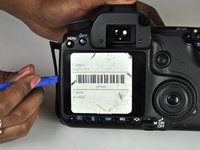
  8. Canon EOS 40D Shutter Button Replacement: crwdns2935265:08crwdnd2935265:01crwdnd2935265:02crwdne2935265:0 Canon EOS 40D Shutter Button Replacement: crwdns2935265:08crwdnd2935265:02crwdnd2935265:02crwdne2935265:0
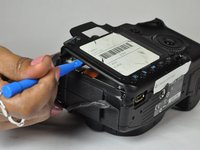
    • Remove the side cover using a plastic opening tool or your hands.

    • Use a plastic opening tool to gently start prying the rear case up from the rest of the camera.

    crwdns2952109:0crwdne2952109:0

    crwdns2917038:0crwdne2917038:0

  9. Canon EOS 40D Shutter Button Replacement: crwdns2935265:09crwdnd2935265:01crwdnd2935265:02crwdne2935265:0 Canon EOS 40D Shutter Button Replacement: crwdns2935265:09crwdnd2935265:02crwdnd2935265:02crwdne2935265:0
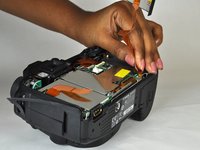
    • Use the tip of a spudger to disconnect the ZIF connector on the left side of the camera.

    • The ribbon cable on this device was torn in the process of removing the back case, so there are no photos showing this step.

    • Disconnect the ribbon cable securing the rear case to the motherboard.

    • Separate the rear case from the camera.

    crwdns2952109:0crwdne2952109:0

    crwdns2917038:0crwdne2917038:0

  10. Canon EOS 40D Shutter Button Replacement: crwdns2935265:010crwdnd2935265:01crwdnd2935265:03crwdne2935265:0 Canon EOS 40D Shutter Button Replacement: crwdns2935265:010crwdnd2935265:02crwdnd2935265:03crwdne2935265:0 Canon EOS 40D Shutter Button Replacement: crwdns2935265:010crwdnd2935265:03crwdnd2935265:03crwdne2935265:0
    • Remove the five 3.0 mm Phillips #000 screws.

    • Remove the two 5.0 mm Phillips #000 screws.

    • Remove the single 3.0 mm Phillips #000 screw.

    • Remove the two 5.0 mm Phillips #000 screws.

    crwdns2952109:0crwdne2952109:0

    crwdns2917038:0crwdne2917038:0

  11. Canon EOS 40D Shutter Button Replacement: crwdns2935265:011crwdnd2935265:01crwdnd2935265:01crwdne2935265:0
    • Pull off the cover.

    crwdns2952109:0crwdne2952109:0

    crwdns2917038:0crwdne2917038:0

  12. Canon EOS 40D Shutter Button Replacement: crwdns2935265:012crwdnd2935265:01crwdnd2935265:01crwdne2935265:0
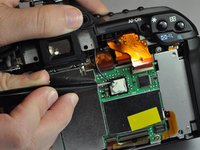
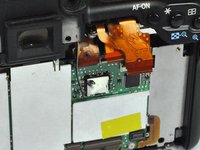
    • Use a plastic opening tool to flip up the black retaining flap on the ZIF connector.

    • Pull the ribbon cables free of the connectors.

    crwdns2952109:0crwdne2952109:0

    crwdns2917038:0crwdne2917038:0

  13. Canon EOS 40D Shutter Button Replacement: crwdns2935265:013crwdnd2935265:01crwdnd2935265:02crwdne2935265:0 Canon EOS 40D Shutter Button Replacement: crwdns2935265:013crwdnd2935265:02crwdnd2935265:02crwdne2935265:0
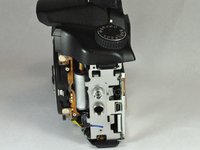
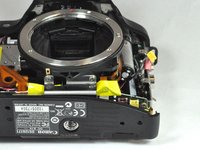
    • Remove the side panel by unscrewing three 5 mm JIS #000 screws.

    crwdns2952109:0crwdne2952109:0

    crwdns2917038:0crwdne2917038:0

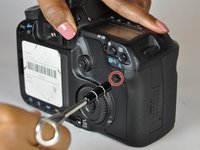
  14. Canon EOS 40D Shutter Button Replacement: crwdns2935265:014crwdnd2935265:01crwdnd2935265:02crwdne2935265:0 Canon EOS 40D Shutter Button Replacement: crwdns2935265:014crwdnd2935265:02crwdnd2935265:02crwdne2935265:0
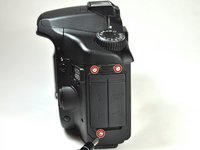
    • Remove the two 5 mm screws from under the wheel and under the shutter button using a JIS #000 screwdriver.

    crwdns2952109:0crwdne2952109:0

    crwdns2917038:0crwdne2917038:0

  15. Canon EOS 40D Shutter Button Replacement: crwdns2935265:015crwdnd2935265:01crwdnd2935265:03crwdne2935265:0 Canon EOS 40D Shutter Button Replacement: crwdns2935265:015crwdnd2935265:02crwdnd2935265:03crwdne2935265:0 Canon EOS 40D Shutter Button Replacement: crwdns2935265:015crwdnd2935265:03crwdnd2935265:03crwdne2935265:0
    • Remove the red and yellow plugs from their sockets using the plastic opening tool.

    • Position the tip of the tool under the raised plastic line, then push up.

    crwdns2952109:0crwdne2952109:0

    crwdns2917038:0crwdne2917038:0

  16. Canon EOS 40D Shutter Button Replacement: crwdns2935265:016crwdnd2935265:01crwdnd2935265:03crwdne2935265:0 Canon EOS 40D Shutter Button Replacement: crwdns2935265:016crwdnd2935265:02crwdnd2935265:03crwdne2935265:0 Canon EOS 40D Shutter Button Replacement: crwdns2935265:016crwdnd2935265:03crwdnd2935265:03crwdne2935265:0
    crwdns2935267:0crwdne2935267:0
    Tweezers
    $4.99
    • Remove the cable running from the top of the camera to the black and white box.

    • Use a pair of precision tweezers to poke through the rubber coating and create a path for the wire to slide out.

    • Disconnect the wire by sliding it away from the rubber.

    crwdns2952109:0crwdne2952109:0

    crwdns2917038:0crwdne2917038:0

  17. Canon EOS 40D Shutter Button Replacement: crwdns2935265:017crwdnd2935265:01crwdnd2935265:01crwdne2935265:0
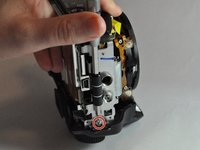
    • Use a Phillips #000 screwdriver to remove the two 5.0 mm screws and single 7.0 mm screw.

    • Notice that one is screwed in from the side.

    crwdns2952109:0crwdne2952109:0

    crwdns2917038:0crwdne2917038:0

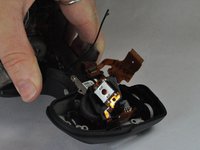
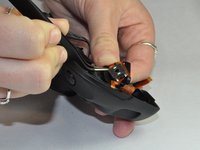
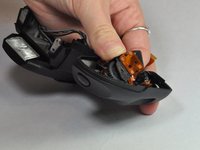
  18. Canon EOS 40D Shutter Button Replacement: crwdns2935265:018crwdnd2935265:01crwdnd2935265:03crwdne2935265:0 Canon EOS 40D Shutter Button Replacement: crwdns2935265:018crwdnd2935265:02crwdnd2935265:03crwdne2935265:0 Canon EOS 40D Shutter Button Replacement: crwdns2935265:018crwdnd2935265:03crwdnd2935265:03crwdne2935265:0
    • Once the screws are removed, wiggle the piece out of its socket and flip it over, exposing the shutter button.

    • Use tweezers to separate the piece from the ribbon that it is glued to.

    crwdns2952109:0crwdne2952109:0

    crwdns2917038:0crwdne2917038:0

crwdns2915888:0crwdne2915888:0

To reassemble your device, follow these instructions in reverse order.

crwdns2935221:0crwdne2935221:0

crwdns2935229:03crwdne2935229:0

Kenadie Buccellato

crwdns2935283:009/03/15crwdne2935283:0

444 crwdns2915208:0crwdne2915208:0

crwdns2935295:0crwdne2935295:0

crwdns2935287:0crwdne2935287:0

USF Tampa, Team 12-3, Blackwell Fall 2015 crwdns2935289:0USF Tampa, Team 12-3, Blackwell Fall 2015crwdne2935289:0

USFT-BLACKWELL-F15S12G3

crwdns2931471:04crwdne2931471:0

crwdns2935297:016crwdne2935297:0

crwdns2947412:03crwdne2947412:0

Thanks for these instructions. I've successfully replaced the shutter button assembly on my Canon 50d using this guide.

William Eggers - crwdns2934203:0crwdne2934203:0 crwdns2950251:0crwdne2950251:0
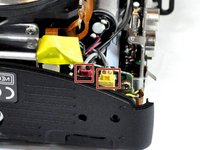
Thank you for the tutorial. I don’t know how to replace the button. Which glue to use ? Must it scratch the connections on the flex circuit before gluing the new button ?

Tony - crwdns2934203:0crwdne2934203:0 crwdns2950251:0crwdne2950251:0
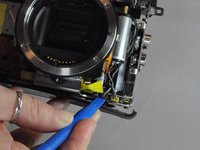
Thanks for this, but this is missing a lot of steps, and you didn't mention the jis #000 in the tools...

New Town - crwdns2934203:0crwdne2934203:0 crwdns2950251:0crwdne2950251:0

crwdns2917038:0crwdne2917038:0

crwdns2936625:0crwdne2936625:0:

crwdns2936751:024crwdne2936751:0 2

crwdns2936753:07crwdne2936753:0 14

crwdns2936753:030crwdne2936753:0 93

crwdns2942667:0crwdne2942667:0 10,908