crwdns2933423:0crwdne2933423:0
crwdns2947577:0crwdnd2947577:0crwdne2947577:0

Canon EOS 30 Remote Control Socket Replacement

crwdns2869540:0crwdne2869540:0: 3.8K

crwdns2959988:0crwdne2959988:0

crwdns2959990:0crwdne2959990:0
2
crwdns2959992:0crwdne2959992:0
21
crwdns2959994:0crwdne2959994:0
91
crwdns2959996:0crwdne2959996:0
3,775
crwdns2955950:0crwdne2955950:0: 1

crwdns2960002:01crwdne2960002:0.

crwdns2959984:0crwdne2959984:0: 2

crwdns2959974:02crwdne2959974:0

crwdns2959986:0crwdne2959986:0: 8

crwdns2959982:08crwdne2959982:0

crwdns2955944:0crwdne2955944:0: crwdns2931287:025crwdne2931287:0
crwdns2955970:0crwdne2955970:0: crwdns2937801:0crwdne2937801:0
crwdns2869444:0crwdne2869444:0

crwdns2869445:0crwdne2869445:0

Canon EOS 30 Remote Control Socket Replacement

crwdns2959930:0crwdne2959930:0

crwdns2943215:0crwdne2943215:0

crwdns2915892:0crwdne2915892:0

crwdns2959928:0crwdne2959928:0 ↓

The Remote Control Socket is not difficult to access. However, it's connections are soldered, so it will be difficult to remove.

    1. Canon EOS 30 Remote Control Socket Replacement, Front Panel: crwdns2935265:01crwdnd2935265:01crwdnd2935265:01crwdne2935265:0
      • Remove the two 4.8 mm black screws above the lens on the front of the camera.

      crwdns2952109:0crwdne2952109:0

      crwdns2917038:0crwdne2917038:0

    2. Canon EOS 30 Remote Control Socket Replacement: crwdns2935265:02crwdnd2935265:01crwdnd2935265:01crwdne2935265:0
      • Remove the 4.3 mm black screw under the lens ring, and the 4.8 mm black screw under the camera.

      crwdns2952109:0crwdne2952109:0

      crwdns2917038:0crwdne2917038:0

    3. Canon EOS 30 Remote Control Socket Replacement: crwdns2935265:03crwdnd2935265:01crwdnd2935265:01crwdne2935265:0
      • Remove the 4.8 mm black screw on the left side of the camera.

      crwdns2952109:0crwdne2952109:0

      crwdns2917038:0crwdne2917038:0

    4. Canon EOS 30 Remote Control Socket Replacement: crwdns2935265:04crwdnd2935265:01crwdnd2935265:01crwdne2935265:0
      • Remove the front panel by lifting it away from the camera's body.

      crwdns2952109:0crwdne2952109:0

      crwdns2917038:0crwdne2917038:0

    1. Canon EOS 30 Remote Control Socket Replacement, Bottom Panel: crwdns2935265:05crwdnd2935265:01crwdnd2935265:01crwdne2935265:0
      • Remove seven 4.25 mm black screws on the bottom panel.

      crwdns2952109:0crwdne2952109:0

      crwdns2917038:0crwdne2917038:0

    2. Canon EOS 30 Remote Control Socket Replacement: crwdns2935265:06crwdnd2935265:01crwdnd2935265:01crwdne2935265:0
      • Remove the bottom panel.

      crwdns2952109:0crwdne2952109:0

      crwdns2917038:0crwdne2917038:0

    1. Canon EOS 30 Remote Control Socket Replacement, Side Panel With Remote Control Socket: crwdns2935265:07crwdnd2935265:01crwdnd2935265:01crwdne2935265:0
      • Remove two 6.5 mm black screws from the panel.

      crwdns2952109:0crwdne2952109:0

      crwdns2917038:0crwdne2917038:0

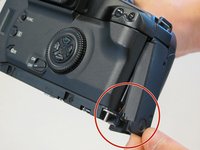
    2. Canon EOS 30 Remote Control Socket Replacement: crwdns2935265:08crwdnd2935265:01crwdnd2935265:01crwdne2935265:0
      • Remove the plastic remote control socket cap by pulling it straight out.

      crwdns2952109:0crwdne2952109:0

      crwdns2917038:0crwdne2917038:0

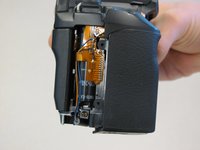
    3. Canon EOS 30 Remote Control Socket Replacement: crwdns2935265:09crwdnd2935265:01crwdnd2935265:02crwdne2935265:0 Canon EOS 30 Remote Control Socket Replacement: crwdns2935265:09crwdnd2935265:02crwdnd2935265:02crwdne2935265:0
      • Slide the panel toward the bottom of the camera to remove.

      crwdns2952109:0crwdne2952109:0

      crwdns2917038:0crwdne2917038:0

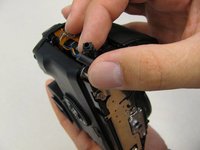
    4. Canon EOS 30 Remote Control Socket Replacement: crwdns2935265:010crwdnd2935265:01crwdnd2935265:01crwdne2935265:0
      • Remove the single 4.8 silver screw from the control socket.

      crwdns2952109:0crwdne2952109:0

      crwdns2917038:0crwdne2917038:0

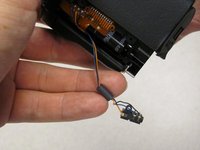
    5. Canon EOS 30 Remote Control Socket Replacement: crwdns2935265:011crwdnd2935265:01crwdnd2935265:02crwdne2935265:0 Canon EOS 30 Remote Control Socket Replacement: crwdns2935265:011crwdnd2935265:02crwdnd2935265:02crwdne2935265:0
      • The control socket is now secure by three wires.

      • Desolder connections to replace the remote control socket.

      crwdns2952109:0crwdne2952109:0

      crwdns2917038:0crwdne2917038:0

    1. Canon EOS 30 Remote Control Socket Replacement, Remote Control Socket: crwdns2935265:012crwdnd2935265:01crwdnd2935265:01crwdne2935265:0
      • Remove one 4.8 mm silver screw securing Remote Control Socket to camera.

      crwdns2952109:0crwdne2952109:0

      crwdns2917038:0crwdne2917038:0

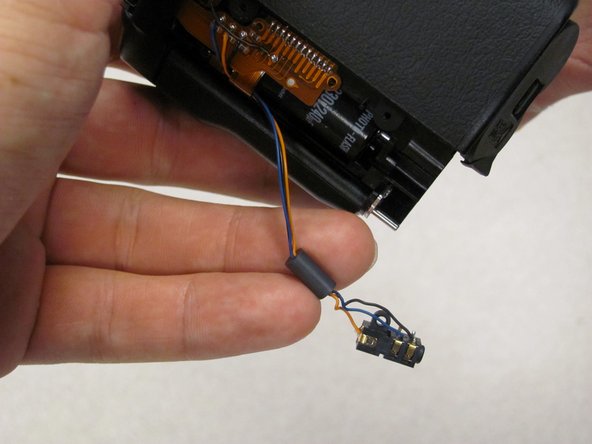
    2. Canon EOS 30 Remote Control Socket Replacement: crwdns2935265:013crwdnd2935265:01crwdnd2935265:02crwdne2935265:0 Canon EOS 30 Remote Control Socket Replacement: crwdns2935265:013crwdnd2935265:02crwdnd2935265:02crwdne2935265:0
      • Remote Control Socket is now secured by 3 wires.

      • Desolder connections to replace Remote Control Socket.

      crwdns2952109:0crwdne2952109:0

      crwdns2917038:0crwdne2917038:0

crwdns2915888:0crwdne2915888:0

To reassemble your device, follow these instructions in reverse order.

crwdns2935221:0crwdne2935221:0

crwdns2935229:02crwdne2935229:0

crwdns2862417:0crwdne2862417:0

crwdns2935293:0crwdne2935293:0

Antonia

crwdns2935283:004/17/11crwdne2935283:0

124 crwdns2915208:0crwdne2915208:0

crwdns2935297:02crwdne2935297:0

crwdns2935287:0crwdne2935287:0

Cal Poly, Team 8-8, Regan Spring 2011 crwdns2935289:0Cal Poly, Team 8-8, Regan Spring 2011crwdne2935289:0

CPSU-REGAN-S11S8G8

crwdns2931471:05crwdne2931471:0

crwdns2935297:0132crwdne2935297:0

crwdns2947412:00crwdne2947412:0

crwdns2917038:0crwdne2917038:0

crwdns2936625:0crwdne2936625:0:

crwdns2936751:024crwdne2936751:0 2

crwdns2936753:07crwdne2936753:0 21

crwdns2936753:030crwdne2936753:0 91

crwdns2959996:0crwdne2959996:0 3,775