
CMS Switch Replacement

crwdns2959932:0crwdnd2959932:0Avrilacrwdnd2959932:0crwdnd2959932:0crwdnd2959932:03crwdnd2959932:0crwdne2959932:0
crwdns2959936:0Ndz 13, 2024crwdne2959936:0
crwdns2869540:0crwdne2869540:0: 1.3K
crwdns2959988:0crwdne2959988:0
- crwdns2959990:0crwdne2959990:0
- 4
- crwdns2959992:0crwdne2959992:0
- 22
- crwdns2959994:0crwdne2959994:0
- 90
- crwdns2959996:0crwdne2959996:0
- 1,278
crwdns2955950:0crwdne2955950:0: 2
crwdns2960008:02crwdne2960008:0
crwdns2960000:0crwdne2960000:0crwdns2959984:0crwdne2959984:0: 1 2
crwdns2959972:01crwdne2959972:0
crwdns2959970:02crwdne2959970:0
crwdns2959986:0crwdne2959986:0: 0 1
crwdns2959958:0crwdne2959958:0
crwdns2959976:01crwdne2959976:0
crwdns2944444:0crwdne2944444:0
crwdns2944446:0crwdne2944446:0
crwdns2915892:0crwdne2915892:0
crwdns2959928:0crwdne2959928:0 ↓Thrustmaster sells spare part through their online Eshop.
You can also contact Thrsutmaster technical support to get spare part if not available in your region.
crwdns2959930:0crwdne2959930:0
crwdns2943215:0crwdne2943215:0

-
-
-
Unscrew the 5 screws shown in the first image
-
Unscrew the 4 screws shown in the second image
-
Turn the handle over and remove the black cover shown in the 3rd image.
 crwdns2952109:0crwdne2952109:0
-
-
-
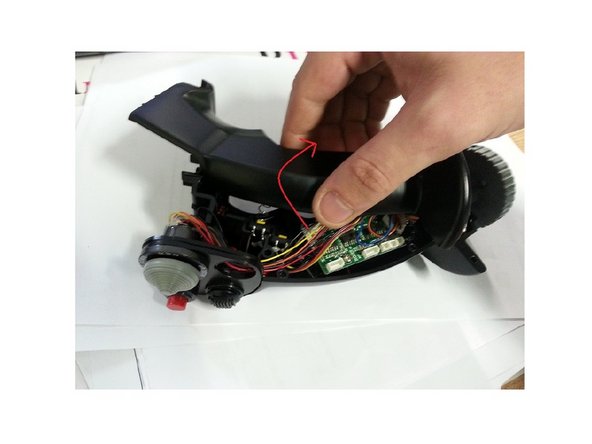
Slowly pull the top half of the stick and rotate it. (Be careful not to damage the wires inside).
-
-
-
Check the internal connections.
-
-
-
-
-
Disconnect the wires from CMS connector, they are highlighted in red.
-
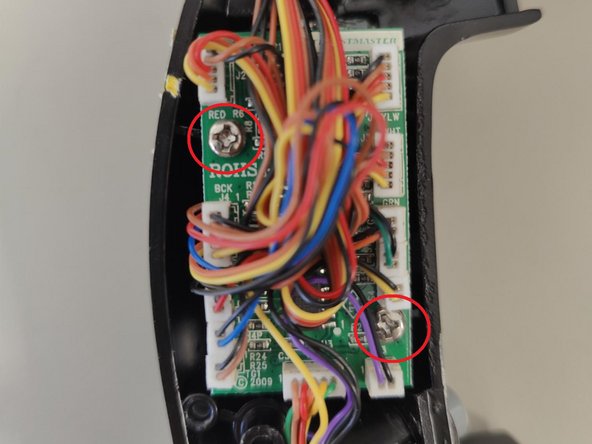
Remove the screws so that you could detach the PCB.
-
-
-
-
Hold down the CMS clip which will allow you to remove the switch. If necessary, you can force it out or brake it.
-
Once the old CMS is removed, you can insert the new one
-
-





To reassemble your device, follow these instructions in reverse order. Be careful not to damage the wires when reattaching the two halves of the joystick handle.
crwdns2935221:0crwdne2935221:0
crwdns2935227:0crwdne2935227:0
crwdns2934873:0crwdne2934873:0
100%

crwdns2934885:0crwdne2934885:0 crwdns2934875:0crwdne2934875:0
crwdns2958738:0crwdne2958738:0 ›
crwdns2955734:0crwdne2955734:0

crwdns2947412:02crwdne2947412:0
Merci pour ces tuto qui peuvent se révéler bien pratique, mais une question demeure, où trouver les pièces de rechanges ! rien sur le site de TM ! ;)
Kervinou - crwdns2934203:0crwdne2934203:0 crwdns2950251:0crwdne2950251:0
if anyone needs this part, contact thrustmaster support with photos of the joystick and serial number. the support team will reach out about purchasing a new part
Donk - crwdns2934203:0crwdne2934203:0 crwdns2950251:0crwdne2950251:0
