crwdns2933423:0crwdne2933423:0
crwdns2947577:0crwdnd2947577:0crwdne2947577:0

Bose SoundLink Color Speaker Replacement

crwdns2942213:0crwdne2942213:0

    1. Bose SoundLink Color Speaker Replacement, Outer Casing: crwdns2935265:01crwdnd2935265:01crwdnd2935265:02crwdne2935265:0 Bose SoundLink Color Speaker Replacement, Outer Casing: crwdns2935265:01crwdnd2935265:02crwdnd2935265:02crwdne2935265:0
      • Four round, plastic plugs are located on the back of the device.

      • Using a metal spudger, carefully pry up the plastic covers.

      • The covers are all glued on, so be careful not to scar the casing when prying them off. If possible, use a spudger or plastic opening tool to remove them.

      crwdns2952109:0crwdne2952109:0

      crwdns2917038:0crwdne2917038:0

    2. Bose SoundLink Color Speaker Replacement: crwdns2935265:02crwdnd2935265:01crwdnd2935265:02crwdne2935265:0 Bose SoundLink Color Speaker Replacement: crwdns2935265:02crwdnd2935265:02crwdnd2935265:02crwdne2935265:0
      • Remove the four 1.8 cm-long T15 Torx Security screws from the outer case.

      • Some of these use T15 "Star" 5-point Torx security screws instead of the more common 6-point ones.

      crwdns2952109:0crwdne2952109:0

      crwdns2917038:0crwdne2917038:0

    3. Bose SoundLink Color Speaker Replacement: crwdns2935265:03crwdnd2935265:01crwdnd2935265:02crwdne2935265:0 Bose SoundLink Color Speaker Replacement: crwdns2935265:03crwdnd2935265:02crwdnd2935265:02crwdne2935265:0
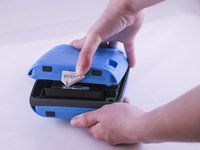
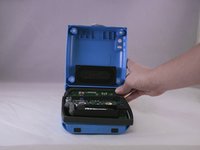
      • Carefully open up the casing.

      • The top button pad may need to be re-glued upon installing the new casing.

      crwdns2952109:0crwdne2952109:0

      crwdns2917038:0crwdne2917038:0

    1. Bose SoundLink Color Speaker Replacement, Speaker: crwdns2935265:04crwdnd2935265:01crwdnd2935265:02crwdne2935265:0 Bose SoundLink Color Speaker Replacement, Speaker: crwdns2935265:04crwdnd2935265:02crwdnd2935265:02crwdne2935265:0
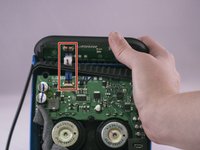
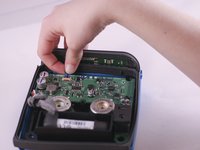
      • Lift up the retaining flap on the button cable ZIF connector.

      • Pull the button cable straight out of the connector.

      • Remove the inner assembly.

      crwdns2952109:0crwdne2952109:0

      crwdns2917038:0crwdne2917038:0

    2. Bose SoundLink Color Speaker Replacement: crwdns2935265:05crwdnd2935265:01crwdnd2935265:01crwdne2935265:0
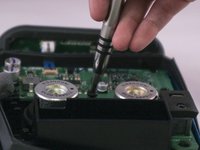
      • The speakers are on the front of the inner assembly.

      • Using the Phillips head screwdriver, unscrew the four 1.3 cm screws holding the speaker that will be replaced.

      crwdns2952109:0crwdne2952109:0

      crwdns2917038:0crwdne2917038:0

    3. Bose SoundLink Color Speaker Replacement: crwdns2935265:06crwdnd2935265:01crwdnd2935265:02crwdne2935265:0 Bose SoundLink Color Speaker Replacement: crwdns2935265:06crwdnd2935265:02crwdnd2935265:02crwdne2935265:0
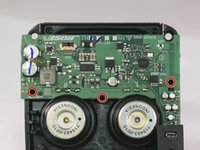
      • Three screws hold the printed circuit board.

      • Using the Phillips head screwdriver, unscrew the three 1.2 cm screws.

      crwdns2952109:0crwdne2952109:0

      crwdns2917038:0crwdne2917038:0

    4. Bose SoundLink Color Speaker Replacement: crwdns2935265:07crwdnd2935265:01crwdnd2935265:02crwdne2935265:0 Bose SoundLink Color Speaker Replacement: crwdns2935265:07crwdnd2935265:02crwdnd2935265:02crwdne2935265:0
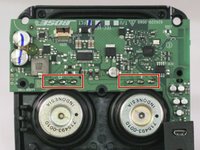
      • Desolder each the three pins connecting the speaker to the motherboard.

      • Carefully lift the motherboard with a spudger to ensure that each pin desolders.

      • Work carefully. Prying too hard may cause damage to the board.

      crwdns2952109:0crwdne2952109:0

      crwdns2917038:0crwdne2917038:0

    5. Bose SoundLink Color Speaker Replacement: crwdns2935265:08crwdnd2935265:01crwdnd2935265:01crwdne2935265:0
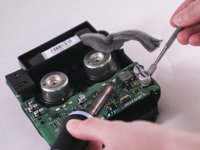
      • Push the speaker through the front of the inner assembly.

      crwdns2952109:0crwdne2952109:0

      crwdns2917038:0crwdne2917038:0

crwdns2915888:0crwdne2915888:0

To reassemble your device, follow these instructions in reverse order.

crwdns2935221:0crwdne2935221:0

crwdns2935229:021crwdne2935229:0

Brett Horstketter

crwdns2935283:003/31/16crwdne2935283:0

2.906 crwdns2915208:0crwdne2915208:0

crwdns2935295:0crwdne2935295:0

crwdns2935287:0crwdne2935287:0

Eastern Washington University, Team 1-4, Giguere Spring 2016 crwdns2935289:0Eastern Washington University, Team 1-4, Giguere Spring 2016crwdne2935289:0

EWU-GIGUERE-S16S1G4

crwdns2931471:05crwdne2931471:0

crwdns2935297:019crwdne2935297:0

crwdns2947412:013crwdne2947412:0

Thanks for this tear down. Never thought that it looks like this on the inside. My battery is kind off aging, bought the unit 7 months ago. Local Bose dealer said battery cost half of this speaker. I hope there is a cheaper alternative.

vintiglao22 - crwdns2934203:0crwdne2934203:0 crwdns2950251:0crwdne2950251:0

You can unsolder the battery and replace with a standard unprotected 18650 cell it literally costs 7$ for a high quality sony or panasonic or samsung cell. The protection and charging circuit is included in the speaker motherboard just make sure you resolder with the proper polarity.

swiftink - crwdns2934203:0crwdne2934203:0 crwdns2950251:0crwdne2950251:0

Speaker looks like a 18650 lithium ion- from the pictures here.

DR Paquette - crwdns2934203:0crwdne2934203:0 crwdns2950251:0crwdne2950251:0

Does anybody know where one could order a spare speaker for this device?

sebastiansebisilva - crwdns2934203:0crwdne2934203:0 crwdns2950251:0crwdne2950251:0

crwdns2917038:0crwdne2917038:0

crwdns2936625:0crwdne2936625:0:

crwdns2936751:024crwdne2936751:0 5

crwdns2936753:07crwdne2936753:0 52

crwdns2936753:030crwdne2936753:0 181

crwdns2942667:0crwdne2942667:0 36,269