crwdns2933423:0crwdne2933423:0
crwdns2947577:0crwdnd2947577:0crwdne2947577:0

Blu Studio Selfie Midframe Replacement

crwdns2942213:0crwdne2942213:0

    1. Blu Studio Selfie Midframe Replacement, Rear Cover: crwdns2935265:01crwdnd2935265:01crwdnd2935265:01crwdne2935265:0
      • Make sure your phone is powered off.

      • Turn the front of the phone away from you.

      • Run your fingers along the sides of the phone to identify where the case can be pulled apart.

      crwdns2952109:0crwdne2952109:0

      crwdns2917038:0crwdne2917038:0

    2. Blu Studio Selfie Midframe Replacement: crwdns2935265:02crwdnd2935265:01crwdnd2935265:01crwdne2935265:0
      • Insert the flat end of your plastic opening into the crevice you found along the side of the phone.

      • Gently apply pressure until you feel the back case pop free of the phone.

      • Continue the previous two steps around the rest of the phone until the case is fully removed.

      crwdns2952109:0crwdne2952109:0

      crwdns2917038:0crwdne2917038:0

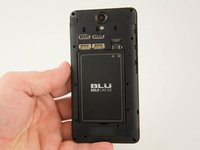
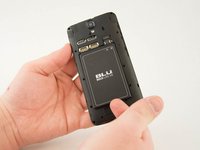
    1. Blu Studio Selfie Midframe Replacement, Battery: crwdns2935265:03crwdnd2935265:01crwdnd2935265:02crwdne2935265:0 Blu Studio Selfie Midframe Replacement, Battery: crwdns2935265:03crwdnd2935265:02crwdnd2935265:02crwdne2935265:0
      • Identify the crevice at the bottom of the battery.

      • There should be enough space for you to fit your fingernail between the battery and the phone.

      • Gently lift the battery free of the phone.

      crwdns2952109:0crwdne2952109:0

      crwdns2917038:0crwdne2917038:0

    1. Blu Studio Selfie Midframe Replacement, Midframe: crwdns2935265:04crwdnd2935265:01crwdnd2935265:01crwdne2935265:0
      • Remove all the 4mm Phillips #000 screws from the midframe.

      crwdns2952109:0crwdne2952109:0

      crwdns2917038:0crwdne2917038:0

    2. Blu Studio Selfie Midframe Replacement: crwdns2935265:05crwdnd2935265:01crwdnd2935265:01crwdne2935265:0
      • Insert the spudger between the midframe and the display assembly.

      • Gently pry up the midframe.

      • When working with electronics, it's important to choose a tool that's ESD-safe to avoid accidental damage to the device. The metal spudger is great when you need serious prying power, but the regular black nylon spudger or a plastic opening tool should be used whenever possible.

      crwdns2952109:0crwdne2952109:0

      crwdns2917038:0crwdne2917038:0

    3. Blu Studio Selfie Midframe Replacement: crwdns2935265:06crwdnd2935265:01crwdnd2935265:01crwdne2935265:0
      • Where the battery rested before, you will find a small clip that holds down the midframe.

      • After the rest of the midframe is detached, from the phone place the flat end of the spudger beneath the clip.

      • Gently lift up on the clip until it comes free.

      • Remove the midframe from the phone.

      crwdns2952109:0crwdne2952109:0

      crwdns2917038:0crwdne2917038:0

crwdns2935217:0crwdne2935217:0

crwdns2935221:0crwdne2935221:0

crwdns2935229:02crwdne2935229:0

Samuel McCandless

crwdns2935283:001/20/16crwdne2935283:0

170 crwdns2915208:0crwdne2915208:0

crwdns2935295:0crwdne2935295:0

crwdns2935287:0crwdne2935287:0

USF Tampa, Team 10-1, Remmell Spring 2016 crwdns2935289:0USF Tampa, Team 10-1, Remmell Spring 2016crwdne2935289:0

USFT-REMMELL-S16S10G1

crwdns2931471:04crwdne2931471:0

crwdns2935297:072crwdne2935297:0

crwdns2947412:00crwdne2947412:0

crwdns2917038:0crwdne2917038:0

crwdns2936625:0crwdne2936625:0:

crwdns2936751:024crwdne2936751:0 0

crwdns2936753:07crwdne2936753:0 3

crwdns2936753:030crwdne2936753:0 17

crwdns2942667:0crwdne2942667:0 740