crwdns2933423:0crwdne2933423:0
crwdns2947577:0crwdnd2947577:0crwdne2947577:0

BlackBerry 7280 Keypad Replacement

crwdns2869540:0crwdne2869540:0: 556

crwdns2959988:0crwdne2959988:0

crwdns2959990:0crwdne2959990:0
0
crwdns2959992:0crwdne2959992:0
5
crwdns2959994:0crwdne2959994:0
34
crwdns2959996:0crwdne2959996:0
556
crwdns2955950:0crwdne2955950:0: 0

crwdns2959998:0crwdne2959998:0

crwdns2960000:0crwdne2960000:0
crwdns2959984:0crwdne2959984:0: 1

crwdns2959972:01crwdne2959972:0

crwdns2959986:0crwdne2959986:0: 0

crwdns2959958:0crwdne2959958:0

crwdns2955944:0crwdne2955944:0: crwdns2931287:010crwdne2931287:0
crwdns2955970:0crwdne2955970:0: crwdns2937801:0crwdne2937801:0
BlackBerry 7280 Keypad Replacement

crwdns2915892:0crwdne2915892:0

crwdns2959928:0crwdne2959928:0 ↓

The keypad is the external part of the keyboard consisting of the rubber buttons. This keypad rests in the front case.

crwdns2959930:0crwdne2959930:0

crwdns2943215:0crwdne2943215:0

    1. BlackBerry 7280 Keypad Replacement, Battery: crwdns2935265:01crwdnd2935265:01crwdnd2935265:03crwdne2935265:0 BlackBerry 7280 Keypad Replacement, Battery: crwdns2935265:01crwdnd2935265:02crwdnd2935265:03crwdne2935265:0 BlackBerry 7280 Keypad Replacement, Battery: crwdns2935265:01crwdnd2935265:03crwdnd2935265:03crwdne2935265:0
      • With your thumb press down on the locking- button on the back of the BlackBerry 7280.

      • Slide the battery cover off the device.

      crwdns2952109:0crwdne2952109:0

      crwdns2917038:0crwdne2917038:0

    2. BlackBerry 7280 Keypad Replacement: crwdns2935265:02crwdnd2935265:01crwdnd2935265:02crwdne2935265:0 BlackBerry 7280 Keypad Replacement: crwdns2935265:02crwdnd2935265:02crwdnd2935265:02crwdne2935265:0
      • Remove the lithium-ion battery from the back of the device using your index finger.

      crwdns2952109:0crwdne2952109:0

      crwdns2917038:0crwdne2917038:0

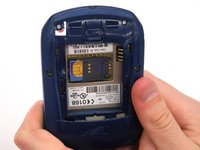
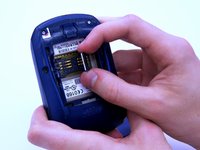
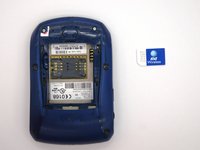
    1. BlackBerry 7280 Keypad Replacement, SIM Card: crwdns2935265:03crwdnd2935265:01crwdnd2935265:03crwdne2935265:0 BlackBerry 7280 Keypad Replacement, SIM Card: crwdns2935265:03crwdnd2935265:02crwdnd2935265:03crwdne2935265:0 BlackBerry 7280 Keypad Replacement, SIM Card: crwdns2935265:03crwdnd2935265:03crwdnd2935265:03crwdne2935265:0
      • Hold the device with both hands.

      • Lift the SIM card holder using your thumb and index finger.

      • Remove the SIM card from the device.

      crwdns2952109:0crwdne2952109:0

      crwdns2917038:0crwdne2917038:0

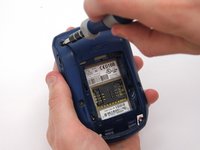
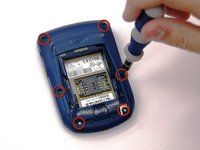
    1. BlackBerry 7280 Keypad Replacement, Back Case: crwdns2935265:04crwdnd2935265:01crwdnd2935265:02crwdne2935265:0 BlackBerry 7280 Keypad Replacement, Back Case: crwdns2935265:04crwdnd2935265:02crwdnd2935265:02crwdne2935265:0
      • Using a Torx T6 screwdriver, remove all six 1/8 inch screws (marked in red) from the back case. Set screws aside.

      • The SIM card has been removed here to prevent damage to the card. This is recommended, but not not required.

      crwdns2952109:0crwdne2952109:0

      crwdns2917038:0crwdne2917038:0

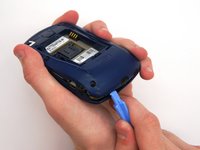
    2. BlackBerry 7280 Keypad Replacement: crwdns2935265:05crwdnd2935265:01crwdnd2935265:02crwdne2935265:0 BlackBerry 7280 Keypad Replacement: crwdns2935265:05crwdnd2935265:02crwdnd2935265:02crwdne2935265:0
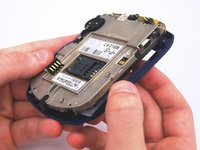
      • Use the plastic opening tool to pry the back case away from the front case.

      crwdns2952109:0crwdne2952109:0

      crwdns2917038:0crwdne2917038:0

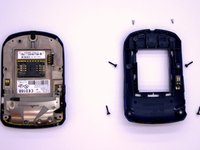
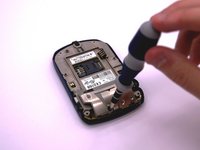
    1. BlackBerry 7280 Keypad Replacement, Front Case: crwdns2935265:06crwdnd2935265:01crwdnd2935265:02crwdne2935265:0 BlackBerry 7280 Keypad Replacement, Front Case: crwdns2935265:06crwdnd2935265:02crwdnd2935265:02crwdne2935265:0
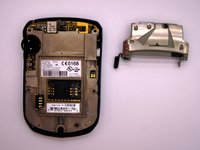
      • Using a Torx T6 screwdriver, remove the lone 1/8 inch screw that holds the upper metal bracket onto the larger metal bracket. Set aside the screw and the bracket.

      crwdns2952109:0crwdne2952109:0

      crwdns2917038:0crwdne2917038:0

    2. BlackBerry 7280 Keypad Replacement: crwdns2935265:07crwdnd2935265:01crwdnd2935265:02crwdne2935265:0 BlackBerry 7280 Keypad Replacement: crwdns2935265:07crwdnd2935265:02crwdnd2935265:02crwdne2935265:0
      • Remove the front plastic case from the metal bracket.

      crwdns2952109:0crwdne2952109:0

      crwdns2917038:0crwdne2917038:0

    1. BlackBerry 7280 Keypad Replacement, Keypad: crwdns2935265:08crwdnd2935265:01crwdnd2935265:01crwdne2935265:0
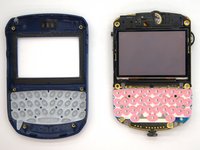
      • The keypad sits in the keyboard slots on the front cover. Simply peel the keyboard off and replace.

      crwdns2952109:0crwdne2952109:0

      crwdns2917038:0crwdne2917038:0

crwdns2915888:0crwdne2915888:0

To reassemble your device, follow these instructions in reverse order.

crwdns2935221:0crwdne2935221:0

crwdns2935227:0crwdne2935227:0

Andrew Johnston

crwdns2935283:003/11/13crwdne2935283:0

4 crwdns2915208:0crwdne2915208:0

crwdns2935297:02crwdne2935297:0

crwdns2935287:0crwdne2935287:0

Clemson, Team 12-2, Benson Spring 2013 crwdns2935289:0Clemson, Team 12-2, Benson Spring 2013crwdne2935289:0

CLEM-BENSON-S13S12G2

crwdns2931471:04crwdne2931471:0

crwdns2935297:0120crwdne2935297:0

crwdns2947412:00crwdne2947412:0

crwdns2917038:0crwdne2917038:0

crwdns2936625:0crwdne2936625:0:

crwdns2936751:024crwdne2936751:0 0

crwdns2936753:07crwdne2936753:0 5

crwdns2936753:030crwdne2936753:0 34

crwdns2959996:0crwdne2959996:0 556