crwdns2933423:0crwdne2933423:0
crwdns2947577:0crwdnd2947577:0crwdne2947577:0

BlackBerry 7280 Inner Keyboard Replacement

crwdns2869540:0crwdne2869540:0: 627

crwdns2959988:0crwdne2959988:0

crwdns2959990:0crwdne2959990:0
1
crwdns2959992:0crwdne2959992:0
9
crwdns2959994:0crwdne2959994:0
40
crwdns2959996:0crwdne2959996:0
627
crwdns2955950:0crwdne2955950:0: 0

crwdns2959998:0crwdne2959998:0

crwdns2960000:0crwdne2960000:0
crwdns2959984:0crwdne2959984:0: 0

crwdns2959956:0crwdne2959956:0

crwdns2959986:0crwdne2959986:0: 0

crwdns2959958:0crwdne2959958:0

crwdns2955944:0crwdne2955944:0: crwdns2931287:010crwdne2931287:0
crwdns2955970:0crwdne2955970:0: crwdns2937801:0crwdne2937801:0
BlackBerry 7280 Inner Keyboard Replacement

crwdns2915892:0crwdne2915892:0

crwdns2959928:0crwdne2959928:0 ↓

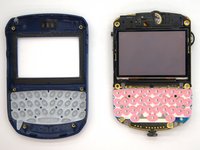
The inner keyboard is the internal part of the device's keyboard. This part provides connections between the rubber keys and the device's motherboard. This guide demonstrates how to remove the inner keyboard after removing the outer case.

crwdns2959930:0crwdne2959930:0

crwdns2943215:0crwdne2943215:0

    1. BlackBerry 7280 Inner Keyboard Replacement, Battery: crwdns2935265:01crwdnd2935265:01crwdnd2935265:03crwdne2935265:0 BlackBerry 7280 Inner Keyboard Replacement, Battery: crwdns2935265:01crwdnd2935265:02crwdnd2935265:03crwdne2935265:0 BlackBerry 7280 Inner Keyboard Replacement, Battery: crwdns2935265:01crwdnd2935265:03crwdnd2935265:03crwdne2935265:0
      • With your thumb press down on the locking- button on the back of the BlackBerry 7280.

      • Slide the battery cover off the device.

      crwdns2952109:0crwdne2952109:0

      crwdns2917038:0crwdne2917038:0

    2. BlackBerry 7280 Inner Keyboard Replacement: crwdns2935265:02crwdnd2935265:01crwdnd2935265:02crwdne2935265:0 BlackBerry 7280 Inner Keyboard Replacement: crwdns2935265:02crwdnd2935265:02crwdnd2935265:02crwdne2935265:0
      • Remove the lithium-ion battery from the back of the device using your index finger.

      crwdns2952109:0crwdne2952109:0

      crwdns2917038:0crwdne2917038:0

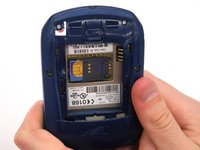
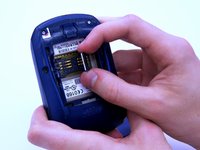
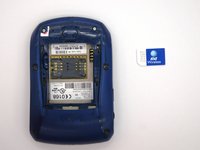
    1. BlackBerry 7280 Inner Keyboard Replacement, SIM Card: crwdns2935265:03crwdnd2935265:01crwdnd2935265:03crwdne2935265:0 BlackBerry 7280 Inner Keyboard Replacement, SIM Card: crwdns2935265:03crwdnd2935265:02crwdnd2935265:03crwdne2935265:0 BlackBerry 7280 Inner Keyboard Replacement, SIM Card: crwdns2935265:03crwdnd2935265:03crwdnd2935265:03crwdne2935265:0
      • Hold the device with both hands.

      • Lift the SIM card holder using your thumb and index finger.

      • Remove the SIM card from the device.

      crwdns2952109:0crwdne2952109:0

      crwdns2917038:0crwdne2917038:0

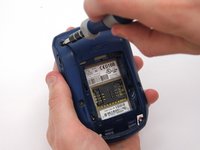
    1. BlackBerry 7280 Inner Keyboard Replacement, Back Case: crwdns2935265:04crwdnd2935265:01crwdnd2935265:02crwdne2935265:0 BlackBerry 7280 Inner Keyboard Replacement, Back Case: crwdns2935265:04crwdnd2935265:02crwdnd2935265:02crwdne2935265:0
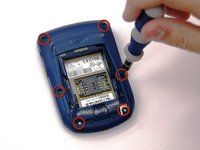
      • Using a Torx T6 screwdriver, remove all six 1/8 inch screws (marked in red) from the back case. Set screws aside.

      • The SIM card has been removed here to prevent damage to the card. This is recommended, but not not required.

      crwdns2952109:0crwdne2952109:0

      crwdns2917038:0crwdne2917038:0

    2. BlackBerry 7280 Inner Keyboard Replacement: crwdns2935265:05crwdnd2935265:01crwdnd2935265:02crwdne2935265:0 BlackBerry 7280 Inner Keyboard Replacement: crwdns2935265:05crwdnd2935265:02crwdnd2935265:02crwdne2935265:0
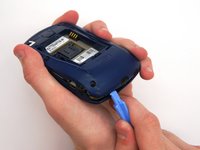
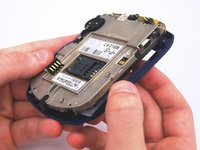
      • Use the plastic opening tool to pry the back case away from the front case.

      crwdns2952109:0crwdne2952109:0

      crwdns2917038:0crwdne2917038:0

    1. BlackBerry 7280 Inner Keyboard Replacement, Front Case: crwdns2935265:06crwdnd2935265:01crwdnd2935265:02crwdne2935265:0 BlackBerry 7280 Inner Keyboard Replacement, Front Case: crwdns2935265:06crwdnd2935265:02crwdnd2935265:02crwdne2935265:0
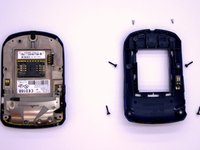
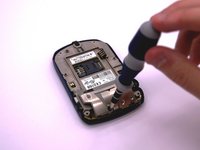
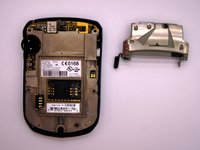
      • Using a Torx T6 screwdriver, remove the lone 1/8 inch screw that holds the upper metal bracket onto the larger metal bracket. Set aside the screw and the bracket.

      crwdns2952109:0crwdne2952109:0

      crwdns2917038:0crwdne2917038:0

    2. BlackBerry 7280 Inner Keyboard Replacement: crwdns2935265:07crwdnd2935265:01crwdnd2935265:02crwdne2935265:0 BlackBerry 7280 Inner Keyboard Replacement: crwdns2935265:07crwdnd2935265:02crwdnd2935265:02crwdne2935265:0
      • Remove the front plastic case from the metal bracket.

      crwdns2952109:0crwdne2952109:0

      crwdns2917038:0crwdne2917038:0

    1. BlackBerry 7280 Inner Keyboard Replacement, Inner Keyboard: crwdns2935265:08crwdnd2935265:01crwdnd2935265:01crwdne2935265:0
      • To remove the inner keyboard, simply peel it off of the logic board as shown.

      crwdns2952109:0crwdne2952109:0

      crwdns2917038:0crwdne2917038:0

crwdns2915888:0crwdne2915888:0

To reassemble your device, follow these instructions in reverse order.

crwdns2935221:0crwdne2935221:0

Andrew Johnston

crwdns2935283:003/11/13crwdne2935283:0

4 crwdns2915208:0crwdne2915208:0

crwdns2935297:02crwdne2935297:0

crwdns2935287:0crwdne2935287:0

Clemson, Team 12-2, Benson Spring 2013 crwdns2935289:0Clemson, Team 12-2, Benson Spring 2013crwdne2935289:0

CLEM-BENSON-S13S12G2

crwdns2931471:04crwdne2931471:0

crwdns2935297:0120crwdne2935297:0

crwdns2947412:00crwdne2947412:0

crwdns2917038:0crwdne2917038:0

crwdns2936625:0crwdne2936625:0:

crwdns2936751:024crwdne2936751:0 1

crwdns2936753:07crwdne2936753:0 9

crwdns2936753:030crwdne2936753:0 40

crwdns2959996:0crwdne2959996:0 627