crwdns2933423:0crwdne2933423:0
crwdns2947577:0crwdnd2947577:0crwdne2947577:0

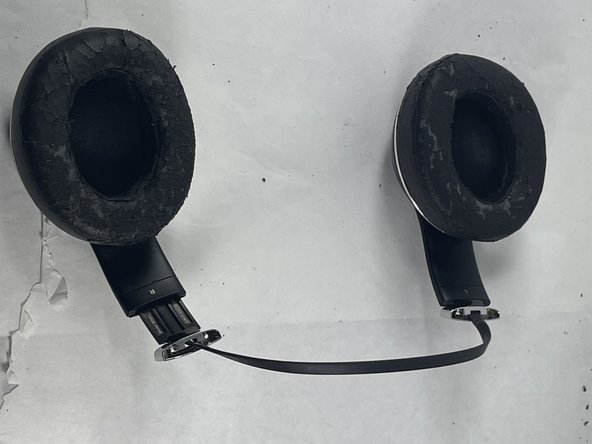
Beats Studio 2 Wireless Headband Replacement

crwdns2942213:0crwdne2942213:0

    1. Beats Studio 2 Wireless Headband Replacement, Headband: crwdns2935265:01crwdnd2935265:01crwdnd2935265:02crwdne2935265:0 Beats Studio 2 Wireless Headband Replacement, Headband: crwdns2935265:01crwdnd2935265:02crwdnd2935265:02crwdne2935265:0
      • Slide the headband down on one side to reveal the two screws under the silver "Studio" label.

      • Use a T5 screwdriver to remove the two screws securing the headband pieces.

      • Slide the headband down on the other side to reveal the two screws beneath the "Wireless" label.

      • Use a T5 screwdriver to remove the two screws securing the headband pieces.

      crwdns2952109:0crwdne2952109:0

      crwdns2917038:0crwdne2917038:0

    2. Beats Studio 2 Wireless Headband Replacement: crwdns2935265:02crwdnd2935265:01crwdnd2935265:02crwdne2935265:0 Beats Studio 2 Wireless Headband Replacement: crwdns2935265:02crwdnd2935265:02crwdnd2935265:02crwdne2935265:0
      • Slide the headband away from the silver "Studio" and "Wireless" silver bands.

      • Peel the rubber interior layer off of the headband to remove it.

      • Save the rubber layer of the headband for your replacement.

      crwdns2952109:0crwdne2952109:0

      crwdns2917038:0crwdne2917038:0

    3. Beats Studio 2 Wireless Headband Replacement: crwdns2935265:03crwdnd2935265:01crwdnd2935265:01crwdne2935265:0
      • Use a nylon spudger to undo the tabs connecting the foam interior of the headband to the outer shell.

      • Remove the foam interior part of the headphone.

      crwdns2952109:0crwdne2952109:0

      crwdns2917038:0crwdne2917038:0

    4. Beats Studio 2 Wireless Headband Replacement: crwdns2935265:04crwdnd2935265:01crwdnd2935265:02crwdne2935265:0 Beats Studio 2 Wireless Headband Replacement: crwdns2935265:04crwdnd2935265:02crwdnd2935265:02crwdne2935265:0
      • The exterior shell of the headband should come off easily at this point or just detach automatically.

      crwdns2952109:0crwdne2952109:0

      crwdns2917038:0crwdne2917038:0

crwdns2915888:0crwdne2915888:0

To reassemble your device, follow these instructions in reverse order.

crwdns2935221:0crwdne2935221:0

crwdns2935229:03crwdne2935229:0

Mike Rosiello

crwdns2935283:003/20/23crwdne2935283:0

325 crwdns2915208:0crwdne2915208:0

crwdns2935297:02crwdne2935297:0

crwdns2935287:0crwdne2935287:0

UMass Dartmouth, Team 5-3, Ramos Spring 2023 crwdns2935289:0UMass Dartmouth, Team 5-3, Ramos Spring 2023crwdne2935289:0

UMASSD-RAMOS-S23S5G3

crwdns2931471:03crwdne2931471:0

crwdns2935297:016crwdne2935297:0

crwdns2947412:00crwdne2947412:0

crwdns2917038:0crwdne2917038:0

crwdns2936625:0crwdne2936625:0:

crwdns2936751:024crwdne2936751:0 1

crwdns2936753:07crwdne2936753:0 25

crwdns2936753:030crwdne2936753:0 66

crwdns2942667:0crwdne2942667:0 2,033