crwdns2915892:0crwdne2915892:0
Prereq for disconnecting the battery of your Samsung Galaxy A10e.
crwdns2942213:0crwdne2942213:0
-
-
Insert a SIM card eject tool, bit, or a straightened paperclip into the small hole in the SIM card tray.
-
Press to eject the tray.
 crwdns2952109:0crwdne2952109:0
-
-
-
Remove the SIM card tray from the phone.
-
-
-
Insert an opening pick between the screen and the back cover on the bottom of the phone where the charging port is located.
-
-
-
Slide the opening pick to the bottom left corner to release the clips.
-
-
-
Slide the opening pick along the left edge to the top left corner of the phone, to release the clips.
-
-
-
-
Slide the opening pick from the top left corner to the top right corner to release the plastic clips.
-
-
-
Slide the opening pick from the top right corner to the bottom right corner to release the remaining clips.
-
-
-
Remove the back cover.
-
-
-
Remove screws from the motherboard antenna cover.
-
3 Phillips #00, 3mm length.
-
-
crwdns2935267:0crwdne2935267:0Tweezers$4.99
-
Use the tip of a spudger or tweezers to remove the antenna cover.
-
-
-
Remove screws from the motherboard cover.
-
3 Phillips #00, 3mm length
-
-
-
Use the tip of a spudger or tweezers to remove the motherboard cover.
-
-
-
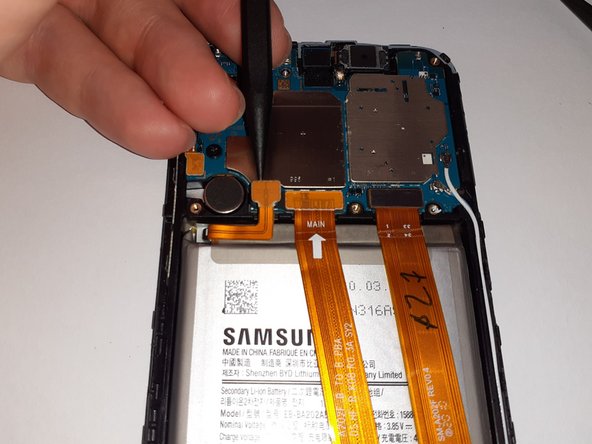
Use a spudger to disconnect the battery by prying the connector straight up from its socket.
-
-
-
Gently flex the battery connector away from its socket.
-



To reassemble your device, follow these instructions in reverse order.
crwdns2935221:0crwdne2935221:0
crwdns2935229:07crwdne2935229:0

crwdns2947412:02crwdne2947412:0
Do I need to heat up the screen of my phone to make it easier for me to get the back cover off of my phone?
Pifase - crwdns2934203:0crwdne2934203:0 crwdns2950251:0crwdne2950251:0
no, it just clips on, there's no adhesive
Ely Wickander - crwdns2934203:0crwdne2934203:0 crwdns2950251:0crwdne2950251:0
