crwdns2933423:0crwdne2933423:0
crwdns2947577:0crwdnd2947577:0crwdne2947577:0

Back Case

crwdns2869540:0crwdne2869540:0: 1352

crwdns2959988:0crwdne2959988:0

crwdns2959990:0crwdne2959990:0
4
crwdns2959992:0crwdne2959992:0
20
crwdns2959994:0crwdne2959994:0
89
crwdns2959996:0crwdne2959996:0
1,352
crwdns2955950:0crwdne2955950:0: 1

crwdns2960002:01crwdne2960002:0.

crwdns2959984:0crwdne2959984:0: 0

crwdns2959956:0crwdne2959956:0

crwdns2959986:0crwdne2959986:0: 0

crwdns2959958:0crwdne2959958:0

crwdns2955944:0crwdne2955944:0: crwdns2931273:0crwdne2931273:0
crwdns2955970:0crwdne2955970:0: crwdns2937801:0crwdne2937801:0
Back Case

crwdns2915892:0crwdne2915892:0

crwdns2959928:0crwdne2959928:0 ↓

Are you trying to figure out what is wrong with your camera? This is a good place to start as it allows you to access everything in the camera that could possibly be wrong.

crwdns2959930:0crwdne2959930:0

crwdns2943215:0crwdne2943215:0

    1. Back Case, Battery: crwdns2935265:01crwdnd2935265:01crwdnd2935265:01crwdne2935265:0
      • Orient camera to look directly at battery compartment side as shown.

      crwdns2952109:0crwdne2952109:0

      crwdns2917038:0crwdne2917038:0

    2. Back Case: crwdns2935265:02crwdnd2935265:01crwdnd2935265:03crwdne2935265:0 Back Case: crwdns2935265:02crwdnd2935265:02crwdnd2935265:03crwdne2935265:0 Back Case: crwdns2935265:02crwdnd2935265:03crwdnd2935265:03crwdne2935265:0
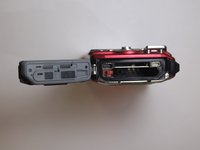
      • Locate the two latches on the battery compartment.

      • First, move the "lock" switch left to reveal red indicator.

      • Next, move the "cover latch" switch downward to reveal red indicator.

      • You have to move the switches in that order for the compartment to unlatch.

      crwdns2952109:0crwdne2952109:0

      crwdns2917038:0crwdne2917038:0

    3. Back Case: crwdns2935265:03crwdnd2935265:01crwdnd2935265:02crwdne2935265:0 Back Case: crwdns2935265:03crwdnd2935265:02crwdnd2935265:02crwdne2935265:0
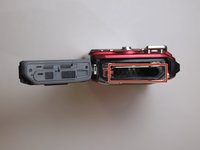
      • Allow the battery compartment latch to completely open.

      • Insert battery with the writing face up.

      • The bigger slot is for the battery. The smaller slot is for the memory card.

      • Battery not shown.

      crwdns2952109:0crwdne2952109:0

      crwdns2917038:0crwdne2917038:0

    1. Back Case, Back Case: crwdns2935265:04crwdnd2935265:01crwdnd2935265:01crwdne2935265:0
      • Orient the camera so you are looking at the bottom.

      • Remove the three 3.85mm Phillips #00 screws from the bottom of the camera.

      crwdns2952109:0crwdne2952109:0

      crwdns2917038:0crwdne2917038:0

    2. Back Case: crwdns2935265:05crwdnd2935265:01crwdnd2935265:01crwdne2935265:0
      • Orient the camera so you are looking at the side plate.

      • Remove the two 3.15mm Phillips #00 screws from the side plate of the camera.

      crwdns2952109:0crwdne2952109:0

      crwdns2917038:0crwdne2917038:0

    3. Back Case: crwdns2935265:06crwdnd2935265:01crwdnd2935265:02crwdne2935265:0 Back Case: crwdns2935265:06crwdnd2935265:02crwdnd2935265:02crwdne2935265:0
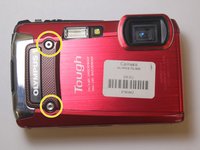
      • Orient the camera so you are looking at the front plate.

      • Remove the two 3.8mm with the Phillips H1.5 from the front plate.

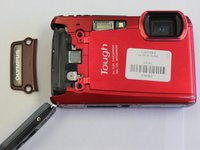
      • Remove the "Olympus" plate.

      crwdns2952109:0crwdne2952109:0

      crwdns2917038:0crwdne2917038:0

    4. Back Case: crwdns2935265:07crwdnd2935265:01crwdnd2935265:01crwdne2935265:0
      • Remove face plate.

      crwdns2952109:0crwdne2952109:0

      crwdns2917038:0crwdne2917038:0

    5. Back Case: crwdns2935265:08crwdnd2935265:01crwdnd2935265:03crwdne2935265:0 Back Case: crwdns2935265:08crwdnd2935265:02crwdnd2935265:03crwdne2935265:0 Back Case: crwdns2935265:08crwdnd2935265:03crwdnd2935265:03crwdne2935265:0
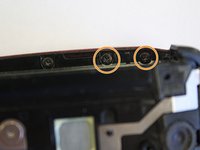
      • Locate three small black screws inside of the battery compartment.

      • Remove the 3.85mm Phillips #00 screw on the far left side.

      • Remove the two 5mm Phillips #00 screws on the right side

      crwdns2952109:0crwdne2952109:0

      crwdns2917038:0crwdne2917038:0

    6. Back Case: crwdns2935265:09crwdnd2935265:01crwdnd2935265:03crwdne2935265:0 Back Case: crwdns2935265:09crwdnd2935265:02crwdnd2935265:03crwdne2935265:0 Back Case: crwdns2935265:09crwdnd2935265:03crwdnd2935265:03crwdne2935265:0
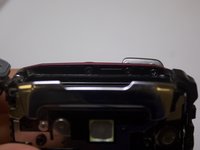
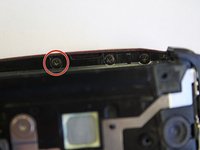
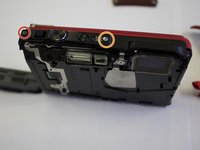
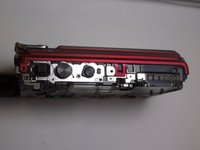
      • Orient the camera to be look at the top.

      • Remove the 5.4mm Phillips #00 screw on the top left side.

      • Remove the 7.4mm Phillips #00 screw next to the "ON/OFF" label.

      • Pry off top button plate with black nylon spudger.

      crwdns2952109:0crwdne2952109:0

      crwdns2917038:0crwdne2917038:0

    7. Back Case: crwdns2935265:010crwdnd2935265:01crwdnd2935265:02crwdne2935265:0 Back Case: crwdns2935265:010crwdnd2935265:02crwdnd2935265:02crwdne2935265:0
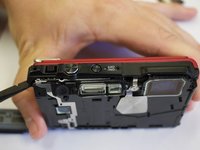
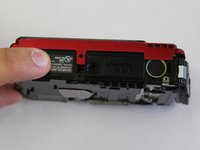
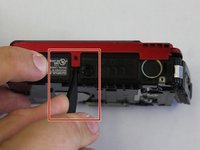
      • Rotate to bottom of camera and locate bottom latch.

      • Wedge black nylon spudger in between bottom latch and camera base to release LCD Screen from camera.

      • Push firmly apart.

      • Some buttons might fall out.

      crwdns2952109:0crwdne2952109:0

      crwdns2917038:0crwdne2917038:0

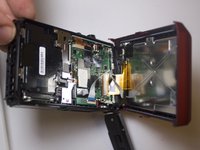
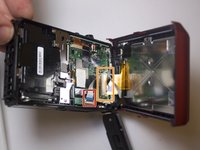
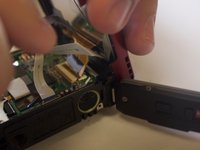
    8. Back Case: crwdns2935265:011crwdnd2935265:01crwdnd2935265:03crwdne2935265:0 Back Case: crwdns2935265:011crwdnd2935265:02crwdnd2935265:03crwdne2935265:0 Back Case: crwdns2935265:011crwdnd2935265:03crwdnd2935265:03crwdne2935265:0
      • Orient the camera to the LCD screen side that is now wedged open.

      • Locate the white ribbon cable and pull out from motherboard.

      • Locate the brown ribbon cable and pull out from motherboard.

      crwdns2952109:0crwdne2952109:0

      crwdns2917038:0crwdne2917038:0

crwdns2915888:0crwdne2915888:0

To reassemble your device, follow these instructions in reverse order.

crwdns2935221:0crwdne2935221:0

Larissa Knight

crwdns2935283:003/21/16crwdne2935283:0

549 crwdns2915208:0crwdne2915208:0

crwdns2935297:05crwdne2935297:0

crwdns2935287:0crwdne2935287:0

Clemson, Team 7-2, Benson Spring 2016 crwdns2935289:0Clemson, Team 7-2, Benson Spring 2016crwdne2935289:0

CLEM-BENSON-S16S7G2

crwdns2931471:04crwdne2931471:0

crwdns2935297:096crwdne2935297:0

crwdns2947412:00crwdne2947412:0

crwdns2917038:0crwdne2917038:0

crwdns2936625:0crwdne2936625:0:

crwdns2936751:024crwdne2936751:0 4

crwdns2936753:07crwdne2936753:0 20

crwdns2936753:030crwdne2936753:0 89

crwdns2959996:0crwdne2959996:0 1,352