
BOSE SoundTouch 30 Display Assembly Replacement

crwdns2959932:0crwdnd2959932:0Brennen Ireycrwdnd2959932:0crwdnd2959932:0crwdne2959932:0
crwdns2959936:0Mud 29, 2018crwdne2959936:0
crwdns2869540:0crwdne2869540:0: 6K
crwdns2959988:0crwdne2959988:0
- crwdns2959990:0crwdne2959990:0
- 5
- crwdns2959992:0crwdne2959992:0
- 38
- crwdns2959994:0crwdne2959994:0
- 155
- crwdns2959996:0crwdne2959996:0
- 5,979
crwdns2955950:0crwdne2955950:0: 3
crwdns2960004:02crwdne2960004:0, crwdns2960006:01crwdne2960006:0
crwdns2960000:0crwdne2960000:0crwdns2959984:0crwdne2959984:0: 4 5
crwdns2959974:04crwdne2959974:0
crwdns2959970:05crwdne2959970:0
crwdns2959986:0crwdne2959986:0: 0 1
crwdns2959958:0crwdne2959958:0
crwdns2959976:01crwdne2959976:0
crwdns2959930:0crwdne2959930:0
crwdns2943215:0crwdne2943215:0


crwdns2915892:0crwdne2915892:0
crwdns2959928:0crwdne2959928:0 ↓The display should be replaced in the event that it gets damaged beyond reasonable repair. Removing the display requires some caution due to the fragile nature of the ribbon connector.
-
-
-
Remove the four 15.5 mm PH2 screws securing the base plate to the device.
 crwdns2952109:0crwdne2952109:0
-
-
-
-
-
Remove the three 15.5mm PH2 screws holding the front-mesh grille in place.
-
-
-
-
Remove the grille by gripping the edges and pulling upwards.
-
-
-
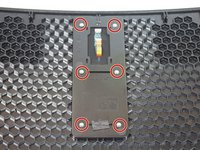
Remove the six 8.9mm T9 torx screws holding the display assembly down.
-
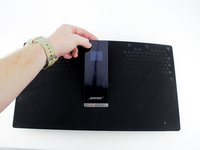
The display assembly can now be lifted out of the grille so that a new one can be put in.
-
-


To reassemble your device, follow these instructions in reverse order.
crwdns2935221:0crwdne2935221:0
crwdns2935229:04crwdne2935229:0

crwdns2935287:0crwdne2935287:0

Cal Poly, Team S16-G2, Livingston Spring 2018 crwdns2935289:0Cal Poly, Team S16-G2, Livingston Spring 2018crwdne2935289:0
CPSU-LIVINGSTON-S18S16G2
crwdns2931471:04crwdne2931471:0
crwdns2935297:072crwdne2935297:0
crwdns2947410:01crwdne2947410:0
Display assembly price
imrankhannnnn786 - crwdns2934203:0crwdne2934203:0 crwdns2950251:0crwdne2950251:0
