crwdns2933423:0crwdne2933423:0
crwdns2947577:0crwdnd2947577:0crwdne2947577:0

BLU Life X8 Back Camera Replacement

crwdns2942213:0crwdne2942213:0

    1. BLU Life X8 Back Camera Replacement, Battery: crwdns2935265:01crwdnd2935265:01crwdnd2935265:02crwdne2935265:0 BLU Life X8 Back Camera Replacement, Battery: crwdns2935265:01crwdnd2935265:02crwdnd2935265:02crwdne2935265:0
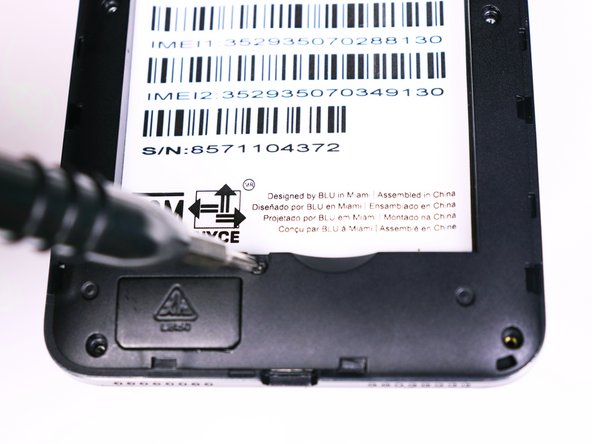
      • Flip the phone over so that the screen is facing down.

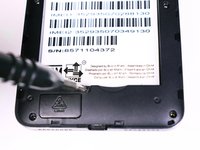
      • Slide the opening tool between the micro-USB port and the back cover.

      • Use the opening tool to create a gap.

      crwdns2952109:0crwdne2952109:0

      crwdns2917038:0crwdne2917038:0

    2. BLU Life X8 Back Camera Replacement: crwdns2935265:02crwdnd2935265:01crwdnd2935265:01crwdne2935265:0
      • Use your thumb to pry off the back panel once the gap is large enough.

      crwdns2952109:0crwdne2952109:0

      crwdns2917038:0crwdne2917038:0

    3. BLU Life X8 Back Camera Replacement: crwdns2935265:03crwdnd2935265:01crwdnd2935265:01crwdne2935265:0
      • Once the back panel is off, locate the indent at the bottom of the battery.

      • Use your thumb to slip the battery out of the case.

      crwdns2952109:0crwdne2952109:0

      crwdns2917038:0crwdne2917038:0

    1. BLU Life X8 Back Camera Replacement, Back Camera: crwdns2935265:04crwdnd2935265:01crwdnd2935265:02crwdne2935265:0 BLU Life X8 Back Camera Replacement, Back Camera: crwdns2935265:04crwdnd2935265:02crwdnd2935265:02crwdne2935265:0
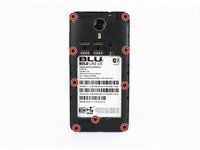
      • Use the Phillips #00 (1.5mm) bit to undo the (9) screws from the back of the device.

      crwdns2952109:0crwdne2952109:0

      crwdns2917038:0crwdne2917038:0

    2. BLU Life X8 Back Camera Replacement: crwdns2935265:05crwdnd2935265:01crwdnd2935265:01crwdne2935265:0
      • Wedge the opening tool into the seam of between the screen and the gray frame.

      • Run the opening tool along the seam to release the clips that hold the two pieces together.

      • You may need to use the opening picks to prevent the clips from reengaging.

      crwdns2952109:0crwdne2952109:0

      crwdns2917038:0crwdne2917038:0

    3. BLU Life X8 Back Camera Replacement: crwdns2935265:06crwdnd2935265:01crwdnd2935265:01crwdne2935265:0
      • Once all the clips have been released, pull back the frame and set it aside.

      crwdns2952109:0crwdne2952109:0

      crwdns2917038:0crwdne2917038:0

    4. BLU Life X8 Back Camera Replacement: crwdns2935265:07crwdnd2935265:01crwdnd2935265:01crwdne2935265:0
      crwdns2935267:0crwdne2935267:0
      Tweezers
      $4.99
      • Use the tweezers to unlock the ribbon cable from the motherboard

      • The ribbon cable should be free. Pull back on the ribbons to release it from the connector

      crwdns2952109:0crwdne2952109:0

      crwdns2917038:0crwdne2917038:0

    5. BLU Life X8 Back Camera Replacement: crwdns2935265:08crwdnd2935265:01crwdnd2935265:01crwdne2935265:0
      • Lift the back camera from its housing

      • The back camera may be glued to the phone

      crwdns2952109:0crwdne2952109:0

      crwdns2917038:0crwdne2917038:0

crwdns2915888:0crwdne2915888:0

To reassemble your device, follow these instructions in reverse order.

crwdns2935221:0crwdne2935221:0

crwdns2935227:0crwdne2935227:0

Alexander Prasil

crwdns2935283:009/28/17crwdne2935283:0

555 crwdns2915208:0crwdne2915208:0

crwdns2935297:05crwdne2935297:0

crwdns2935287:0crwdne2935287:0

USF Tampa, Team S1-G2, Nance Fall 2017 crwdns2935289:0USF Tampa, Team S1-G2, Nance Fall 2017crwdne2935289:0

USFT-NANCE-F17S1G2

crwdns2931471:04crwdne2931471:0

crwdns2935297:072crwdne2935297:0

crwdns2947412:00crwdne2947412:0

crwdns2917038:0crwdne2917038:0

crwdns2936625:0crwdne2936625:0:

crwdns2936751:024crwdne2936751:0 0

crwdns2936753:07crwdne2936753:0 3

crwdns2936753:030crwdne2936753:0 28

crwdns2942667:0crwdne2942667:0 574