
Azpen A720 Back Cover Replacement

crwdns2959932:0crwdnd2959932:0Bencrwdnd2959932:0crwdnd2959932:0crwdnd2959932:011crwdnd2959932:0crwdne2959932:0
crwdns2959936:0Maw 7, 2025crwdne2959936:0
crwdns2869540:0crwdne2869540:0: 891
crwdns2959988:0crwdne2959988:0
- crwdns2959990:0crwdne2959990:0
- 2
- crwdns2959992:0crwdne2959992:0
- 19
- crwdns2959994:0crwdne2959994:0
- 94
- crwdns2959996:0crwdne2959996:0
- 891
crwdns2955950:0crwdne2955950:0: 2
crwdns2960004:02crwdne2960004:0.
crwdns2959984:0crwdne2959984:0: 0 1
crwdns2959956:0crwdne2959956:0
crwdns2959968:01crwdne2959968:0
crwdns2959986:0crwdne2959986:0: 0 1
crwdns2959958:0crwdne2959958:0
crwdns2959976:01crwdne2959976:0
crwdns2862633:0crwdne2862633:0
crwdns2862634:0crwdne2862634:0
crwdns2862635:0crwdne2862635:0
crwdns2862636:0crwdne2862636:0
crwdns2915892:0crwdne2915892:0
crwdns2959928:0crwdne2959928:0 ↓All of the key components that could fail are accessed by removing the Azpen A720 back cover. The process will include removing a couple of screws and then utilizing the plastic opening tool to pry the cover apart from the body of the device.
crwdns2959930:0crwdne2959930:0
crwdns2943215:0crwdne2943215:0


-
-
-
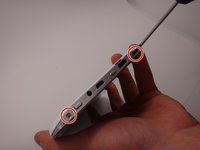
Use a Phillips #00 screwdriver to remove the two 4mm screws found on the top edge of the tablet near the power button.
 crwdns2952109:0crwdne2952109:0
-
-
-
-
Use the plastic opening tool to pry the white back from the silver frame. Start near the micro SD slot.
-
-
-
Remove the rear casing.
-
-




To reassemble your device, follow these instructions in reverse order.

crwdns2935287:0crwdne2935287:0

Michigan Tech, Team 1-3, Lauer Spring 2015 crwdns2935289:0Michigan Tech, Team 1-3, Lauer Spring 2015crwdne2935289:0
MTU-LAUER-S15S1G3
crwdns2931471:02crwdne2931471:0
crwdns2935297:060crwdne2935297:0
