crwdns2933423:0crwdne2933423:0
crwdns2947577:0crwdnd2947577:0crwdne2947577:0

August Smart Lock Speaker Replacement

crwdns2869540:0crwdne2869540:0: 2,2 B

crwdns2959988:0crwdne2959988:0

crwdns2959990:0crwdne2959990:0
3
crwdns2959992:0crwdne2959992:0
28
crwdns2959994:0crwdne2959994:0
109
crwdns2959996:0crwdne2959996:0
2.228
crwdns2955950:0crwdne2955950:0: 0

crwdns2959998:0crwdne2959998:0

crwdns2960000:0crwdne2960000:0
crwdns2959984:0crwdne2959984:0: 2

crwdns2959974:02crwdne2959974:0

crwdns2959986:0crwdne2959986:0: 0

crwdns2959958:0crwdne2959958:0

crwdns2955944:0crwdne2955944:0: 20 - 25 crwdns2931279:0crwdne2931279:0
crwdns2955970:0crwdne2955970:0: crwdns2937801:0crwdne2937801:0
August Smart Lock Speaker Replacement

crwdns2915892:0crwdne2915892:0

crwdns2959928:0crwdne2959928:0 ↓

This guide will teach you how to replace the speaker that are located within the device. The speaker can malfunction causing you to not hear the proper sounds from the lock.

crwdns2959930:0crwdne2959930:0

crwdns2943215:0crwdne2943215:0

    1. August Smart Lock Speaker Replacement, Speaker: crwdns2935265:01crwdnd2935265:01crwdnd2935265:03crwdne2935265:0 August Smart Lock Speaker Replacement, Speaker: crwdns2935265:01crwdnd2935265:02crwdnd2935265:03crwdne2935265:0 August Smart Lock Speaker Replacement, Speaker: crwdns2935265:01crwdnd2935265:03crwdnd2935265:03crwdne2935265:0
      • Flip the device so the back cover is facing you.

      • Undo the latches on both sides to remove the metal cover.

      • Using a Phillips #0 screwdriver, remove the black screws to release the back cover.

      • To unscrew all of the screws, you will need to close the latches again.

      • Do not pull the cover apart too far as the speaker is in the cover and connected to the motherboard.

      crwdns2952109:0crwdne2952109:0

      crwdns2917038:0crwdne2917038:0

    2. August Smart Lock Speaker Replacement: crwdns2935265:02crwdnd2935265:01crwdnd2935265:03crwdne2935265:0 August Smart Lock Speaker Replacement: crwdns2935265:02crwdnd2935265:02crwdnd2935265:03crwdne2935265:0 August Smart Lock Speaker Replacement: crwdns2935265:02crwdnd2935265:03crwdnd2935265:03crwdne2935265:0
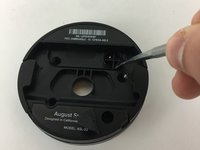
      • Use the metal spudger to pry the plug off of the motherboard.

      • The plug can be dislodged when prying it from the side.

      crwdns2952109:0crwdne2952109:0

      crwdns2917038:0crwdne2917038:0

    3. August Smart Lock Speaker Replacement: crwdns2935265:03crwdnd2935265:01crwdnd2935265:03crwdne2935265:0 August Smart Lock Speaker Replacement: crwdns2935265:03crwdnd2935265:02crwdnd2935265:03crwdne2935265:0 August Smart Lock Speaker Replacement: crwdns2935265:03crwdnd2935265:03crwdnd2935265:03crwdne2935265:0
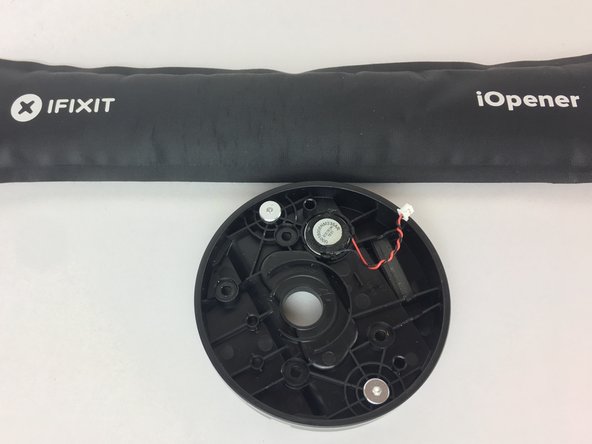
      • Warm up the iOpener.

      • Do not place the iOpener in microwave for more than 30 seconds.

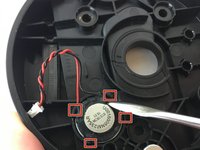
      • Place the iOpener heating pad over the speaker and let sit for a few moments.

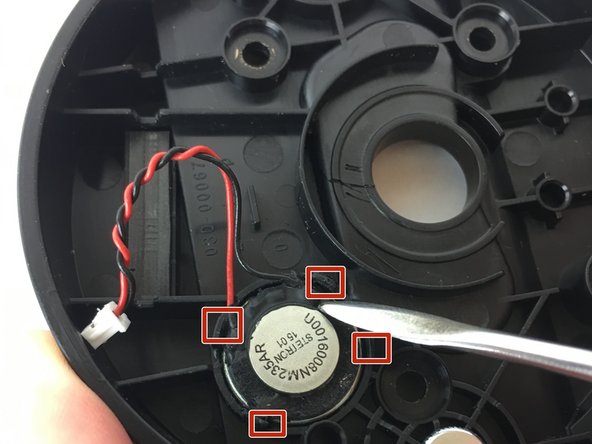
      • Using the metal spudger, pry some of the glue off the hinges holding the speaker in place.

      crwdns2952109:0crwdne2952109:0

      crwdns2917038:0crwdne2917038:0

    4. August Smart Lock Speaker Replacement: crwdns2935265:04crwdnd2935265:01crwdnd2935265:02crwdne2935265:0 August Smart Lock Speaker Replacement: crwdns2935265:04crwdnd2935265:02crwdnd2935265:02crwdne2935265:0
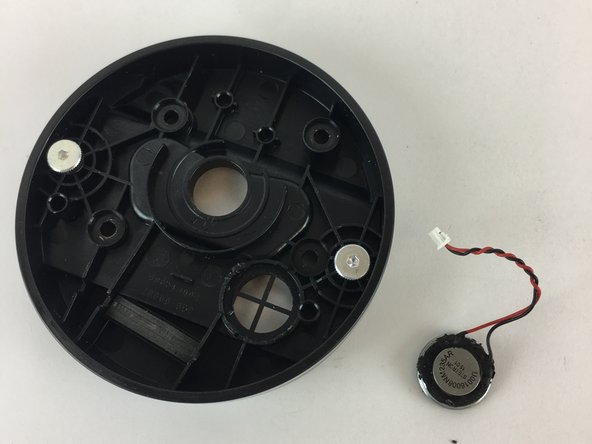
      • Once the speaker looks mobile, flip the cover over and push below the speaker to pop it out.

      crwdns2952109:0crwdne2952109:0

      crwdns2917038:0crwdne2917038:0

crwdns2915888:0crwdne2915888:0

To reassemble your device, follow these instructions in reverse order.

crwdns2935221:0crwdne2935221:0

crwdns2935229:02crwdne2935229:0

crwdns2862417:0crwdne2862417:0

crwdns2935291:0crwdne2935291:0

William Fink

crwdns2935283:009/26/17crwdne2935283:0

841 crwdns2915208:0crwdne2915208:0

crwdns2935297:03crwdne2935297:0

crwdns2935287:0crwdne2935287:0

USF Tampa, Team S11-G6, Passmore Fall 2017 crwdns2935289:0USF Tampa, Team S11-G6, Passmore Fall 2017crwdne2935289:0

USFT-PASSMORE-F17S11G6

crwdns2931471:04crwdne2931471:0

crwdns2935297:036crwdne2935297:0

crwdns2947412:00crwdne2947412:0

crwdns2917038:0crwdne2917038:0

crwdns2936625:0crwdne2936625:0:

crwdns2936751:024crwdne2936751:0 3

crwdns2936753:07crwdne2936753:0 28

crwdns2936753:030crwdne2936753:0 109

crwdns2959996:0crwdne2959996:0 2,228