crwdns2933423:0crwdne2933423:0
crwdns2947577:0crwdnd2947577:0crwdne2947577:0

Audiovox CDM-8910 Keyboard Replacement

crwdns2942213:0crwdne2942213:0

  1. Audiovox CDM-8910 Keyboard Replacement, Antenna: crwdns2935265:01crwdnd2935265:01crwdnd2935265:01crwdne2935265:0
    • Locate the antenna (shown in red box) at the top of the phone when closed.

    crwdns2952109:0crwdne2952109:0

    crwdns2917038:0crwdne2917038:0

  2. Audiovox CDM-8910 Keyboard Replacement: crwdns2935265:02crwdnd2935265:01crwdnd2935265:01crwdne2935265:0
    • Using your thumb and index finger, grip the antenna near its base and unscrew counter clockwise. Once loose, remove the antenna by pulling it from its insert hole.

    crwdns2952109:0crwdne2952109:0

    crwdns2917038:0crwdne2917038:0

  3. Audiovox CDM-8910 Keyboard Replacement, Battery: crwdns2935265:03crwdnd2935265:01crwdnd2935265:01crwdne2935265:0
    • Locate the back side of the phone.

    • The battery is the large main compartment (red box).

    crwdns2952109:0crwdne2952109:0

    crwdns2917038:0crwdne2917038:0

  4. Audiovox CDM-8910 Keyboard Replacement: crwdns2935265:04crwdnd2935265:01crwdnd2935265:01crwdne2935265:0
    • Use your finger to slide the latch (circled) upwards.

    • While holding the latch up, pull the battery off the phone.

    crwdns2952109:0crwdne2952109:0

    crwdns2917038:0crwdne2917038:0

  5. Audiovox CDM-8910 Keyboard Replacement: crwdns2935265:05crwdnd2935265:01crwdnd2935265:01crwdne2935265:0
    • The back of the phone will look like this when the battery is correctly removed.

    crwdns2952109:0crwdne2952109:0

    crwdns2917038:0crwdne2917038:0

  6. Audiovox CDM-8910 Keyboard Replacement, Rear Case: crwdns2935265:06crwdnd2935265:01crwdnd2935265:01crwdne2935265:0
    • Peel the rubber indicated toward the top of the phone

    crwdns2952109:0crwdne2952109:0

    crwdns2917038:0crwdne2917038:0

  7. Audiovox CDM-8910 Keyboard Replacement: crwdns2935265:07crwdnd2935265:01crwdnd2935265:01crwdne2935265:0
    • Remove the screw that sits underneath the rubber covering.

    crwdns2952109:0crwdne2952109:0

    crwdns2917038:0crwdne2917038:0

  8. Audiovox CDM-8910 Keyboard Replacement: crwdns2935265:08crwdnd2935265:01crwdnd2935265:01crwdne2935265:0
    • Remove the five (5) total screws using a Philips head screwdriver.

    crwdns2952109:0crwdne2952109:0

    crwdns2917038:0crwdne2917038:0

  9. Audiovox CDM-8910 Keyboard Replacement: crwdns2935265:09crwdnd2935265:01crwdnd2935265:01crwdne2935265:0
    • Use spudger and insert it towards the bottom of the phone as pictured.

    • Carefully working yourself around the phone with the spudger, pry it open. This may require a bit of force.

    • The volume control button will be loose, so make sure to take it out once the rear case is fully removed.

    crwdns2952109:0crwdne2952109:0

    crwdns2917038:0crwdne2917038:0

  10. Audiovox CDM-8910 Keyboard Replacement: crwdns2935265:010crwdnd2935265:01crwdnd2935265:01crwdne2935265:0
    • The back case should now be completely removed and the motherboard will be visible.

    crwdns2952109:0crwdne2952109:0

    crwdns2917038:0crwdne2917038:0

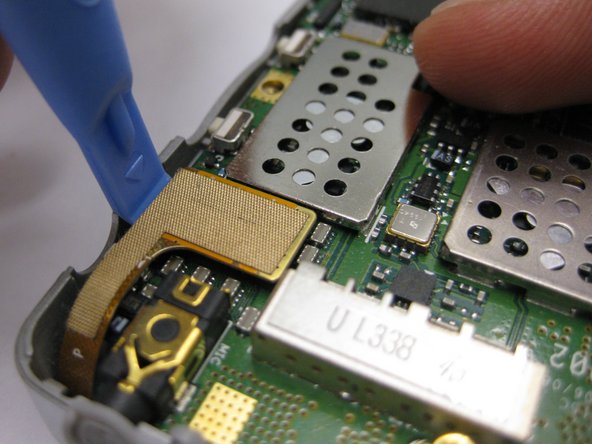
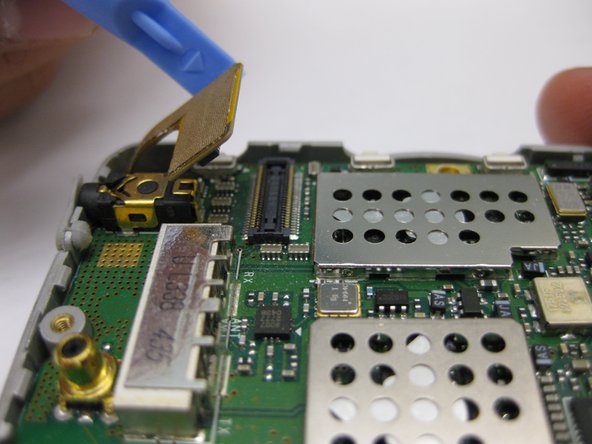
  11. Audiovox CDM-8910 Keyboard Replacement, Motherboard: crwdns2935265:011crwdnd2935265:01crwdnd2935265:03crwdne2935265:0 Audiovox CDM-8910 Keyboard Replacement, Motherboard: crwdns2935265:011crwdnd2935265:02crwdnd2935265:03crwdne2935265:0 Audiovox CDM-8910 Keyboard Replacement, Motherboard: crwdns2935265:011crwdnd2935265:03crwdnd2935265:03crwdne2935265:0
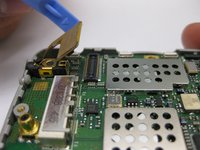
    • Disconnect the gold connection patch

    • Use a spudger or finger to disconnect the piece.

    crwdns2952109:0crwdne2952109:0

    crwdns2917038:0crwdne2917038:0

  12. Audiovox CDM-8910 Keyboard Replacement: crwdns2935265:012crwdnd2935265:01crwdnd2935265:01crwdne2935265:0
    • Using a spudger, lift the motherboard out of the phone case as pictured.

    crwdns2952109:0crwdne2952109:0

    crwdns2917038:0crwdne2917038:0

  13. Audiovox CDM-8910 Keyboard Replacement: crwdns2935265:013crwdnd2935265:01crwdnd2935265:01crwdne2935265:0
    • The motherboard should now be completely removed from the phone.

    crwdns2952109:0crwdne2952109:0

    crwdns2917038:0crwdne2917038:0

  14. Audiovox CDM-8910 Keyboard Replacement, Keyboard: crwdns2935265:014crwdnd2935265:01crwdnd2935265:01crwdne2935265:0
    • Once the motherboard has been removed, peel the keyboard as pictured.

    crwdns2952109:0crwdne2952109:0

    crwdns2917038:0crwdne2917038:0

crwdns2915888:0crwdne2915888:0

To reassemble your device, follow these instructions in reverse order.

crwdns2935221:0crwdne2935221:0

Carlos Guerrero

crwdns2935283:010/04/10crwdne2935283:0

1 crwdns2915208:0crwdne2915208:0

crwdns2935297:02crwdne2935297:0

crwdns2935287:0crwdne2935287:0

Cal Poly, Team 3-24, Regan Fall 2010 crwdns2935289:0Cal Poly, Team 3-24, Regan Fall 2010crwdne2935289:0

CPSU-REGAN-F10S3G24

crwdns2931471:04crwdne2931471:0

crwdns2935297:012crwdne2935297:0

crwdns2947412:00crwdne2947412:0

crwdns2917038:0crwdne2917038:0

crwdns2936625:0crwdne2936625:0:

crwdns2936751:024crwdne2936751:0 0

crwdns2936753:07crwdne2936753:0 10

crwdns2936753:030crwdne2936753:0 58

crwdns2942667:0crwdne2942667:0 1,739