crwdns2933423:0crwdne2933423:0
crwdns2947577:0crwdnd2947577:0crwdne2947577:0

Asus Zenbook UX21e Solid-State Drive Replacement

crwdns2942213:0crwdne2942213:0

    1. Asus Zenbook UX21e Solid-State Drive Replacement, Battery: crwdns2935265:01crwdnd2935265:01crwdnd2935265:03crwdne2935265:0 Asus Zenbook UX21e Solid-State Drive Replacement, Battery: crwdns2935265:01crwdnd2935265:02crwdnd2935265:03crwdne2935265:0 Asus Zenbook UX21e Solid-State Drive Replacement, Battery: crwdns2935265:01crwdnd2935265:03crwdnd2935265:03crwdne2935265:0
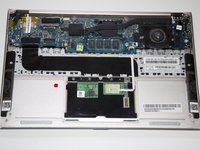
      • Using a T4 Torx screwdriver, unscrew the ten screws lining the bottom cover. Then, proceed to remove the bottom cover by sliding it out parallel toward the back of the computer.

      • There are two length of screws. Eight screws are 3mm and two are 5mm. The two 5mm screws always go into the two center holes along the back edge.

      crwdns2952109:0crwdne2952109:0

      crwdns2917038:0crwdne2917038:0

    2. Asus Zenbook UX21e Solid-State Drive Replacement: crwdns2935265:02crwdnd2935265:01crwdnd2935265:03crwdne2935265:0 Asus Zenbook UX21e Solid-State Drive Replacement: crwdns2935265:02crwdnd2935265:02crwdnd2935265:03crwdne2935265:0 Asus Zenbook UX21e Solid-State Drive Replacement: crwdns2935265:02crwdnd2935265:03crwdnd2935265:03crwdne2935265:0
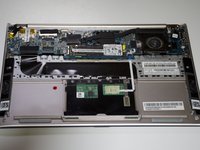
      • Using an iFixit opening tool and your other hand, gently lift the connector up from the tape wrapped around the connector wires and pry the connector from the motherboard.

      crwdns2952109:0crwdne2952109:0

      crwdns2917038:0crwdne2917038:0

    3. Asus Zenbook UX21e Solid-State Drive Replacement: crwdns2935265:03crwdnd2935265:01crwdnd2935265:01crwdne2935265:0
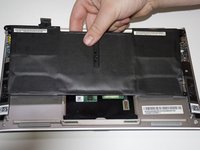
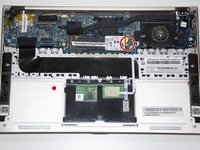
      • Remove the battery by unscrewing the five 3mm screws using a Phillips #1 screwdriver.

      • One at each corner and one in the center.

      crwdns2952109:0crwdne2952109:0

      crwdns2917038:0crwdne2917038:0

    4. Asus Zenbook UX21e Solid-State Drive Replacement: crwdns2935265:04crwdnd2935265:01crwdnd2935265:02crwdne2935265:0 Asus Zenbook UX21e Solid-State Drive Replacement: crwdns2935265:04crwdnd2935265:02crwdnd2935265:02crwdne2935265:0
      • Lift the battery directly up and remove it from the device.

      crwdns2952109:0crwdne2952109:0

      crwdns2917038:0crwdne2917038:0

    1. Asus Zenbook UX21e Solid-State Drive Replacement, Solid-State Drive: crwdns2935265:05crwdnd2935265:01crwdnd2935265:03crwdne2935265:0 Asus Zenbook UX21e Solid-State Drive Replacement, Solid-State Drive: crwdns2935265:05crwdnd2935265:02crwdnd2935265:03crwdne2935265:0 Asus Zenbook UX21e Solid-State Drive Replacement, Solid-State Drive: crwdns2935265:05crwdnd2935265:03crwdnd2935265:03crwdne2935265:0
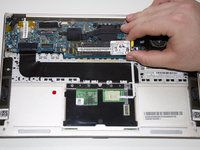
      • Unscrew the single 3mm screw with a Phillips #1 screwdriver at the rightmost edge of the Hard Drive.

      • Remove the Hard Drive by sliding it parallel to the motherboard.

      crwdns2952109:0crwdne2952109:0

      crwdns2917038:0crwdne2917038:0

crwdns2915888:0crwdne2915888:0

To reassemble your device, follow these instructions in reverse order.

crwdns2935221:0crwdne2935221:0

Zachary Eslick

crwdns2935283:004/23/18crwdne2935283:0

756 crwdns2915208:0crwdne2915208:0

crwdns2935297:05crwdne2935297:0

crwdns2935287:0crwdne2935287:0

Cal Poly, Team S22-G1, Maness Spring 2018 crwdns2935289:0Cal Poly, Team S22-G1, Maness Spring 2018crwdne2935289:0

CPSU-MANESS-S18S22G1

crwdns2931471:03crwdne2931471:0

crwdns2935297:020crwdne2935297:0

crwdns2947412:00crwdne2947412:0

crwdns2917038:0crwdne2917038:0

crwdns2936625:0crwdne2936625:0:

crwdns2936751:024crwdne2936751:0 3

crwdns2936753:07crwdne2936753:0 10

crwdns2936753:030crwdne2936753:0 46

crwdns2942667:0crwdne2942667:0 5,267