crwdns2915892:0crwdne2915892:0
This guide will show you how to replace the screen on an Asus ZenBook UX303U laptop.
crwdns2942213:0crwdne2942213:0
-
-
-
Remove the two round rubber feet at the hinge-edge of the laptop.
 crwdns2952109:0crwdne2952109:0
-
-
-
Remove the eleven 4 mm Phillips #00 screws from the back panel.
-
-
-
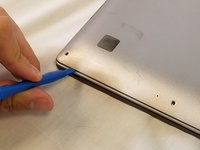
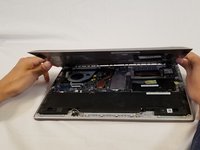
Using a plastic opening tool pry the back panel off of the laptop.
-
-
-
-
-
-
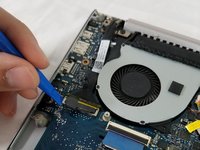
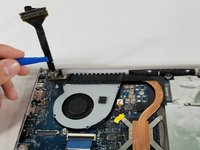
Remove cable connecting the screen assembly to the the motherboard.
-
-
-
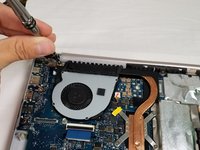
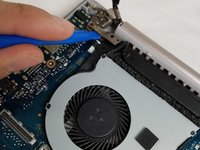
Remove the three 4mm Phillips #00 screws in the hinge to loosen the motherboard fan.
-
Lift the hinge up.
-
-
-
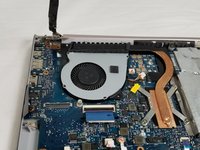
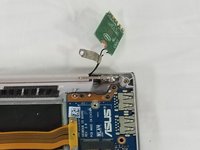
Remove the three Phillips #00 screws securing the hinge to the IO board.
-
-
-
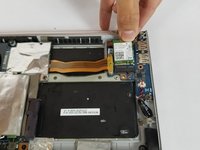
Remove the Wi-Fi card by pulling it straight out of its connector.
-
-
-
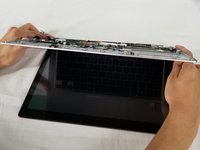
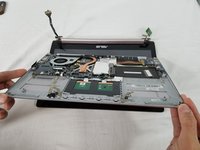
Lift the entire lower assembly up and off of the hinges securing it into place.
-
-










To reassemble your device, follow these instructions in reverse order.
crwdns2935221:0crwdne2935221:0
crwdns2935229:08crwdne2935229:0

crwdns2935287:0crwdne2935287:0

USF Tampa, Team S3-G5, Nance Spring 2018 crwdns2935289:0USF Tampa, Team S3-G5, Nance Spring 2018crwdne2935289:0
USFT-NANCE-S18S3G5
crwdns2931471:03crwdne2931471:0
crwdns2935297:060crwdne2935297:0
crwdns2947412:07crwdne2947412:0
If anyone knows of a good, reliable source to buy a replacement screen assembly let me know, please. I have a 303U with the 1800 screen and I accidentally sat something heavy enough on top of the laptop to crack the screen on the right-third of the screen. I can’t use half of the touch screen and it’s fairly obvious depending on the color/brightness of the content I’m looking at. Would like to be able to replace this and these steps are pretty easy for me to follow so I’m confident I can have a newish looking laptop again if I can find a replacement screen.
chris.schroeder86 - crwdns2934203:0crwdne2934203:0 crwdns2950251:0crwdne2950251:0
Hi ! Did you manage to find one? I’m trying to do the same thing :)
Adrien Rousseau - crwdns2934203:0crwdne2934203:0 crwdns2950251:0crwdne2950251:0
The bottom of the pictured device may feature Phillips #00 screws, but I also have this laptop and the screws around the edge of the bottom panel are Torx T5s on my device.
Nick Brennan - crwdns2934203:0crwdne2934203:0 crwdns2950251:0crwdne2950251:0
It seems that the hinge assembly on one side is broken on my UX303U, on the screen side of the hinge. Do I need to replace the whole screen assembly? The laptop works perfectly otherwise.
Kobus - crwdns2934203:0crwdne2934203:0 crwdns2950251:0crwdne2950251:0
Same here, asus ux303u screen side hinge is stuffed. But I think it may actually be the plastic screen cover itself where the hinge attaches, not just the hinge.
Dash OShea - crwdns2934203:0crwdne2934203:0 crwdns2950251:0crwdne2950251:0
