crwdns2933423:0crwdne2933423:0
crwdns2947577:0crwdnd2947577:0crwdne2947577:0

Asus X501A-RH31 Fan Replacement

crwdns2942213:0crwdne2942213:0

    1. Asus X501A-RH31 Fan Replacement, Battery: crwdns2935265:01crwdnd2935265:01crwdnd2935265:01crwdne2935265:0
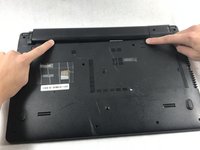
      • Turn the laptop over so that the back is facing upwards.

      crwdns2952109:0crwdne2952109:0

      crwdns2917038:0crwdne2917038:0

    2. Asus X501A-RH31 Fan Replacement: crwdns2935265:02crwdnd2935265:01crwdnd2935265:01crwdne2935265:0
      • To unlock the left tab, make sure the tab on the left has red showing.

      crwdns2952109:0crwdne2952109:0

      crwdns2917038:0crwdne2917038:0

    3. Asus X501A-RH31 Fan Replacement: crwdns2935265:03crwdnd2935265:01crwdnd2935265:02crwdne2935265:0 Asus X501A-RH31 Fan Replacement: crwdns2935265:03crwdnd2935265:02crwdnd2935265:02crwdne2935265:0
      • To unlock the right tab, push the right slider to the left with one hand.

      • Push the battery out with the other hand.

      crwdns2952109:0crwdne2952109:0

      crwdns2917038:0crwdne2917038:0

    1. Asus X501A-RH31 Fan Replacement, Keyboard: crwdns2935265:04crwdnd2935265:01crwdnd2935265:02crwdne2935265:0 Asus X501A-RH31 Fan Replacement, Keyboard: crwdns2935265:04crwdnd2935265:02crwdnd2935265:02crwdne2935265:0
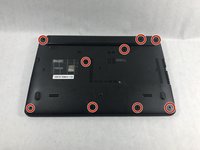
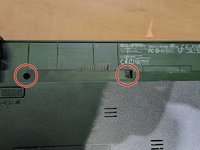
      • Using the Phillips #00 screwdriver unscrew all nine screws from the bottom of the laptop, as well as the additional two screws inside the battery compartment.

      • Nine of the screws are 5 mm long, 4.5 mm in diameter, while two screws closest to the hinges are 7 mm long.

      crwdns2952109:0crwdne2952109:0

      crwdns2917038:0crwdne2917038:0

    2. Asus X501A-RH31 Fan Replacement: crwdns2935265:05crwdnd2935265:01crwdnd2935265:01crwdne2935265:0
      • Turn the laptop over and open the top so the keyboard is facing you.

      crwdns2952109:0crwdne2952109:0

      crwdns2917038:0crwdne2917038:0

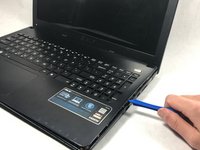
    3. Asus X501A-RH31 Fan Replacement: crwdns2935265:06crwdnd2935265:01crwdnd2935265:02crwdne2935265:0 Asus X501A-RH31 Fan Replacement: crwdns2935265:06crwdnd2935265:02crwdnd2935265:02crwdne2935265:0
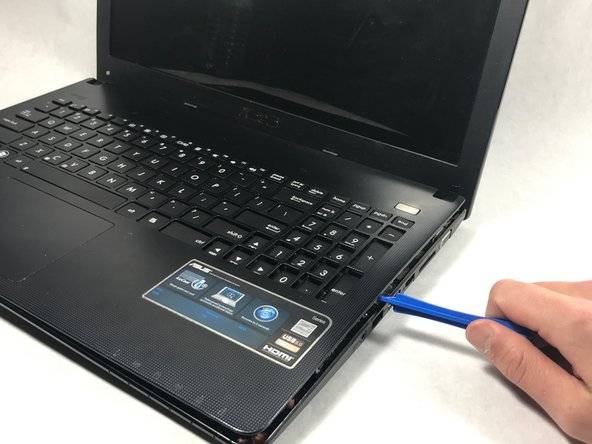
      • Pry off the keyboard cover on the edge using the plastic opening tool.

      • Start from one side. Once it is lose, carry out the same procedure on the front and other side.

      • Only do little sections at a time as the keyboard may break if you attempt to take the whole thing off from a single point.

      crwdns2952109:0crwdne2952109:0

      crwdns2917038:0crwdne2917038:0

    4. Asus X501A-RH31 Fan Replacement: crwdns2935265:07crwdnd2935265:01crwdnd2935265:01crwdne2935265:0
      • Slowly lift the keyboard upward, but do not remove completely.

      • Remove the two data cables that attach the keyboard to the motherboard.

      crwdns2952109:0crwdne2952109:0

      crwdns2917038:0crwdne2917038:0

    5. Asus X501A-RH31 Fan Replacement: crwdns2935265:08crwdnd2935265:01crwdnd2935265:01crwdne2935265:0
      crwdns2935267:0crwdne2935267:0
      Tweezers
      $4.99
      • Use tweezers to pull the white plastic piece up that is attached to the data cable.

      • Repeat this process for the big black cable as well.

      • Use caution when unlatching the data cables from the motherboard. The cables are extremely delicate and can break.

      crwdns2952109:0crwdne2952109:0

      crwdns2917038:0crwdne2917038:0

    1. Asus X501A-RH31 Fan Replacement, Fan: crwdns2935265:09crwdnd2935265:01crwdnd2935265:01crwdne2935265:0
      • Unscrew the three screws using the Phillips #00 screwdriver.

      • The three screws are 5 mm in length, 4.2 mm in diameter.

      crwdns2952109:0crwdne2952109:0

      crwdns2917038:0crwdne2917038:0

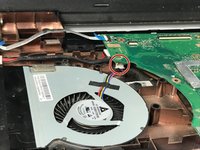
    2. Asus X501A-RH31 Fan Replacement: crwdns2935265:010crwdnd2935265:01crwdnd2935265:01crwdne2935265:0
      • Unscrew the three screws on the left hand side of the big motherboard.

      • This will loosen the motherboard, which will allow for better access to the cables in the next step.

      • The three screws are 5 mm in length, 4.2 mm in diameter and Phillips head screws.

      crwdns2952109:0crwdne2952109:0

      crwdns2917038:0crwdne2917038:0

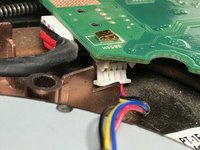
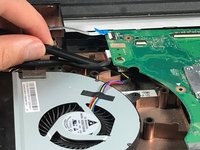
    3. Asus X501A-RH31 Fan Replacement: crwdns2935265:011crwdnd2935265:01crwdnd2935265:03crwdne2935265:0 Asus X501A-RH31 Fan Replacement: crwdns2935265:011crwdnd2935265:02crwdnd2935265:03crwdne2935265:0 Asus X501A-RH31 Fan Replacement: crwdns2935265:011crwdnd2935265:03crwdnd2935265:03crwdne2935265:0
      • Remove the connector cable attached to the bottom of the motherboard.

      • Take the black plastic spudger and press down on the lower half of the white plastic piece to remove the connector cable.

      crwdns2952109:0crwdne2952109:0

      crwdns2917038:0crwdne2917038:0

crwdns2915888:0crwdne2915888:0

To reassemble your device, follow these instructions in reverse order.

crwdns2935221:0crwdne2935221:0

crwdns2935227:0crwdne2935227:0

Christopher

crwdns2935283:010/19/17crwdne2935283:0

371 crwdns2915208:0crwdne2915208:0

crwdns2935297:03crwdne2935297:0

crwdns2935287:0crwdne2935287:0

UMass Dartmouth, Team S3-G3, Bailey Fall 2017 crwdns2935289:0UMass Dartmouth, Team S3-G3, Bailey Fall 2017crwdne2935289:0

UMASSD-BAILEY-F17S3G3

crwdns2931471:03crwdne2931471:0

crwdns2935297:072crwdne2935297:0

crwdns2947412:00crwdne2947412:0

crwdns2917038:0crwdne2917038:0

crwdns2936625:0crwdne2936625:0:

crwdns2936751:024crwdne2936751:0 1

crwdns2936753:07crwdne2936753:0 7

crwdns2936753:030crwdne2936753:0 31

crwdns2942667:0crwdne2942667:0 911