
Asus Transformer T100 Battery Replacement

crwdns2959932:0crwdnd2959932:0Taylor Pantigacrwdnd2959932:0crwdnd2959932:0crwdnd2959932:09crwdnd2959932:0crwdne2959932:0
crwdns2959936:0Sun 29, 2018crwdne2959936:0
crwdns2869540:0crwdne2869540:0: 134K
crwdns2959988:0crwdne2959988:0
- crwdns2959990:0crwdne2959990:0
- 9
- crwdns2959992:0crwdne2959992:0
- 79
- crwdns2959994:0crwdne2959994:0
- 282
- crwdns2959996:0crwdne2959996:0
- 133,953
crwdns2955950:0crwdne2955950:0: 25
crwdns2960004:03crwdne2960004:0, crwdns2960008:022crwdne2960008:0
crwdns2960000:0crwdne2960000:0crwdns2959984:0crwdne2959984:0: 70 71
crwdns2959974:070crwdne2959974:0
crwdns2959970:071crwdne2959970:0
crwdns2959986:0crwdne2959986:0: 9 10
crwdns2959982:09crwdne2959982:0
crwdns2959978:010crwdne2959978:0
crwdns2862611:0crwdne2862611:0
crwdns2862612:0crwdne2862612:0
crwdns2915892:0crwdne2915892:0
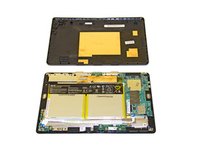
crwdns2959928:0crwdne2959928:0 ↓The battery is located inside the tablet part of the device. The plastic backing must be removed before the battery can be accessed.
crwdns2959930:0crwdne2959930:0
crwdns2943215:0crwdne2943215:0
-
Spudger4.9
-


-
-
-
Separate the tablet from the base by pressing the large silver button below the tablet. The silver button is located at the base of the tablet.
-
Remove the tablet by lifting up.
 crwdns2952109:0crwdne2952109:0
-
-
-
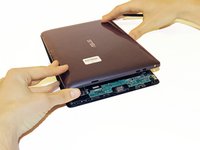
Insert the opening tool into the seam of the tablet casing and gently pry upwards.
-
With a little force, you will feel the clips release.
-
-
-
Slide the tool along all four edges of the tablet, making sure that all the clips are released.
-
-
-
-
Remove the rear casing.
-
-
-
-
-
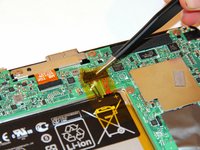
Remove the copper tape carefully.
-
-
-
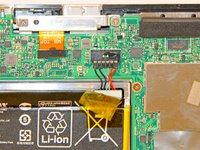
Gently pull back the yellow transparent plastic covering on top of the battery connection port.
-
-
-
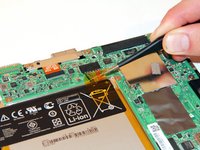
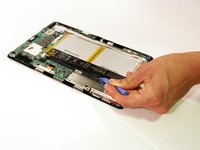
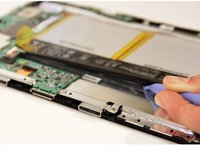
Rotate the device so the top of the screen is facing you. Place the plastic opening tool underneath the battery and gently pry upwards to lift the battery out.
-
-
-
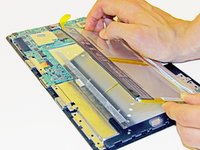
Remove the battery by slowly peeling the battery away from the connected side.
-
The adhesive on the back will pull away from the battery.
-
-








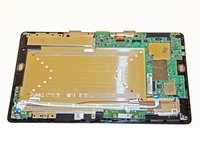
To reassemble your device, follow these instructions in reverse order.
crwdns2935221:0crwdne2935221:0
crwdns2935229:070crwdne2935229:0

crwdns2935287:0crwdne2935287:0

Cal Poly, Team 13-31, Maness Spring 2014 crwdns2935289:0Cal Poly, Team 13-31, Maness Spring 2014crwdne2935289:0
CPSU-MANESS-S14S13G31
crwdns2931471:03crwdne2931471:0
crwdns2935297:072crwdne2935297:0
crwdns2947412:022crwdne2947412:0
So I switched out my screen for it and its not turning on and I checked it everything was correctly place, but my Asus transformer was dead before hand so I tried charging it, and it wasn't charging, so I checked it and it seems the battery wire harness is loose enough to come off, is it possible to fix that?
christian cantu - crwdns2934203:0crwdne2934203:0 crwdns2950251:0crwdne2950251:0
Hi christian! How did you solve this problem? That happened to me too...
Matheus Moraes - crwdns2934203:0crwdne2934203:0 crwdns2950251:0crwdne2950251:0
what is the battery part # for t100 and can you purchase it?
thank you
RJ - crwdns2934203:0crwdne2934203:0 crwdns2950251:0crwdne2950251:0
Part number is C12N1320. They are available from a variety of sources.
Jack Riggins - crwdns2934203:0crwdne2934203:0 crwdns2950251:0crwdne2950251:0
Thanks for detailed guide.
I could not get the transformer tablet to power up no matter which buttons I held for how long or in what sequence. Unplugging the battery internally and replugging fixed a hung device.
JPWhite - crwdns2934203:0crwdne2934203:0 crwdns2950251:0crwdne2950251:0
