crwdns2933423:0crwdne2933423:0
crwdns2947577:0crwdnd2947577:0crwdne2947577:0

Asus ROG G752V Wireless Card Replacement

crwdns2942213:0crwdne2942213:0

    1. Asus ROG G752V Wireless Card Replacement, Keyboard: crwdns2935265:01crwdnd2935265:01crwdnd2935265:02crwdne2935265:0 Asus ROG G752V Wireless Card Replacement, Keyboard: crwdns2935265:01crwdnd2935265:02crwdnd2935265:02crwdne2935265:0
      crwdns2935267:0crwdne2935267:0
      Tweezers
      $4.99
      • Make sure you disconnect the charger before starting this guide.

      • Using a pair of tweezers, remove all 11 rubber plugs off of the back cover.

      crwdns2952109:0crwdne2952109:0

      crwdns2917038:0crwdne2917038:0

    2. Asus ROG G752V Wireless Card Replacement: crwdns2935265:02crwdnd2935265:01crwdnd2935265:02crwdne2935265:0 Asus ROG G752V Wireless Card Replacement: crwdns2935265:02crwdnd2935265:02crwdnd2935265:02crwdne2935265:0
      • Using a Phillips #0 screwdriver, remove all twelve 5.2mm screws on the back of the laptop.

      • There is one 5.2 mm screw under the rubber plug in the middle.

      crwdns2952109:0crwdne2952109:0

      crwdns2917038:0crwdne2917038:0

    3. Asus ROG G752V Wireless Card Replacement: crwdns2935265:03crwdnd2935265:01crwdnd2935265:01crwdne2935265:0
      • Pull up the rubber seal and the service cover will come off.

      crwdns2952109:0crwdne2952109:0

      crwdns2917038:0crwdne2917038:0

    4. Asus ROG G752V Wireless Card Replacement: crwdns2935265:04crwdnd2935265:01crwdnd2935265:01crwdne2935265:0
      • Using the Phillips #00 screwdriver, remove the six 5.2 mm screws under the service cover.

      crwdns2952109:0crwdne2952109:0

      crwdns2917038:0crwdne2917038:0

    5. Asus ROG G752V Wireless Card Replacement: crwdns2935265:05crwdnd2935265:01crwdnd2935265:01crwdne2935265:0
      • Using your hands, pull the optical drive out.

      crwdns2952109:0crwdne2952109:0

      crwdns2917038:0crwdne2917038:0

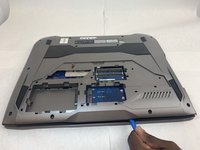
    6. Asus ROG G752V Wireless Card Replacement: crwdns2935265:06crwdnd2935265:01crwdnd2935265:02crwdne2935265:0 Asus ROG G752V Wireless Card Replacement: crwdns2935265:06crwdnd2935265:02crwdnd2935265:02crwdne2935265:0
      • Use the iFixit opening tool to pry apart the back panel from the main body of the laptop.

      • Start from the front side of the laptop and then continue to the side for easier access.

      crwdns2952109:0crwdne2952109:0

      crwdns2917038:0crwdne2917038:0

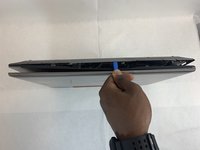
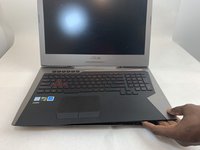
    7. Asus ROG G752V Wireless Card Replacement: crwdns2935265:07crwdnd2935265:01crwdnd2935265:02crwdne2935265:0 Asus ROG G752V Wireless Card Replacement: crwdns2935265:07crwdnd2935265:02crwdnd2935265:02crwdne2935265:0
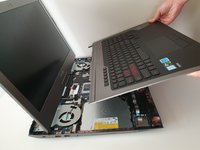
      • Slowly pull out the keyboard while lifting it about an inch.

      • There are cables attached to the keyboard and motherboard. DO NOT lift it more than 2 inches above the laptop.

      crwdns2952109:0crwdne2952109:0

      crwdns2917038:0crwdne2917038:0

    8. Asus ROG G752V Wireless Card Replacement: crwdns2935265:08crwdnd2935265:01crwdnd2935265:03crwdne2935265:0 Asus ROG G752V Wireless Card Replacement: crwdns2935265:08crwdnd2935265:02crwdnd2935265:03crwdne2935265:0 Asus ROG G752V Wireless Card Replacement: crwdns2935265:08crwdnd2935265:03crwdnd2935265:03crwdne2935265:0
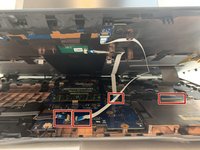
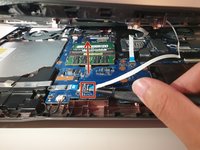
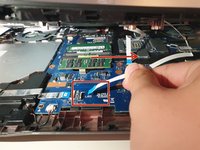
      • Using an ESD safe tool, detach all 3 ribbon cables. To do so, lift up the cable up and out.

      crwdns2952109:0crwdne2952109:0

      crwdns2917038:0crwdne2917038:0

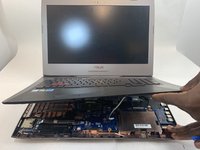
    9. Asus ROG G752V Wireless Card Replacement: crwdns2935265:09crwdnd2935265:01crwdnd2935265:02crwdne2935265:0 Asus ROG G752V Wireless Card Replacement: crwdns2935265:09crwdnd2935265:02crwdnd2935265:02crwdne2935265:0
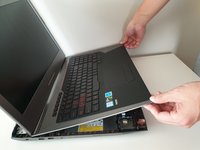
      • Once the cables are detached, lift the keyboard about 2 inches up and remove it from the rest of the body.

      • Make sure that the screen is open like the photo. This will ensure that none of your laptop components will be bent.

      crwdns2952109:0crwdne2952109:0

      crwdns2917038:0crwdne2917038:0

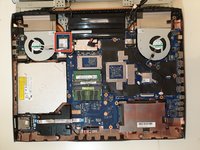
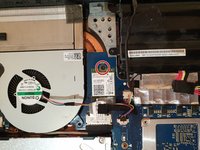
    1. Asus ROG G752V Wireless Card Replacement, Wireless Card: crwdns2935265:010crwdnd2935265:01crwdnd2935265:03crwdne2935265:0 Asus ROG G752V Wireless Card Replacement, Wireless Card: crwdns2935265:010crwdnd2935265:02crwdnd2935265:03crwdne2935265:0 Asus ROG G752V Wireless Card Replacement, Wireless Card: crwdns2935265:010crwdnd2935265:03crwdnd2935265:03crwdne2935265:0
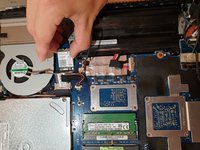
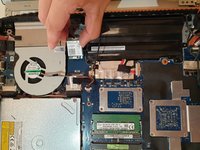
      • Unscrew one 3mm Philips #00 screw on the wireless card.

      crwdns2952109:0crwdne2952109:0

      crwdns2917038:0crwdne2917038:0

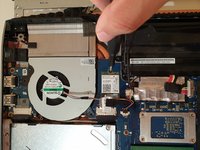
    2. Asus ROG G752V Wireless Card Replacement: crwdns2935265:011crwdnd2935265:01crwdnd2935265:02crwdne2935265:0 Asus ROG G752V Wireless Card Replacement: crwdns2935265:011crwdnd2935265:02crwdnd2935265:02crwdne2935265:0
      • Using your hands, unlatch the wireless card by pulling it out toward the screen.

      • Gently wiggle the card and pull it out of the motherboard.

      crwdns2952109:0crwdne2952109:0

      crwdns2917038:0crwdne2917038:0

crwdns2915888:0crwdne2915888:0

To reassemble your device, follow these instructions in reverse order.

crwdns2935221:0crwdne2935221:0

crwdns2935229:02crwdne2935229:0

Jeong

crwdns2935283:009/16/19crwdne2935283:0

1,227 crwdns2915208:0crwdne2915208:0

crwdns2935297:05crwdne2935297:0

crwdns2935287:0crwdne2935287:0

Embry-Riddle Aeronautical University, Team S2-G36, Watkins Fall 2019 crwdns2935289:0Embry-Riddle Aeronautical University, Team S2-G36, Watkins Fall 2019crwdne2935289:0

ERAU-WATKINS-F19S2G36

crwdns2931471:04crwdne2931471:0

crwdns2935297:072crwdne2935297:0

crwdns2947412:00crwdne2947412:0

crwdns2917038:0crwdne2917038:0

crwdns2936625:0crwdne2936625:0:

crwdns2936751:024crwdne2936751:0 1

crwdns2936753:07crwdne2936753:0 12

crwdns2936753:030crwdne2936753:0 61

crwdns2942667:0crwdne2942667:0 4,232