crwdns2933423:0crwdne2933423:0
crwdns2947577:0crwdnd2947577:0crwdne2947577:0

Asus MeMO Pad 7 ME170C Motherboard Replacement

crwdns2942213:0crwdne2942213:0

    1. Asus MeMO Pad 7 ME170C  Motherboard  Replacement, Motherboard: crwdns2935265:01crwdnd2935265:01crwdnd2935265:03crwdne2935265:0 Asus MeMO Pad 7 ME170C  Motherboard  Replacement, Motherboard: crwdns2935265:01crwdnd2935265:02crwdnd2935265:03crwdne2935265:0 Asus MeMO Pad 7 ME170C  Motherboard  Replacement, Motherboard: crwdns2935265:01crwdnd2935265:03crwdnd2935265:03crwdne2935265:0
      • Power off the device before disassembly.

      • Be gentle; excessive force can result in a damaged or cracked screen.

      • Gently pry a Jimmy all around the seam of the device until the back panel detaches.

      crwdns2952109:0crwdne2952109:0

      crwdns2917038:0crwdne2917038:0

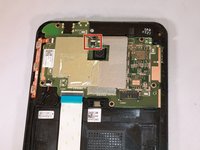
    2. Asus MeMO Pad 7 ME170C  Motherboard  Replacement: crwdns2935265:02crwdnd2935265:01crwdnd2935265:03crwdne2935265:0 Asus MeMO Pad 7 ME170C  Motherboard  Replacement: crwdns2935265:02crwdnd2935265:02crwdnd2935265:03crwdne2935265:0 Asus MeMO Pad 7 ME170C  Motherboard  Replacement: crwdns2935265:02crwdnd2935265:03crwdnd2935265:03crwdne2935265:0
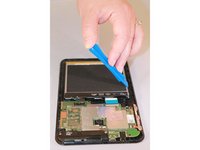
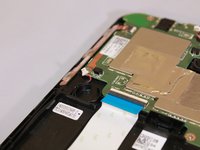
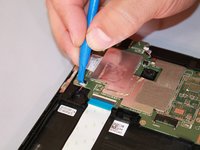
      • Use an iFixit opening tool to gently push the black bundle cable connector in a forward motion until it loosens without pushing down on the bundle cable connector.

      crwdns2952109:0crwdne2952109:0

      crwdns2917038:0crwdne2917038:0

    3. Asus MeMO Pad 7 ME170C  Motherboard  Replacement: crwdns2935265:03crwdnd2935265:01crwdnd2935265:03crwdne2935265:0 Asus MeMO Pad 7 ME170C  Motherboard  Replacement: crwdns2935265:03crwdnd2935265:02crwdnd2935265:03crwdne2935265:0 Asus MeMO Pad 7 ME170C  Motherboard  Replacement: crwdns2935265:03crwdnd2935265:03crwdnd2935265:03crwdne2935265:0
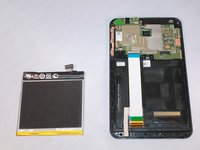
      • Use the plastic opening tool to pry around the edges of the battery.

      • The battery should be laying freely in its port.

      • Lift the battery out of its port.

      crwdns2952109:0crwdne2952109:0

      crwdns2917038:0crwdne2917038:0

    4. Asus MeMO Pad 7 ME170C  Motherboard  Replacement: crwdns2935265:04crwdnd2935265:01crwdnd2935265:03crwdne2935265:0 Asus MeMO Pad 7 ME170C  Motherboard  Replacement: crwdns2935265:04crwdnd2935265:02crwdnd2935265:03crwdne2935265:0 Asus MeMO Pad 7 ME170C  Motherboard  Replacement: crwdns2935265:04crwdnd2935265:03crwdnd2935265:03crwdne2935265:0
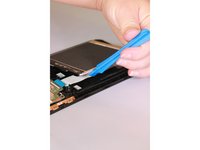
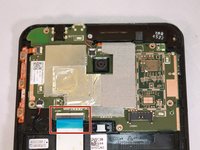
      • Use a plastic opening tool to slide the white cable connector completely out of the port.

      crwdns2952109:0crwdne2952109:0

      crwdns2917038:0crwdne2917038:0

    5. Asus MeMO Pad 7 ME170C  Motherboard  Replacement: crwdns2935265:05crwdnd2935265:01crwdnd2935265:03crwdne2935265:0 Asus MeMO Pad 7 ME170C  Motherboard  Replacement: crwdns2935265:05crwdnd2935265:02crwdnd2935265:03crwdne2935265:0 Asus MeMO Pad 7 ME170C  Motherboard  Replacement: crwdns2935265:05crwdnd2935265:03crwdnd2935265:03crwdne2935265:0
      crwdns2935267:0crwdne2935267:0
      Tweezers
      $4.99
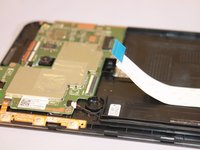
      • Flip up the beige clip to loosen the cable.

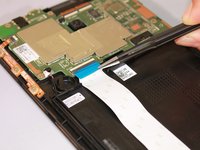
      • Use the wide nosed tweezers to pinch the blue tab attached to the ribbon cable.

      • Pull the blue tab gently in a lateral motion until it is completely out of its port.

      crwdns2952109:0crwdne2952109:0

      crwdns2917038:0crwdne2917038:0

    6. Asus MeMO Pad 7 ME170C  Motherboard  Replacement: crwdns2935265:06crwdnd2935265:01crwdnd2935265:03crwdne2935265:0 Asus MeMO Pad 7 ME170C  Motherboard  Replacement: crwdns2935265:06crwdnd2935265:02crwdnd2935265:03crwdne2935265:0 Asus MeMO Pad 7 ME170C  Motherboard  Replacement: crwdns2935265:06crwdnd2935265:03crwdnd2935265:03crwdne2935265:0
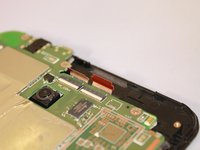
      • Use the wide nosed tweezers to gently pull out the orange ribbon inserted in the port on the motherboard.

      crwdns2952109:0crwdne2952109:0

      crwdns2917038:0crwdne2917038:0

    7. Asus MeMO Pad 7 ME170C  Motherboard  Replacement: crwdns2935265:07crwdnd2935265:01crwdnd2935265:03crwdne2935265:0 Asus MeMO Pad 7 ME170C  Motherboard  Replacement: crwdns2935265:07crwdnd2935265:02crwdnd2935265:03crwdne2935265:0 Asus MeMO Pad 7 ME170C  Motherboard  Replacement: crwdns2935265:07crwdnd2935265:03crwdnd2935265:03crwdne2935265:0
      • Use a plastic opening tool to push the white cable connector out of its port in a side to side motion.

      crwdns2952109:0crwdne2952109:0

      crwdns2917038:0crwdne2917038:0

    8. Asus MeMO Pad 7 ME170C  Motherboard  Replacement: crwdns2935265:08crwdnd2935265:01crwdnd2935265:02crwdne2935265:0 Asus MeMO Pad 7 ME170C  Motherboard  Replacement: crwdns2935265:08crwdnd2935265:02crwdnd2935265:02crwdne2935265:0
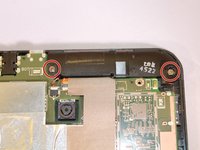
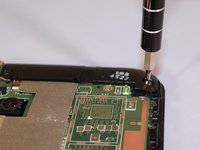
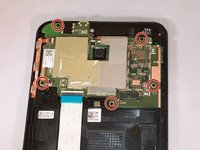
      • Use the Phillips #000 screwdriver to unscrew the seven screws.

      • There should be two silver and five black screws.

      crwdns2952109:0crwdne2952109:0

      crwdns2917038:0crwdne2917038:0

    9. Asus MeMO Pad 7 ME170C  Motherboard  Replacement: crwdns2935265:09crwdnd2935265:01crwdnd2935265:02crwdne2935265:0 Asus MeMO Pad 7 ME170C  Motherboard  Replacement: crwdns2935265:09crwdnd2935265:02crwdnd2935265:02crwdne2935265:0
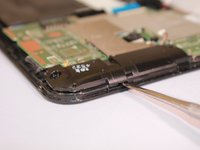
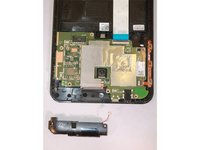
      • Once the screws are removed, the speaker component will be loosely laying in the track.

      • Use the metal spudger tool to remove the speaker by gently lifting the edge of it.

      crwdns2952109:0crwdne2952109:0

      crwdns2917038:0crwdne2917038:0

    10. Asus MeMO Pad 7 ME170C  Motherboard  Replacement: crwdns2935265:010crwdnd2935265:01crwdnd2935265:03crwdne2935265:0 Asus MeMO Pad 7 ME170C  Motherboard  Replacement: crwdns2935265:010crwdnd2935265:02crwdnd2935265:03crwdne2935265:0 Asus MeMO Pad 7 ME170C  Motherboard  Replacement: crwdns2935265:010crwdnd2935265:03crwdnd2935265:03crwdne2935265:0
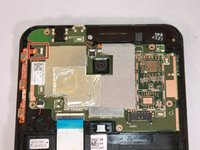
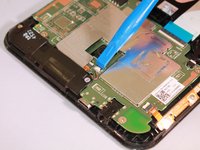
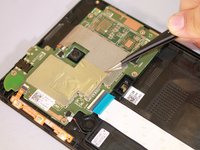
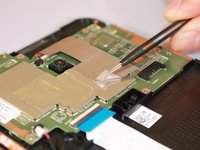
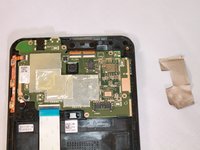
      • Remove the silver tape on one corner with the needle nosed tweezers, and remove the tape from the motherboard.

      crwdns2952109:0crwdne2952109:0

      crwdns2917038:0crwdne2917038:0

    11. Asus MeMO Pad 7 ME170C  Motherboard  Replacement: crwdns2935265:011crwdnd2935265:01crwdnd2935265:03crwdne2935265:0 Asus MeMO Pad 7 ME170C  Motherboard  Replacement: crwdns2935265:011crwdnd2935265:02crwdnd2935265:03crwdne2935265:0 Asus MeMO Pad 7 ME170C  Motherboard  Replacement: crwdns2935265:011crwdnd2935265:03crwdnd2935265:03crwdne2935265:0
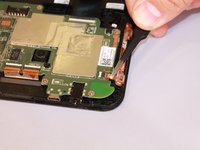
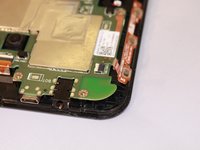
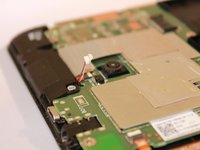
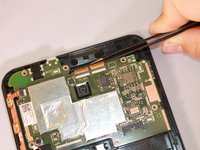
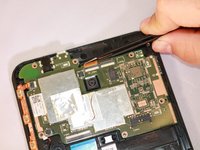
      • Use the needle nosed tweezers to gently pull both of the orange ribbon cables out of their ports.

      crwdns2952109:0crwdne2952109:0

      crwdns2917038:0crwdne2917038:0

    12. Asus MeMO Pad 7 ME170C  Motherboard  Replacement: crwdns2935265:012crwdnd2935265:01crwdnd2935265:03crwdne2935265:0 Asus MeMO Pad 7 ME170C  Motherboard  Replacement: crwdns2935265:012crwdnd2935265:02crwdnd2935265:03crwdne2935265:0 Asus MeMO Pad 7 ME170C  Motherboard  Replacement: crwdns2935265:012crwdnd2935265:03crwdnd2935265:03crwdne2935265:0
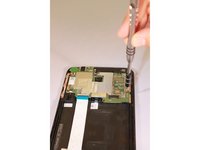
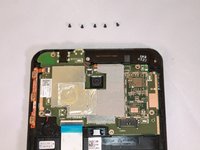
      • Use the Phillips #000 screwdriver to unscrew all five screws.

      crwdns2952109:0crwdne2952109:0

      crwdns2917038:0crwdne2917038:0

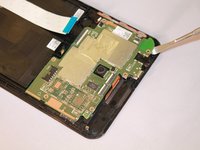
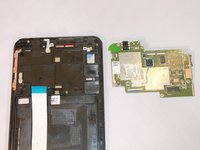
    13. Asus MeMO Pad 7 ME170C  Motherboard  Replacement: crwdns2935265:013crwdnd2935265:01crwdnd2935265:02crwdne2935265:0 Asus MeMO Pad 7 ME170C  Motherboard  Replacement: crwdns2935265:013crwdnd2935265:02crwdnd2935265:02crwdne2935265:0
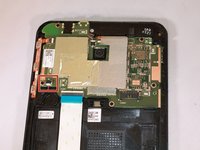
      • To uninstall the motherboard, use the metal spudger tool to lift it out of the device.

      crwdns2952109:0crwdne2952109:0

      crwdns2917038:0crwdne2917038:0

crwdns2915888:0crwdne2915888:0

To reassemble your device, follow these instructions in reverse order.

crwdns2935221:0crwdne2935221:0

crwdns2935229:06crwdne2935229:0

Tatiana Schneider

crwdns2935283:010/04/15crwdne2935283:0

599 crwdns2915208:0crwdne2915208:0

crwdns2935297:04crwdne2935297:0

crwdns2935287:0crwdne2935287:0

Eastern Washington University, Team 2-3, Plummer Fall 2015 crwdns2935289:0Eastern Washington University, Team 2-3, Plummer Fall 2015crwdne2935289:0

EWU-PLUMMER-F15S2G3

crwdns2931471:05crwdne2931471:0

crwdns2935297:060crwdne2935297:0

crwdns2947410:01crwdne2947410:0

You are amazing!! Please make the tutorial "how change ASUS ME170 Touch Screen Digitizer". Thanks!!!

Walter Tejerina - crwdns2934203:0crwdne2934203:0 crwdns2950251:0crwdne2950251:0

crwdns2917038:0crwdne2917038:0

crwdns2936625:0crwdne2936625:0:

crwdns2936751:024crwdne2936751:0 3

crwdns2936753:07crwdne2936753:0 29

crwdns2936753:030crwdne2936753:0 90

crwdns2942667:0crwdne2942667:0 3,881