crwdns2933423:0crwdne2933423:0
crwdns2947577:0crwdnd2947577:0crwdne2947577:0

Astro Mixamp Control Button Replacement

crwdns2942213:0crwdne2942213:0

    1. Astro Mixamp Control Button Replacement, Panel Dial: crwdns2935265:01crwdnd2935265:01crwdnd2935265:02crwdne2935265:0 Astro Mixamp Control Button Replacement, Panel Dial: crwdns2935265:01crwdnd2935265:02crwdnd2935265:02crwdne2935265:0
      • Grip the dial tightly and pull straight off the device.

      • Repeat for the second dial

      crwdns2952109:0crwdne2952109:0

      crwdns2917038:0crwdne2917038:0

    2. Astro Mixamp Control Button Replacement: crwdns2935265:02crwdnd2935265:01crwdnd2935265:02crwdne2935265:0 Astro Mixamp Control Button Replacement: crwdns2935265:02crwdnd2935265:02crwdnd2935265:02crwdne2935265:0
      crwdns2935267:0crwdne2935267:0
      Tweezers
      $4.99
      • Using tweezers, remove the spacer nuts and washers from each dial post.

      crwdns2952109:0crwdne2952109:0

      crwdns2917038:0crwdne2917038:0

    1. Astro Mixamp Control Button Replacement, Outer Casing: crwdns2935265:03crwdnd2935265:01crwdnd2935265:02crwdne2935265:0 Astro Mixamp Control Button Replacement, Outer Casing: crwdns2935265:03crwdnd2935265:02crwdnd2935265:02crwdne2935265:0
      • Before opening your device, ensure the device is not on or connected to the charging cable.

      • Insert a plastic opening tool into the seam between the rubber foot and plastic casing.

      • Pull the rubber foot free of the plastic casing.

      crwdns2952109:0crwdne2952109:0

      crwdns2917038:0crwdne2917038:0

    2. Astro Mixamp Control Button Replacement: crwdns2935265:04crwdnd2935265:01crwdnd2935265:01crwdne2935265:0
      • Use a screwdriver to remove the screw from the rear casing.

      crwdns2952109:0crwdne2952109:0

      crwdns2917038:0crwdne2917038:0

    3. Astro Mixamp Control Button Replacement: crwdns2935265:05crwdnd2935265:01crwdnd2935265:01crwdne2935265:0
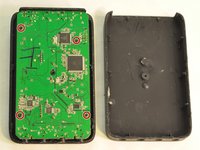
      • Gently lift the rear casing from the device.

      crwdns2952109:0crwdne2952109:0

      crwdns2917038:0crwdne2917038:0

    1. Astro Mixamp Control Button Replacement, Motherboard: crwdns2935265:06crwdnd2935265:01crwdnd2935265:03crwdne2935265:0 Astro Mixamp Control Button Replacement, Motherboard: crwdns2935265:06crwdnd2935265:02crwdnd2935265:03crwdne2935265:0 Astro Mixamp Control Button Replacement, Motherboard: crwdns2935265:06crwdnd2935265:03crwdnd2935265:03crwdne2935265:0
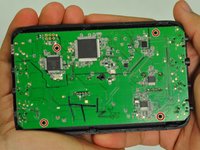
      • Remove the four screws that hold the motherboard in place.

      • Only touch the edges of the motherboard. Touching the surface can damage the motherboard.

      crwdns2952109:0crwdne2952109:0

      crwdns2917038:0crwdne2917038:0

    2. Astro Mixamp Control Button Replacement: crwdns2935265:07crwdnd2935265:01crwdnd2935265:01crwdne2935265:0
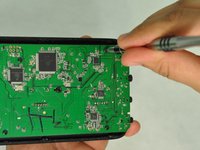
      • Gently pull the motherboard from the front cover.

      crwdns2952109:0crwdne2952109:0

      crwdns2917038:0crwdne2917038:0

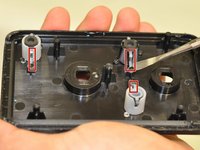
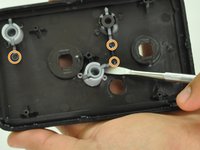
    1. Astro Mixamp Control Button Replacement, Control Button: crwdns2935265:08crwdnd2935265:01crwdnd2935265:02crwdne2935265:0 Astro Mixamp Control Button Replacement, Control Button: crwdns2935265:08crwdnd2935265:02crwdnd2935265:02crwdne2935265:0
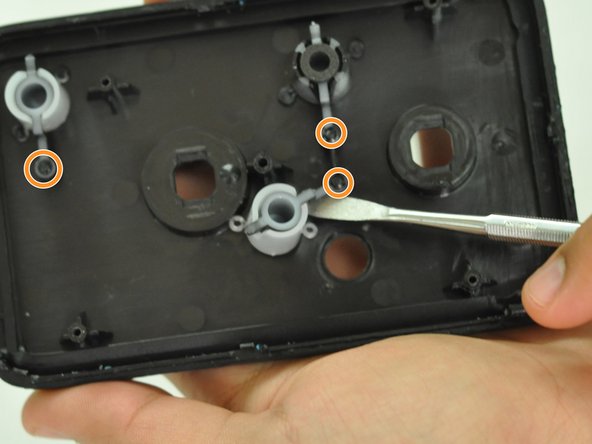
      • Gently insert a metal spudger under a control button housing.

      • Do not pry the button housing from the front panel, this can cause damage to the button.

      • Rotate the control button around the marked pin.

      crwdns2952109:0crwdne2952109:0

      crwdns2917038:0crwdne2917038:0

crwdns2915888:0crwdne2915888:0

To reassemble your device, follow these instructions in reverse order.

crwdns2935221:0crwdne2935221:0

crwdns2935229:03crwdne2935229:0

Hope Burns

crwdns2935283:010/29/16crwdne2935283:0

769 crwdns2915208:0crwdne2915208:0

crwdns2935297:05crwdne2935297:0

crwdns2947412:00crwdne2947412:0

crwdns2917038:0crwdne2917038:0

crwdns2936625:0crwdne2936625:0:

crwdns2936751:024crwdne2936751:0 1

crwdns2936753:07crwdne2936753:0 5

crwdns2936753:030crwdne2936753:0 35

crwdns2942667:0crwdne2942667:0 2,113