crwdns2933423:0crwdne2933423:0
crwdns2947577:0crwdnd2947577:0crwdne2947577:0

Astak Mole Motherboard Replacement

crwdns2942213:0crwdne2942213:0

    1. Astak Mole Motherboard Replacement, Lower Case: crwdns2935265:01crwdnd2935265:01crwdnd2935265:01crwdne2935265:0
      • Remove the four bottom tabs in order to access the bottom screws.

      crwdns2952109:0crwdne2952109:0

      crwdns2917038:0crwdne2917038:0

    2. Astak Mole Motherboard Replacement: crwdns2935265:02crwdnd2935265:01crwdnd2935265:01crwdne2935265:0
      • Remove all four 14 mm Phillips #1 screws.

      crwdns2952109:0crwdne2952109:0

      crwdns2917038:0crwdne2917038:0

    3. Astak Mole Motherboard Replacement: crwdns2935265:03crwdnd2935265:01crwdnd2935265:01crwdne2935265:0
      • Remove the SD card.

      crwdns2952109:0crwdne2952109:0

      crwdns2917038:0crwdne2917038:0

    4. Astak Mole Motherboard Replacement: crwdns2935265:04crwdnd2935265:01crwdnd2935265:01crwdne2935265:0
      • Pry up the motherboard on the four points using a spudger.

      • The regular black nylon spudger should be used whenever possible, especially around sensitive internal components.

      crwdns2952109:0crwdne2952109:0

      crwdns2917038:0crwdne2917038:0

    5. Astak Mole Motherboard Replacement: crwdns2935265:05crwdnd2935265:01crwdnd2935265:01crwdne2935265:0
      • Gently pull back the motherboard to expose many of the component's wired connections.

      crwdns2952109:0crwdne2952109:0

      crwdns2917038:0crwdne2917038:0

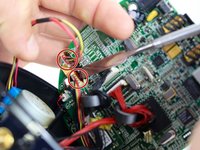
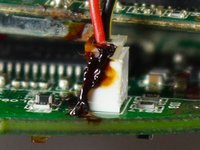
    1. Astak Mole Motherboard Replacement, Motherboard: crwdns2935265:06crwdnd2935265:01crwdnd2935265:02crwdne2935265:0 Astak Mole Motherboard Replacement, Motherboard: crwdns2935265:06crwdnd2935265:02crwdnd2935265:02crwdne2935265:0
      • Sever the indicated adhesive connections to the motherboard allowing the wired connections to be removed.

      • All wired connections to the motherboard are removed by the thin plastic male connector inserted into the larger female plastic connection.

      • The regular black nylon spudger should be used whenever possible, especially around sensitive internal components.

      crwdns2952109:0crwdne2952109:0

      crwdns2917038:0crwdne2917038:0

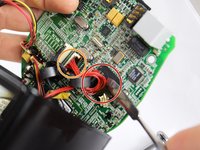
    2. Astak Mole Motherboard Replacement: crwdns2935265:07crwdnd2935265:01crwdnd2935265:02crwdne2935265:0 Astak Mole Motherboard Replacement: crwdns2935265:07crwdnd2935265:02crwdnd2935265:02crwdne2935265:0
      • The red wires may be adhered to the CPU as indicated and will need to be severed as shown.

      • Be careful not to scratch the CPU in this step. This is not a wired connection.

      • Sever the additional adhesive connections so that the wired connections may be removed.

      crwdns2952109:0crwdne2952109:0

      crwdns2917038:0crwdne2917038:0

    3. Astak Mole Motherboard Replacement: crwdns2935265:08crwdnd2935265:01crwdnd2935265:01crwdne2935265:0
      • Locate and unscrew the indicated screw using the (PH1) Phillips head bit.

      • Screw Measurements: (Length= 5.3mm)

      crwdns2952109:0crwdne2952109:0

      crwdns2917038:0crwdne2917038:0

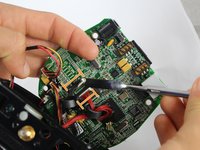
    4. Astak Mole Motherboard Replacement: crwdns2935265:09crwdnd2935265:01crwdnd2935265:02crwdne2935265:0 Astak Mole Motherboard Replacement: crwdns2935265:09crwdnd2935265:02crwdnd2935265:02crwdne2935265:0
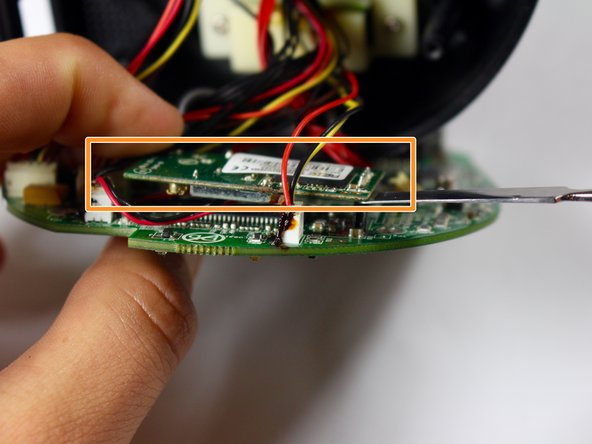
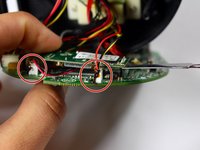
      • Remove the last two wired connections to the motherboard by severing the indicated connections.

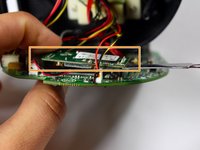
      • Lift up the secondary motherboard as indicated using the metal spudger.

      • All connections should be severed from the motherboard and a new motherboard may be inserted.

      • It is advised to reapply adhesive to wired connections during reassembly.

      crwdns2952109:0crwdne2952109:0

      crwdns2917038:0crwdne2917038:0

crwdns2915888:0crwdne2915888:0

To reassemble your device, follow these instructions in reverse order.

crwdns2935221:0crwdne2935221:0

Andrew Birch

crwdns2935283:009/15/16crwdne2935283:0

204 crwdns2915208:0crwdne2915208:0

crwdns2935297:02crwdne2935297:0

crwdns2935287:0crwdne2935287:0

USF Tampa, Team 2-2, Blackwell Fall 2016 crwdns2935289:0USF Tampa, Team 2-2, Blackwell Fall 2016crwdne2935289:0

USFT-BLACKWELL-F16S2G2

crwdns2931471:04crwdne2931471:0

crwdns2935297:072crwdne2935297:0

crwdns2947412:00crwdne2947412:0

crwdns2917038:0crwdne2917038:0

crwdns2936625:0crwdne2936625:0:

crwdns2936751:024crwdne2936751:0 0

crwdns2936753:07crwdne2936753:0 10

crwdns2936753:030crwdne2936753:0 34

crwdns2942667:0crwdne2942667:0 982