crwdns2933423:0crwdne2933423:0
crwdns2947577:0crwdnd2947577:0crwdne2947577:0

Apple Studio Display M7649 Inverter Replacement

crwdns2942213:0crwdne2942213:0

  1. Apple Studio Display M7649 Inverter Replacement, Stand: crwdns2935265:01crwdnd2935265:01crwdnd2935265:02crwdne2935265:0 Apple Studio Display M7649 Inverter Replacement, Stand: crwdns2935265:01crwdnd2935265:02crwdnd2935265:02crwdne2935265:0
    • Lay the display facing down with the stand away from you.

    • Remove the three size 2.0 hex screws on the swing arm and remove the swing arm as well as the plastic shield under it.

    crwdns2952109:0crwdne2952109:0

    crwdns2917038:0crwdne2917038:0

  2. Apple Studio Display M7649 Inverter Replacement, Panels: crwdns2935265:02crwdnd2935265:01crwdnd2935265:01crwdne2935265:0
    • Remove the size 2.5 hex screws from each corner that connects the panels to the display and remove them.

    crwdns2952109:0crwdne2952109:0

    crwdns2917038:0crwdne2917038:0

  3. Apple Studio Display M7649 Inverter Replacement: crwdns2935265:03crwdnd2935265:01crwdnd2935265:01crwdne2935265:0
    • Rotate the display so the legs of the display are now facing you

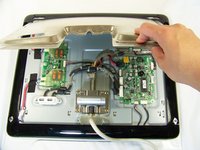
    • Grip the top of the clear panel and lift it upwards, and pull the ADC cable through the hole.

    crwdns2952109:0crwdne2952109:0

    crwdns2917038:0crwdne2917038:0

  4. Apple Studio Display M7649 Inverter Replacement: crwdns2935265:04crwdnd2935265:01crwdnd2935265:01crwdne2935265:0
    • Remove the grey back panel by lifting the bottom and pulling the ADC cable through the hole.

    crwdns2952109:0crwdne2952109:0

    crwdns2917038:0crwdne2917038:0

  5. Apple Studio Display M7649 Inverter Replacement, Metal EMI Shield: crwdns2935265:05crwdnd2935265:01crwdnd2935265:01crwdne2935265:0
    • The next layer will be a shiny metal panel, which might have some stickers. Make sure to remove these stickers.

    crwdns2952109:0crwdne2952109:0

    crwdns2917038:0crwdne2917038:0

  6. Apple Studio Display M7649 Inverter Replacement: crwdns2935265:06crwdnd2935265:01crwdnd2935265:01crwdne2935265:0
    • Now locate and remove the lone Phillips screw holding the EMI shield to the display

    crwdns2952109:0crwdne2952109:0

    crwdns2917038:0crwdne2917038:0

  7. Apple Studio Display M7649 Inverter Replacement: crwdns2935265:07crwdnd2935265:01crwdnd2935265:02crwdne2935265:0 Apple Studio Display M7649 Inverter Replacement: crwdns2935265:07crwdnd2935265:02crwdnd2935265:02crwdne2935265:0
    • Now that the screw has been removed, slide the panel towards your body and lift it out.

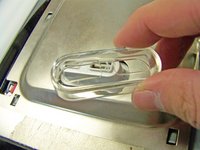
    • You may need to remove the clear USB port cover to remove the metal EMI shield.

    crwdns2952109:0crwdne2952109:0

    crwdns2917038:0crwdne2917038:0

  8. Apple Studio Display M7649 Inverter Replacement, Inverter: crwdns2935265:08crwdnd2935265:01crwdnd2935265:01crwdne2935265:0
    • Remove these three screws holding the board to the display

    crwdns2952109:0crwdne2952109:0

    crwdns2917038:0crwdne2917038:0

  9. Apple Studio Display M7649 Inverter Replacement: crwdns2935265:09crwdnd2935265:01crwdnd2935265:01crwdne2935265:0
    • Remove these five cables connection the inverter to the backlights and logic board.

    • Taking note where they connect to for reassembly

    crwdns2952109:0crwdne2952109:0

    crwdns2917038:0crwdne2917038:0

  10. Apple Studio Display M7649 Inverter Replacement: crwdns2935265:010crwdnd2935265:01crwdnd2935265:01crwdne2935265:0
    • Remove and replace the inverter

    crwdns2952109:0crwdne2952109:0

    crwdns2917038:0crwdne2917038:0

crwdns2915888:0crwdne2915888:0

To reassemble your device, follow these instructions in reverse order.

crwdns2935221:0crwdne2935221:0

crwdns2935229:05crwdne2935229:0

Andrew Tsao

crwdns2935283:001/19/10crwdne2935283:0

186 crwdns2915208:0crwdne2915208:0

crwdns2935297:05crwdne2935297:0

crwdns2935287:0crwdne2935287:0

Cal Poly, Team 3-20, Maness Winter 2010 crwdns2935289:0Cal Poly, Team 3-20, Maness Winter 2010crwdne2935289:0

CPSU-MANESS-W10S3G20

crwdns2931471:04crwdne2931471:0

crwdns2935297:023crwdne2935297:0

crwdns2947412:00crwdne2947412:0

crwdns2917038:0crwdne2917038:0

crwdns2936625:0crwdne2936625:0:

crwdns2936751:024crwdne2936751:0 2

crwdns2936753:07crwdne2936753:0 18

crwdns2936753:030crwdne2936753:0 83

crwdns2942667:0crwdne2942667:0 7,807