crwdns2933423:0crwdne2933423:0
crwdns2947577:0crwdnd2947577:0crwdne2947577:0

Apple Cinema Display M8149 USB Port Replacement

crwdns2942213:0crwdne2942213:0

    1. Apple Cinema Display M8149 USB Port Replacement, USB Port: crwdns2935265:01crwdnd2935265:01crwdnd2935265:03crwdne2935265:0 Apple Cinema Display M8149 USB Port Replacement, USB Port: crwdns2935265:01crwdnd2935265:02crwdnd2935265:03crwdne2935265:0 Apple Cinema Display M8149 USB Port Replacement, USB Port: crwdns2935265:01crwdnd2935265:03crwdnd2935265:03crwdne2935265:0
      • Before starting, make sure the display is UNPLUGGED. Failure to do so can result in shock and serious injury.

      • Flip the Cinema Display so it is on its face and the feet are pointed away from you.

      • Using the PH 2 screwdriver, unscrew the three feet screws (9.52 x 4.43 mm).

      • Remove the back foot from the hinge mount by gently pulling it upwards.

      crwdns2952109:0crwdne2952109:0

      crwdns2917038:0crwdne2917038:0

    2. Apple Cinema Display M8149 USB Port Replacement: crwdns2935265:02crwdnd2935265:01crwdnd2935265:03crwdne2935265:0 Apple Cinema Display M8149 USB Port Replacement: crwdns2935265:02crwdnd2935265:02crwdnd2935265:03crwdne2935265:0 Apple Cinema Display M8149 USB Port Replacement: crwdns2935265:02crwdnd2935265:03crwdnd2935265:03crwdne2935265:0
      • Remove the back plate screws (5.25 x 4.43 mm) using the PH 2 screw driver.

      • Once the screws are removed, lift the back plate off of the display.

      • Completely remove the back plate and set it aside.

      crwdns2952109:0crwdne2952109:0

      crwdns2917038:0crwdne2917038:0

    3. Apple Cinema Display M8149 USB Port Replacement: crwdns2935265:03crwdnd2935265:01crwdnd2935265:01crwdne2935265:0
      • Unscrew the USB cable routing screw (8 x 2.72mm) using the PH 2 screwdriver.

      crwdns2952109:0crwdne2952109:0

      crwdns2917038:0crwdne2917038:0

    4. Apple Cinema Display M8149 USB Port Replacement: crwdns2935265:04crwdnd2935265:01crwdnd2935265:01crwdne2935265:0
      • Unplug the USB cable connector from the screen box.

      crwdns2952109:0crwdne2952109:0

      crwdns2917038:0crwdne2917038:0

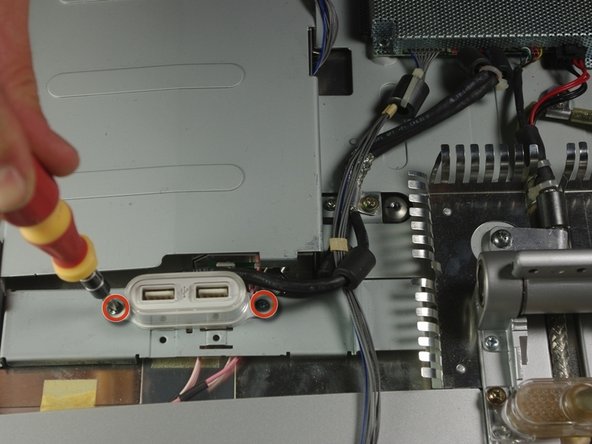
    5. Apple Cinema Display M8149 USB Port Replacement: crwdns2935265:05crwdnd2935265:01crwdnd2935265:02crwdne2935265:0 Apple Cinema Display M8149 USB Port Replacement: crwdns2935265:05crwdnd2935265:02crwdnd2935265:02crwdne2935265:0
      • Using the PH 2 screwdriver, unscrew the two screws (4.85 x 2.94mm) on the USB ports.

      crwdns2952109:0crwdne2952109:0

      crwdns2917038:0crwdne2917038:0

crwdns2915888:0crwdne2915888:0

To reassemble your device, follow these instructions in reverse order.

crwdns2935221:0crwdne2935221:0

Kyle Suguitan

crwdns2935283:004/01/11crwdne2935283:0

21 crwdns2915208:0crwdne2915208:0

crwdns2935295:0crwdne2935295:0

crwdns2935287:0crwdne2935287:0

Cal Poly, Team 10-41, Forte Spring 2011 crwdns2935289:0Cal Poly, Team 10-41, Forte Spring 2011crwdne2935289:0

CPSU-FORTE-S11S10G41

crwdns2931471:05crwdne2931471:0

crwdns2935297:024crwdne2935297:0

crwdns2947412:00crwdne2947412:0

crwdns2917038:0crwdne2917038:0

crwdns2936625:0crwdne2936625:0:

crwdns2936751:024crwdne2936751:0 1

crwdns2936753:07crwdne2936753:0 18

crwdns2936753:030crwdne2936753:0 47

crwdns2942667:0crwdne2942667:0 5,020