crwdns2933423:0crwdne2933423:0
crwdns2947577:0crwdnd2947577:0crwdne2947577:0

Anki Vector Infrared Sensor Replacement

crwdns2869540:0crwdne2869540:0: 1303

crwdns2959988:0crwdne2959988:0

crwdns2959990:0crwdne2959990:0
1
crwdns2959992:0crwdne2959992:0
11
crwdns2959994:0crwdne2959994:0
55
crwdns2959996:0crwdne2959996:0
1.303
crwdns2955950:0crwdne2955950:0: 0

crwdns2959998:0crwdne2959998:0

crwdns2960000:0crwdne2960000:0
crwdns2959984:0crwdne2959984:0: 0

crwdns2959956:0crwdne2959956:0

crwdns2959986:0crwdne2959986:0: 0

crwdns2959958:0crwdne2959958:0

crwdns2955944:0crwdne2955944:0: 2 - 3 crwdns2931279:0crwdne2931279:0
crwdns2955970:0crwdne2955970:0: crwdns2937801:0crwdne2937801:0
Anki Vector Infrared Sensor Replacement

crwdns2915892:0crwdne2915892:0

crwdns2959928:0crwdne2959928:0 ↓

This guide will illustrate the process to remove or replace the infrared sensor of the Anki Vector. The only bit of equipment you will need to complete this guide is a screwdriver.

This guide should be helpful if your Anki Vector is having trouble distance tracking or mapping its environment.

crwdns2959930:0crwdne2959930:0

crwdns2943215:0crwdne2943215:0

    1. Anki Vector Infrared Sensor Replacement, Belts: crwdns2935265:01crwdnd2935265:01crwdnd2935265:01crwdne2935265:0
      • Raise Vector's arms above his head.

      crwdns2952109:0crwdne2952109:0

      crwdns2917038:0crwdne2917038:0

    2. Anki Vector Infrared Sensor Replacement: crwdns2935265:02crwdnd2935265:01crwdnd2935265:02crwdne2935265:0 Anki Vector Infrared Sensor Replacement: crwdns2935265:02crwdnd2935265:02crwdnd2935265:02crwdne2935265:0
      • Using your thumb and index finger, grab the lower portion of the belt near the large wheel and pull the belt off.

      • Repeat on the other side.

      crwdns2952109:0crwdne2952109:0

      crwdns2917038:0crwdne2917038:0

    1. Anki Vector Infrared Sensor Replacement, Infrared Sensor: crwdns2935265:03crwdnd2935265:01crwdnd2935265:02crwdne2935265:0 Anki Vector Infrared Sensor Replacement, Infrared Sensor: crwdns2935265:03crwdnd2935265:02crwdnd2935265:02crwdne2935265:0
      • Pull each front wheel cover off.

      • This will require a good amount of force due to the three clips holding it in place.

      crwdns2952109:0crwdne2952109:0

      crwdns2917038:0crwdne2917038:0

    2. Anki Vector Infrared Sensor Replacement: crwdns2935265:04crwdnd2935265:01crwdnd2935265:02crwdne2935265:0 Anki Vector Infrared Sensor Replacement: crwdns2935265:04crwdnd2935265:02crwdnd2935265:02crwdne2935265:0
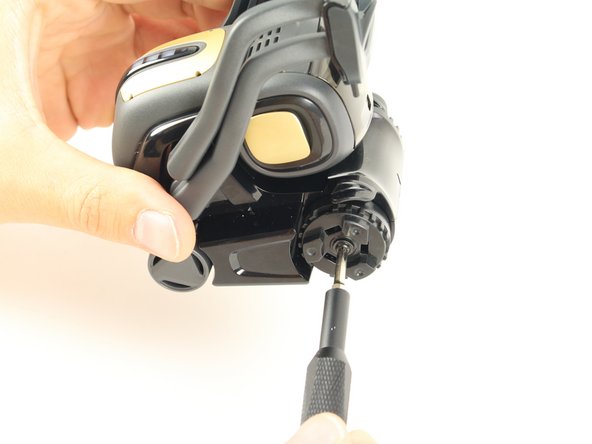
      • Unscrew the wheel with the Phillips #00 screwdriver and gently remove it.

      crwdns2952109:0crwdne2952109:0

      crwdns2917038:0crwdne2917038:0

    3. Anki Vector Infrared Sensor Replacement: crwdns2935265:05crwdnd2935265:01crwdnd2935265:01crwdne2935265:0
      • Unscrew the two body screws beneath the wheel using the same screwdriver.

      crwdns2952109:0crwdne2952109:0

      crwdns2917038:0crwdne2917038:0

    4. Anki Vector Infrared Sensor Replacement: crwdns2935265:06crwdnd2935265:01crwdnd2935265:02crwdne2935265:0 Anki Vector Infrared Sensor Replacement: crwdns2935265:06crwdnd2935265:02crwdnd2935265:02crwdne2935265:0
      • Gently pull off the front panel to unplug the Infrared sensor.

      • Be careful when pulling off the front panel. The Sensor is connected by wires to both the panel and the device.

      crwdns2952109:0crwdne2952109:0

      crwdns2917038:0crwdne2917038:0

crwdns2915888:0crwdne2915888:0

To reassemble your device, follow these instructions in reverse order.

crwdns2935221:0crwdne2935221:0

crwdns2862417:0crwdne2862417:0

crwdns2935293:0crwdne2935293:0

Shay Takei

crwdns2935283:004/16/19crwdne2935283:0

1.864 crwdns2915208:0crwdne2915208:0

crwdns2935297:05crwdne2935297:0

crwdns2935287:0crwdne2935287:0

Cal Poly, Team S2-G6, Maness Spring 2019 crwdns2935289:0Cal Poly, Team S2-G6, Maness Spring 2019crwdne2935289:0

CPSU-MANESS-S19S2G6

crwdns2931471:04crwdne2931471:0

crwdns2935297:060crwdne2935297:0

crwdns2947412:00crwdne2947412:0

crwdns2917038:0crwdne2917038:0

crwdns2936625:0crwdne2936625:0:

crwdns2936751:024crwdne2936751:0 1

crwdns2936753:07crwdne2936753:0 11

crwdns2936753:030crwdne2936753:0 55

crwdns2959996:0crwdne2959996:0 1,303