crwdns2933423:0crwdne2933423:0
crwdns2947577:0crwdnd2947577:0crwdne2947577:0

AlphaSmart Pro Lithium Coin Battery Replacement

crwdns2869540:0crwdne2869540:0: 1610

crwdns2959988:0crwdne2959988:0

crwdns2959990:0crwdne2959990:0
3
crwdns2959992:0crwdne2959992:0
8
crwdns2959994:0crwdne2959994:0
50
crwdns2959996:0crwdne2959996:0
1,610
crwdns2955950:0crwdne2955950:0: 0

crwdns2959998:0crwdne2959998:0

crwdns2960000:0crwdne2960000:0
crwdns2959984:0crwdne2959984:0: 0

crwdns2959956:0crwdne2959956:0

crwdns2959986:0crwdne2959986:0: 0

crwdns2959958:0crwdne2959958:0

crwdns2955944:0crwdne2955944:0: 5 - 10 crwdns2931279:0crwdne2931279:0
crwdns2955970:0crwdne2955970:0: crwdns2937801:0crwdne2937801:0
AlphaSmart Pro Lithium Coin Battery Replacement

crwdns2915892:0crwdne2915892:0

crwdns2959928:0crwdne2959928:0 ↓

The lithium coin battery is responsible for storage when the device is turned off. If you believe it is defective, you can use this guide to help you replace it.

crwdns2959930:0crwdne2959930:0

crwdns2943215:0crwdne2943215:0

    1. AlphaSmart Pro Lithium Coin Battery Replacement, Separating Panels: crwdns2935265:01crwdnd2935265:01crwdnd2935265:03crwdne2935265:0 AlphaSmart Pro Lithium Coin Battery Replacement, Separating Panels: crwdns2935265:01crwdnd2935265:02crwdnd2935265:03crwdne2935265:0 AlphaSmart Pro Lithium Coin Battery Replacement, Separating Panels: crwdns2935265:01crwdnd2935265:03crwdnd2935265:03crwdne2935265:0
      • Removing the lithium coin battery will erase existing files. Make sure all important files have been safely transferred to another device before attempting to remove the lithium coin battery.

      • Power off your AlphaSmart Pro device and remove the batteries before beginning disassembly.

      • Remove the eight 1 cm Phillips head screws from the back panel of the AlphaSmart Pro with the Phillips #00 Screwdriver.

      • Carefully separate the front panel from the back panel.

      • Notice that the front and back panels are still connected by a ribbon cable.

      crwdns2952109:0crwdne2952109:0

      crwdns2917038:0crwdne2917038:0

    2. AlphaSmart Pro Lithium Coin Battery Replacement, Detaching Ribbon Cable: crwdns2935265:02crwdnd2935265:01crwdnd2935265:02crwdne2935265:0 AlphaSmart Pro Lithium Coin Battery Replacement, Detaching Ribbon Cable: crwdns2935265:02crwdnd2935265:02crwdnd2935265:02crwdne2935265:0
      • To remove the ribbon cable, use the spudger to lift each side of the connector from the socket.

      • Gently pull up on the connector to completely remove the connector from the socket.

      crwdns2952109:0crwdne2952109:0

      crwdns2917038:0crwdne2917038:0

    3. AlphaSmart Pro Lithium Coin Battery Replacement, Locate Lithium Coin Battery: crwdns2935265:03crwdnd2935265:01crwdnd2935265:02crwdne2935265:0 AlphaSmart Pro Lithium Coin Battery Replacement, Locate Lithium Coin Battery: crwdns2935265:03crwdnd2935265:02crwdnd2935265:02crwdne2935265:0
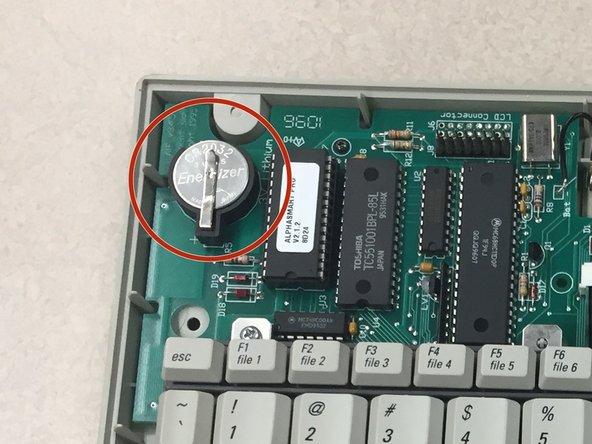
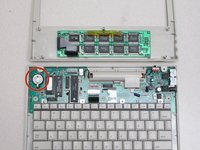
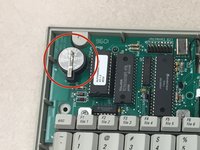
      • With the front panel removed, locate the lithium coin battery at the top left corner of the motherboard.

      crwdns2952109:0crwdne2952109:0

      crwdns2917038:0crwdne2917038:0

    4. AlphaSmart Pro Lithium Coin Battery Replacement, Remove Lithium Coin Battery: crwdns2935265:04crwdnd2935265:01crwdnd2935265:02crwdne2935265:0 AlphaSmart Pro Lithium Coin Battery Replacement, Remove Lithium Coin Battery: crwdns2935265:04crwdnd2935265:02crwdnd2935265:02crwdne2935265:0
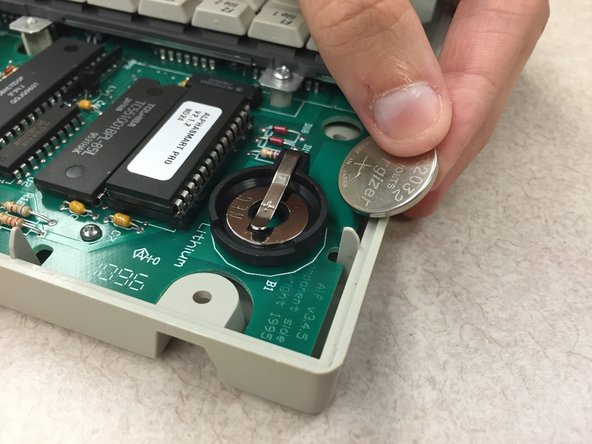
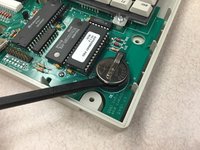
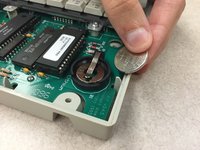
      • Use the spudger, plastic opening tool, or your finger/fingernail to lift up the lithium coin battery.

      • Slide the battery out from underneath the clip that holds it in place.

      • The positive side of the battery is facing up.

      crwdns2952109:0crwdne2952109:0

      crwdns2917038:0crwdne2917038:0

crwdns2915888:0crwdne2915888:0

To reassemble your device, follow these instructions in reverse order.

crwdns2935221:0crwdne2935221:0

Katy Beth Culp

crwdns2935283:010/13/14crwdne2935283:0

1 crwdns2915208:0crwdne2915208:0

crwdns2935297:02crwdne2935297:0

crwdns2935287:0crwdne2935287:0

Clemson, Team 1-1, Benson Fall 2014 crwdns2935289:0Clemson, Team 1-1, Benson Fall 2014crwdne2935289:0

CLEM-BENSON-F14S1G1

crwdns2931471:04crwdne2931471:0

crwdns2935297:096crwdne2935297:0

crwdns2947412:00crwdne2947412:0

crwdns2917038:0crwdne2917038:0

crwdns2936625:0crwdne2936625:0:

crwdns2936751:024crwdne2936751:0 3

crwdns2936753:07crwdne2936753:0 8

crwdns2936753:030crwdne2936753:0 50

crwdns2959996:0crwdne2959996:0 1,610