crwdns2933423:0crwdne2933423:0
crwdns2947577:0crwdnd2947577:0crwdne2947577:0

Alienware M15x Memory Modules Replacement

crwdns2942213:0crwdne2942213:0

    1. Alienware M15x Memory Modules Replacement, Turn the Computer: crwdns2935265:01crwdnd2935265:01crwdnd2935265:01crwdne2935265:0
      • WARNING: Before working inside your computer, read the safety information that shipped with your computer.

      • Turn the computer over.

      crwdns2952109:0crwdne2952109:0

      crwdns2917038:0crwdne2917038:0

    2. Alienware M15x Memory Modules Replacement, Sliding the Battery: crwdns2935265:02crwdnd2935265:01crwdnd2935265:01crwdne2935265:0
      • Slide the battery latch to the unlock position as shown.

      crwdns2952109:0crwdne2952109:0

      crwdns2917038:0crwdne2917038:0

    3. Alienware M15x Memory Modules Replacement, Removing the Battery Pack: crwdns2935265:03crwdnd2935265:01crwdnd2935265:01crwdne2935265:0
      • After the Battery Pack pops up, remove the Battery Pack.

      crwdns2952109:0crwdne2952109:0

      crwdns2917038:0crwdne2917038:0

    4. Alienware M15x Memory Modules Replacement, Aligning the Battery Pack Tabs: crwdns2935265:04crwdnd2935265:01crwdnd2935265:01crwdne2935265:0
      • Align the battery pack tabs with the slots in the battery bay.

      crwdns2952109:0crwdne2952109:0

      crwdns2917038:0crwdne2917038:0

    5. Alienware M15x Memory Modules Replacement, Pushing the Battery Pack: crwdns2935265:05crwdnd2935265:01crwdnd2935265:01crwdne2935265:0
      • Push the NEW battery pack into the battery bay until the battery pack clicks into place.

      crwdns2952109:0crwdne2952109:0

      crwdns2917038:0crwdne2917038:0

    1. Alienware M15x Memory Modules Replacement, Loosen the Screws: crwdns2935265:06crwdnd2935265:01crwdnd2935265:01crwdne2935265:0
      • WARNING: Before working inside your computer, read the safety information that shipped with your computer.

      • CAUTION: To avoid electrostatic discharge, ground yourself by using a wrist grounding strap or by periodically touching an unpainted metal surface (such as a connector on the back of the computer).

      • Loosen the two captive screws that secure the memory-module door to the computer base.

      crwdns2952109:0crwdne2952109:0

      crwdns2917038:0crwdne2917038:0

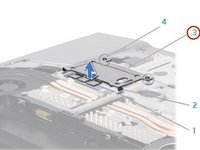
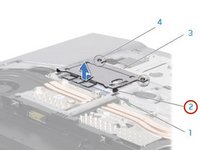
    2. Alienware M15x Memory Modules Replacement, Lifting the Memory Module Door: crwdns2935265:07crwdnd2935265:01crwdnd2935265:02crwdne2935265:0 Alienware M15x Memory Modules Replacement, Lifting the Memory Module Door: crwdns2935265:07crwdnd2935265:02crwdnd2935265:02crwdne2935265:0
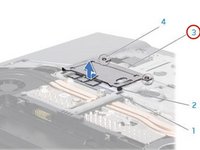
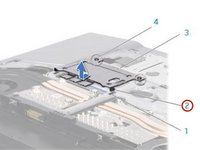
      • Slide the memory-module door to release the tabs and lift the memory-module door out of the computer base.

      crwdns2952109:0crwdne2952109:0

      crwdns2917038:0crwdne2917038:0

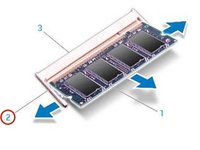
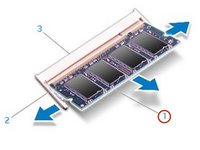
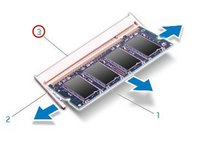
    3. Alienware M15x Memory Modules Replacement, Popping up the Memory Module: crwdns2935265:08crwdnd2935265:01crwdnd2935265:02crwdne2935265:0 Alienware M15x Memory Modules Replacement, Popping up the Memory Module: crwdns2935265:08crwdnd2935265:02crwdnd2935265:02crwdne2935265:0
      • CAUTION: If you need to remove memory modules from both connectors, remove the memory module in the upper connector before you remove the module in the lower connector.

      • CAUTION: To prevent damage to the memory module connector(s), do not use tools to spread the memory module spring-locks.

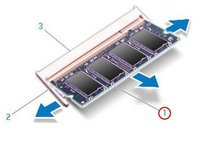
      • Use your fingertips to carefully spread apart the spring-locks on the memory-module connector until the memory module pops up.

      crwdns2952109:0crwdne2952109:0

      crwdns2917038:0crwdne2917038:0

    4. Alienware M15x Memory Modules Replacement, Remove the Memory Module: crwdns2935265:09crwdnd2935265:01crwdnd2935265:01crwdne2935265:0
      • Remove the memory module.

      crwdns2952109:0crwdne2952109:0

      crwdns2917038:0crwdne2917038:0

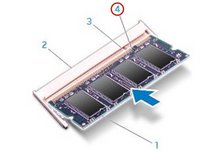
    5. Alienware M15x Memory Modules Replacement, Align the Notch: crwdns2935265:010crwdnd2935265:01crwdnd2935265:03crwdne2935265:0 Alienware M15x Memory Modules Replacement, Align the Notch: crwdns2935265:010crwdnd2935265:02crwdnd2935265:03crwdne2935265:0 Alienware M15x Memory Modules Replacement, Align the Notch: crwdns2935265:010crwdnd2935265:03crwdnd2935265:03crwdne2935265:0
      • Align the notch on the NEW memory module with the tab on the memory-module connector.

      crwdns2952109:0crwdne2952109:0

      crwdns2917038:0crwdne2917038:0

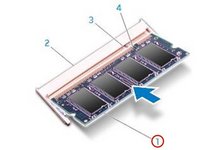
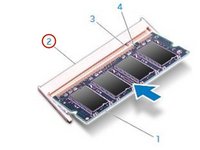
    6. Alienware M15x Memory Modules Replacement, Insert the Module: crwdns2935265:011crwdnd2935265:01crwdnd2935265:02crwdne2935265:0 Alienware M15x Memory Modules Replacement, Insert the Module: crwdns2935265:011crwdnd2935265:02crwdnd2935265:02crwdne2935265:0
      • Insert the module into the memory-module connector at a 45-degree angle, and press the memory module down until it clicks into place. If you do not hear the click, remove the module and reinstall it.

      crwdns2952109:0crwdne2952109:0

      crwdns2917038:0crwdne2917038:0

    7. Alienware M15x Memory Modules Replacement, Align and Insert the Memory Module Tabs: crwdns2935265:012crwdnd2935265:01crwdnd2935265:02crwdne2935265:0 Alienware M15x Memory Modules Replacement, Align and Insert the Memory Module Tabs: crwdns2935265:012crwdnd2935265:02crwdnd2935265:02crwdne2935265:0
      • CAUTION: If the memory-module door is difficult to close, remove the memory module and reinstall it. Forcing the memory-module door to close may damage your computer.

      • NOTE: If the memory module is not installed properly, the computer may not boot.

      • Align and insert the memory-module door tabs into the slots on the computer base.

      crwdns2952109:0crwdne2952109:0

      crwdns2917038:0crwdne2917038:0

    8. Alienware M15x Memory Modules Replacement, Replacing and Tightening the Screws: crwdns2935265:013crwdnd2935265:01crwdnd2935265:01crwdne2935265:0
      • Replace and tighten the two captive screws that secure the memory-module door to the computer base.

      crwdns2952109:0crwdne2952109:0

      crwdns2917038:0crwdne2917038:0

crwdns2915888:0crwdne2915888:0

To reassemble your device, follow these instructions in reverse order.

crwdns2935221:0crwdne2935221:0

Terrence15

crwdns2935283:012/18/17crwdne2935283:0

80,125 crwdns2915208:0crwdne2915208:0

crwdns2935297:0441crwdne2935297:0

crwdns2935287:0crwdne2935287:0

RampUP America, Inc. crwdns2935289:0RampUP America, Inc.crwdne2935289:0

Community

crwdns2931471:045crwdne2931471:0

crwdns2935297:012,235crwdne2935297:0

crwdns2947412:00crwdne2947412:0

crwdns2917038:0crwdne2917038:0

crwdns2936625:0crwdne2936625:0:

crwdns2936751:024crwdne2936751:0 0

crwdns2936753:07crwdne2936753:0 9

crwdns2936753:030crwdne2936753:0 30

crwdns2942667:0crwdne2942667:0 654