crwdns2933423:0crwdne2933423:0
crwdns2947577:0crwdnd2947577:0crwdne2947577:0

Alienware M11x Memory Module Replacement

crwdns2942213:0crwdne2942213:0

  1. Alienware M11x Memory Module Replacement, Introduction: crwdns2935265:01crwdnd2935265:01crwdnd2935265:01crwdne2935265:0
    • WARNING: Before working inside your computer, read the safety information that shipped with your computer.

    • CAUTION: To avoid electrostatic discharge, ground yourself by using a wrist grounding strap or by periodically touching an unpainted metal surface (such as a connector on your computer).

    crwdns2952109:0crwdne2952109:0

    crwdns2917038:0crwdne2917038:0

  2. Alienware M11x Memory Module Replacement, Removing the Memory Module: crwdns2935265:02crwdnd2935265:01crwdnd2935265:01crwdne2935265:0
    • CAUTION: To prevent damage to the memory module connector, do not use tools to spread the memory module securing clips.

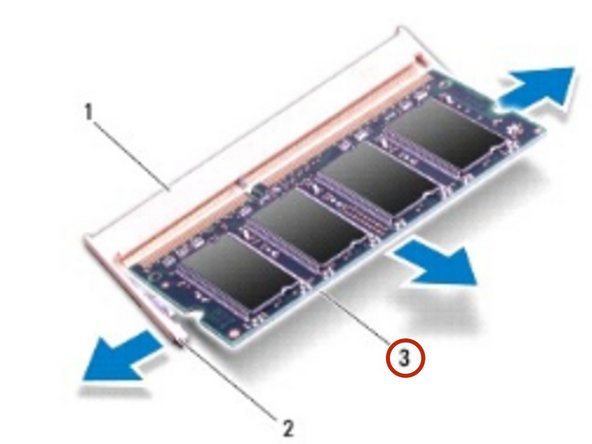
    • Use your fingertips to carefully spread apart the securing clips on each end of the memory module connector until the memory module pops up.

    crwdns2952109:0crwdne2952109:0

    crwdns2917038:0crwdne2917038:0

  3. Alienware M11x Memory Module Replacement, Removing the Memory Module: crwdns2935265:03crwdnd2935265:01crwdnd2935265:02crwdne2935265:0 Alienware M11x Memory Module Replacement, Removing the Memory Module: crwdns2935265:03crwdnd2935265:02crwdnd2935265:02crwdne2935265:0
    • Remove the memory module from the memory module connector.

    crwdns2952109:0crwdne2952109:0

    crwdns2917038:0crwdne2917038:0

  4. Alienware M11x Memory Module Replacement, Replacing the Memory Module: crwdns2935265:04crwdnd2935265:01crwdnd2935265:01crwdne2935265:0
    • NOTE: If you need to install memory modules in two connectors, install a memory module in the lower connector before you install a module in the upper connector

    • Align the notch in the NEW memory module with the tab in the memory module connector.

    crwdns2952109:0crwdne2952109:0

    crwdns2917038:0crwdne2917038:0

  5. Alienware M11x Memory Module Replacement, Installing the Memory Module: crwdns2935265:05crwdnd2935265:01crwdnd2935265:01crwdne2935265:0
    • Slide the memory module firmly into the slot at a 45-degree angle, and press the memory module down until it clicks into place. If you do not hear the click, remove the memory module and reinstall it.

    • NOTE: If the memory module is not installed properly, the computer may not boot.

    crwdns2952109:0crwdne2952109:0

    crwdns2917038:0crwdne2917038:0

crwdns2935217:0crwdne2935217:0

crwdns2935221:0crwdne2935221:0

crwdns2935229:02crwdne2935229:0

darrius

crwdns2935283:003/26/18crwdne2935283:0

5,213 crwdns2915208:0crwdne2915208:0

crwdns2935297:030crwdne2935297:0

crwdns2935287:0crwdne2935287:0

RampUP America, Inc. crwdns2935289:0RampUP America, Inc.crwdne2935289:0

Community

crwdns2931471:045crwdne2931471:0

crwdns2935297:02,002crwdne2935297:0

crwdns2947412:00crwdne2947412:0

crwdns2917038:0crwdne2917038:0

crwdns2936625:0crwdne2936625:0:

crwdns2936751:024crwdne2936751:0 1

crwdns2936753:07crwdne2936753:0 10

crwdns2936753:030crwdne2936753:0 48

crwdns2942667:0crwdne2942667:0 735