crwdns2915892:0crwdne2915892:0
If resetting your Alienware 15 R2 drivers fails to fix internet connectivity issues, you might need to replace the Wi-Fi card. Make sure the Wi-Fi card you are using as a replacement is compatible with the laptop. When working with computers, always make sure to unplug your computer and ground yourself before reaching inner components so you don’t accidentally release an electrical charge into the sensitive technology. The discharge could potentially damage your computer’s internals.
crwdns2942213:0crwdne2942213:0
-
-
Place laptop upside down with the hinge facing you, then remove the two 9mm Phillips #0 screws located in the center of the rear panel. Remove the rear panel by using the iFixit opening tool to separate it from the back of the laptop.
 crwdns2952109:0crwdne2952109:0
-
-
-
-
Use plastic opening tool to disconnect battery cable.
-
-
-
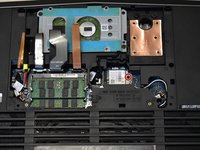
Remove the 6.0 mm Phillips #0 screw on the Wifi card. Disconnect the white and black wires, then slide the card out.
-



To reassemble your device, follow these instructions in reverse order.

crwdns2935287:0crwdne2935287:0

Western Carolina University, Team S1-G2, Virtue Fall 2019 crwdns2935289:0Western Carolina University, Team S1-G2, Virtue Fall 2019crwdne2935289:0
WCU-VIRTUE-F19S1G2
crwdns2931471:04crwdne2931471:0
crwdns2935297:07crwdne2935297:0
