crwdns2933423:0crwdne2933423:0
crwdns2947577:0crwdnd2947577:0crwdne2947577:0

Alcatel Pop 4 Plus Power/Volume Button Rocker Replacement

crwdns2942213:0crwdne2942213:0

    1. Alcatel Pop 4 Plus Power/Volume Button Rocker  Replacement, Power/Volume Button Rocker Replacement: crwdns2935265:01crwdnd2935265:01crwdnd2935265:02crwdne2935265:0 Alcatel Pop 4 Plus Power/Volume Button Rocker  Replacement, Power/Volume Button Rocker Replacement: crwdns2935265:01crwdnd2935265:02crwdnd2935265:02crwdne2935265:0
      • Begin by removing the back of the phone. Press your nail or a thin object in the bottom right-hand corner of the phone and gently press to release the back of the phone from the front.

      crwdns2952109:0crwdne2952109:0

      crwdns2917038:0crwdne2917038:0

    2. Alcatel Pop 4 Plus Power/Volume Button Rocker  Replacement: crwdns2935265:02crwdnd2935265:01crwdnd2935265:02crwdne2935265:0 Alcatel Pop 4 Plus Power/Volume Button Rocker  Replacement: crwdns2935265:02crwdnd2935265:02crwdnd2935265:02crwdne2935265:0
      • Once removed completely, use the back portion to disassemble the Power/Volume Button Rocker.

      crwdns2952109:0crwdne2952109:0

      crwdns2917038:0crwdne2917038:0

    3. Alcatel Pop 4 Plus Power/Volume Button Rocker  Replacement: crwdns2935265:03crwdnd2935265:01crwdnd2935265:01crwdne2935265:0
      crwdns2935267:0crwdne2935267:0
      Tweezers
      $4.99
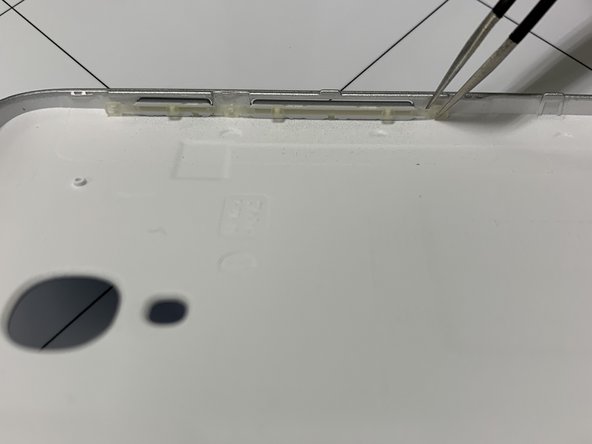
      • Remove the middle insert of the elastic on the Power/Volume button rocker with tweezers.

      crwdns2952109:0crwdne2952109:0

      crwdns2917038:0crwdne2917038:0

    4. Alcatel Pop 4 Plus Power/Volume Button Rocker  Replacement: crwdns2935265:04crwdnd2935265:01crwdnd2935265:03crwdne2935265:0 Alcatel Pop 4 Plus Power/Volume Button Rocker  Replacement: crwdns2935265:04crwdnd2935265:02crwdnd2935265:03crwdne2935265:0 Alcatel Pop 4 Plus Power/Volume Button Rocker  Replacement: crwdns2935265:04crwdnd2935265:03crwdnd2935265:03crwdne2935265:0
      • Remove the 3 elastic bands holding the rocker in place with tweezers.

      crwdns2952109:0crwdne2952109:0

      crwdns2917038:0crwdne2917038:0

    5. Alcatel Pop 4 Plus Power/Volume Button Rocker  Replacement: crwdns2935265:05crwdnd2935265:01crwdnd2935265:01crwdne2935265:0
      • Once removed, place new rocker in same elastic slots. Follow instructions backwards to reassemble.

      crwdns2952109:0crwdne2952109:0

      crwdns2917038:0crwdne2917038:0

crwdns2915888:0crwdne2915888:0

To reassemble your device, follow these instructions in reverse order.

crwdns2935221:0crwdne2935221:0

Anna Gongre

crwdns2935283:009/20/19crwdne2935283:0

319 crwdns2915208:0crwdne2915208:0

crwdns2935297:02crwdne2935297:0

crwdns2935287:0crwdne2935287:0

University of North Alabama, Team S1-G5, Winner Fall 2019 crwdns2935289:0University of North Alabama, Team S1-G5, Winner Fall 2019crwdne2935289:0

UNA-WINNER-F19S1G5

crwdns2931471:03crwdne2931471:0

crwdns2935297:036crwdne2935297:0

crwdns2947412:00crwdne2947412:0

crwdns2917038:0crwdne2917038:0

crwdns2936625:0crwdne2936625:0:

crwdns2936751:024crwdne2936751:0 0

crwdns2936753:07crwdne2936753:0 7

crwdns2936753:030crwdne2936753:0 30

crwdns2942667:0crwdne2942667:0 589