crwdns2915892:0crwdne2915892:0
Sim cards are a pivotal component in a cellular phone and affect almost every software function. It is often called the ‘smart card’ because it hold all information about the phone, network authorization, and personal data. Unfortunately these cards can malfunction or can be deactivated by your provider. In these cases, you must be able to access the card. The following guide will provide you with the information to easily do this yourself.
crwdns2942213:0crwdne2942213:0
-
-
-
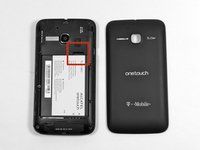
This will be an opening with enough space to insert the flat head of the plastic opening tool.
-
It will be located on the bottom right of the phone
 crwdns2952109:0crwdne2952109:0
-
-
-
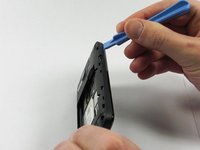
Rotate the pry tool 90 degrees until the panel lifts up.
-
With your thumb nail, lift the rest of the panel up around the perimeter of the phone.
-
-
-
-
-
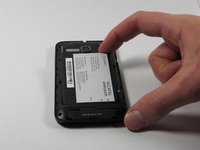
This is the battery for the Alcatel One Touch Evolve. Look for this component when the back panel has been removed.
-
-
-
-
Place finger in the tab on the top right corner of the battery indicated by a black arrow. With slight pressure, push battery down and out of the slot until the battery is removed
-
-
-
-
-
There will be eight 4.5mm screws that fit your Phillips head PH00 screwdriver notated by the red circles in the image.
-
-
crwdns2935267:0crwdne2935267:0Tweezers$4.99
-
Unscrew each screw, counter-clockwise (left), until each one has been removed.
-
If necessary, use tweezers to fully remove the screws from the device.
-
-
-
Access the small pry tool in the tool kit
-
Place flat head in the crease between the phone and panel where the matte finish meets the shiny finish of the front of the phone.
-
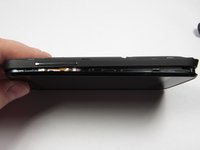
Rotate the pry tool 90 degrees until part of the panel lifts up
-
All areas need to be fully risen off before the panel can be removed.
-
-
-
-
-
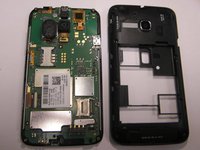
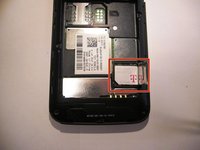
The SIM card is located below the battery in an easy to access location.
-
If there is currently no SIM card in the phone, it will be a blank area
-
-
crwdns2935267:0crwdne2935267:0Tweezers$4.99
-
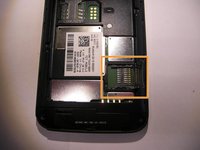
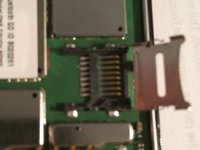
The SIM card is encased in a housing unit. In order to remove it, push left as written on the metal housing cover and it will snap loose and be able to be risen.
-
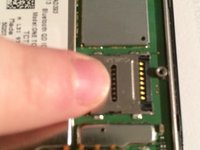
Place finger on metal housing. While applying a downward force, push the finger in the direction towards the edge of the phone. An arrow also indicated this direction
-
This housing case top will be on a hinge system. Put this top in the upper position and remove card with finger tips, or if necessary, tweezers.
-
-








To reassemble your device, follow these instructions in reverse order.
crwdns2935221:0crwdne2935221:0
crwdns2935229:09crwdne2935229:0

crwdns2935287:0crwdne2935287:0

UMass Dartmouth, Team 4-5, Miles Fall 2014 crwdns2935289:0UMass Dartmouth, Team 4-5, Miles Fall 2014crwdne2935289:0
UMASSD-MILES-F14S4G5
crwdns2931471:03crwdne2931471:0
crwdns2935297:072crwdne2935297:0
crwdns2947412:04crwdne2947412:0
Easy to follow. Great help. Thank you!
cathyf48 - crwdns2934203:0crwdne2934203:0 crwdns2950251:0crwdne2950251:0
Which simcard can I use for Alcatel one touch Wi-Fi in kenya?
james wangwa - crwdns2934203:0crwdne2934203:0 crwdns2950251:0crwdne2950251:0
Which sim card can I use for Alcatel one touch Wi-Fi in kenya?
james wangwa - crwdns2934203:0crwdne2934203:0 crwdns2950251:0crwdne2950251:0
Thank you very much. I thought it has an inbuilt SIM at first. Some of this Model have six screw.
JAMES OBIA - crwdns2934203:0crwdne2934203:0 crwdns2950251:0crwdne2950251:0
