
Akai MPK25 Keys Replacement

crwdns2959932:0crwdnd2959932:0Will Sabacrwdnd2959932:0crwdnd2959932:0crwdnd2959932:05crwdnd2959932:0crwdne2959932:0
crwdns2959936:0Maw 22, 2015crwdne2959936:0
crwdns2869540:0crwdne2869540:0: 12K
crwdns2959988:0crwdne2959988:0
- crwdns2959990:0crwdne2959990:0
- 4
- crwdns2959992:0crwdne2959992:0
- 31
- crwdns2959994:0crwdne2959994:0
- 145
- crwdns2959996:0crwdne2959996:0
- 12,260
crwdns2955950:0crwdne2955950:0: 2
crwdns2960004:02crwdne2960004:0.
crwdns2959984:0crwdne2959984:0: 7 8
crwdns2959974:07crwdne2959974:0
crwdns2959970:08crwdne2959970:0
crwdns2959986:0crwdne2959986:0: 2 3
crwdns2959982:02crwdne2959982:0
crwdns2959978:03crwdne2959978:0
crwdns2862591:0crwdne2862591:0
crwdns2862592:0crwdne2862592:0
crwdns2915892:0crwdne2915892:0
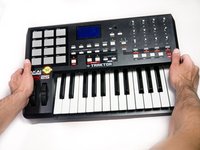
crwdns2959928:0crwdne2959928:0 ↓Use this guide if any of the keys are broken, chipped, or stuck.
crwdns2959930:0crwdne2959930:0
crwdns2943213:0crwdne2943213:0
crwdns2943215:0crwdne2943215:0


-
-
-
Remove all the selector knob covers by pulling them off.
 crwdns2952109:0crwdne2952109:0
-
-
-
Using needle nose pliers, remove the washers from the four corner selector knobs.
-
-
-
Flip the device over. Using a Philips #2 screw driver, remove the fourteen 10.3 mm black screws holding the back panel in place.
-
-
-
Carefully flip the device to the front making sure you secure the face plate and the chassis together.
-
-
-
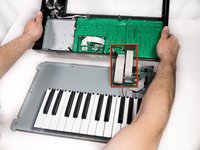
Rotate the device 180 degrees and carefully remove the face plate by slightly lifting the screen side towards you and then sliding the bottom out from under the keys.
-
-
-
-
-
-
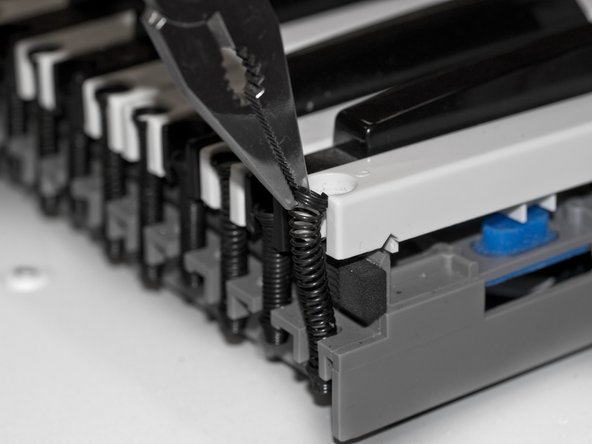
Using needle nose pliers, grip the top of the spring coil, that is holding down the key, and gently lift the spring away from the key.
-
-
-
Lift the key from the front of the keyboard towards the back in order to remove it completely.
-
-







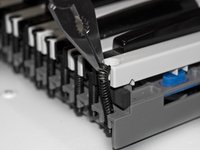

To reassemble the keyboard and close up the case, follow these instructions in reverse order.
crwdns2935221:0crwdne2935221:0
crwdns2935229:07crwdne2935229:0

crwdns2935287:0crwdne2935287:0

Cal Poly, Team 20-6, Maness Winter 2013 crwdns2935289:0Cal Poly, Team 20-6, Maness Winter 2013crwdne2935289:0
CPSU-MANESS-W13S20G6
crwdns2931471:05crwdne2931471:0
crwdns2935297:072crwdne2935297:0
