crwdns2933423:0crwdne2933423:0
crwdns2947577:0crwdnd2947577:0crwdne2947577:0

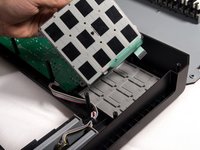
Akai MPK25 Beat Pad Replacement

crwdns2942213:0crwdne2942213:0

  1. Akai MPK25 Beat Pad Replacement, Face Plate: crwdns2935265:01crwdnd2935265:01crwdnd2935265:01crwdne2935265:0
    • Remove all the selector knob covers by pulling them off.

    crwdns2952109:0crwdne2952109:0
  2. Akai MPK25 Beat Pad Replacement: crwdns2935265:02crwdnd2935265:01crwdnd2935265:01crwdne2935265:0
    • Using needle nose pliers, remove the washers from the four corner selector knobs.

    crwdns2952109:0crwdne2952109:0
  3. Akai MPK25 Beat Pad Replacement: crwdns2935265:03crwdnd2935265:01crwdnd2935265:01crwdne2935265:0
    • Flip the device over. Using a Philips #2 screw driver, remove the fourteen 10.3 mm black screws holding the back panel in place.

    crwdns2952109:0crwdne2952109:0
  4. Akai MPK25 Beat Pad Replacement: crwdns2935265:04crwdnd2935265:01crwdnd2935265:03crwdne2935265:0 Akai MPK25 Beat Pad Replacement: crwdns2935265:04crwdnd2935265:02crwdnd2935265:03crwdne2935265:0 Akai MPK25 Beat Pad Replacement: crwdns2935265:04crwdnd2935265:03crwdnd2935265:03crwdne2935265:0
    • Carefully flip the device to the front making sure you secure the face plate and the chassis together.

    • Please use care in following the step above to avoid ripping the ribbon cables connecting the two sides.

    crwdns2952109:0crwdne2952109:0
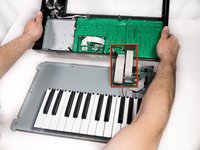
  5. Akai MPK25 Beat Pad Replacement: crwdns2935265:05crwdnd2935265:01crwdnd2935265:03crwdne2935265:0 Akai MPK25 Beat Pad Replacement: crwdns2935265:05crwdnd2935265:02crwdnd2935265:03crwdne2935265:0 Akai MPK25 Beat Pad Replacement: crwdns2935265:05crwdnd2935265:03crwdnd2935265:03crwdne2935265:0
    • Rotate the device 180 degrees and carefully remove the face plate by slightly lifting the screen side towards you and then sliding the bottom out from under the keys.

    • Use care when doing the step above so that the ribbon connectors which connect the top of the chassis to the top of the face plate are not damaged.

    crwdns2952109:0crwdne2952109:0
  6. Akai MPK25 Beat Pad Replacement, Beat Pad: crwdns2935265:06crwdnd2935265:01crwdnd2935265:01crwdne2935265:0
    • Using a Phillips #2 screwdriver, remove the thirteen 9.8 mm silver screws holding the mother board to the face plate.

    crwdns2952109:0crwdne2952109:0
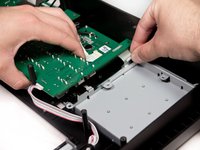
  7. Akai MPK25 Beat Pad Replacement: crwdns2935265:07crwdnd2935265:01crwdnd2935265:01crwdne2935265:0
    • Using a Phillips #2 screwdriver, remove the four 9.8mm screws holding in the base of the beat pad.

    crwdns2952109:0crwdne2952109:0
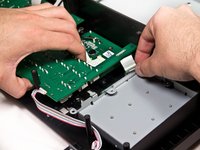
  8. Akai MPK25 Beat Pad Replacement: crwdns2935265:08crwdnd2935265:01crwdnd2935265:02crwdne2935265:0 Akai MPK25 Beat Pad Replacement: crwdns2935265:08crwdnd2935265:02crwdnd2935265:02crwdne2935265:0
    • Slightly lift the mother board near the edge of the beat pads and wiggle the beat pad ribbon connector free.

    crwdns2952109:0crwdne2952109:0
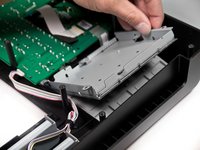
  9. Akai MPK25 Beat Pad Replacement: crwdns2935265:09crwdnd2935265:01crwdnd2935265:02crwdne2935265:0 Akai MPK25 Beat Pad Replacement: crwdns2935265:09crwdnd2935265:02crwdnd2935265:02crwdne2935265:0
    • Remove the beat pad sensor from the face plate.

    crwdns2952109:0crwdne2952109:0
crwdns2915888:0crwdne2915888:0

To reassemble your device, follow these instructions in reverse order.

Serbinder Singh

crwdns2935283:001/30/13crwdne2935283:0

81 crwdns2915208:0crwdne2915208:0

crwdns2935297:03crwdne2935297:0

crwdns2935287:0crwdne2935287:0

Cal Poly, Team 20-6, Maness Winter 2013 crwdns2935289:0Cal Poly, Team 20-6, Maness Winter 2013crwdne2935289:0

CPSU-MANESS-W13S20G6

crwdns2931471:05crwdne2931471:0

crwdns2935297:06crwdne2935297:0

crwdns2947412:00crwdne2947412:0

crwdns2917038:0crwdne2917038:0

crwdns2936625:0crwdne2936625:0:

crwdns2936751:024crwdne2936751:0 0

crwdns2936753:07crwdne2936753:0 11

crwdns2936753:030crwdne2936753:0 87

crwdns2942667:0crwdne2942667:0 4,547