crwdns2933423:0crwdne2933423:0
crwdns2947577:0crwdnd2947577:0crwdne2947577:0

Acer Extensa 4420 Back Panel Replacement

crwdns2942213:0crwdne2942213:0

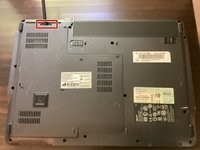
    1. Acer Extensa 4420 Back Panel Replacement, Battery: crwdns2935265:01crwdnd2935265:01crwdnd2935265:02crwdne2935265:0 Acer Extensa 4420 Back Panel Replacement, Battery: crwdns2935265:01crwdnd2935265:02crwdnd2935265:02crwdne2935265:0
      • First, make sure that the battery lock is turned off.

      • The battery lock makes it so the battery doesn't accidentally fall out of your computer while it is running.

      crwdns2952109:0crwdne2952109:0

      crwdns2917038:0crwdne2917038:0

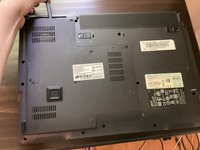
    2. Acer Extensa 4420 Back Panel Replacement: crwdns2935265:02crwdnd2935265:01crwdnd2935265:03crwdne2935265:0 Acer Extensa 4420 Back Panel Replacement: crwdns2935265:02crwdnd2935265:02crwdnd2935265:03crwdne2935265:0 Acer Extensa 4420 Back Panel Replacement: crwdns2935265:02crwdnd2935265:03crwdnd2935265:03crwdne2935265:0
      • Then, slide the other battery lock while pulling the battery out.

      crwdns2952109:0crwdne2952109:0

      crwdns2917038:0crwdne2917038:0

    1. Acer Extensa 4420 Back Panel Replacement, Back Panel: crwdns2935265:03crwdnd2935265:01crwdnd2935265:01crwdne2935265:0
      crwdns2935267:0crwdne2935267:0
      Phillips #00 Screwdriver
      $5.49
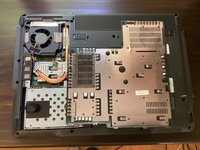
      • Unscrew all five screws on the back panel with a Phillips #00 screwdriver

      • The screws will stay in the back panel, so when you remove it, you don't have to worry about organizing the screws.

      crwdns2952109:0crwdne2952109:0

      crwdns2917038:0crwdne2917038:0

    2. Acer Extensa 4420 Back Panel Replacement: crwdns2935265:04crwdnd2935265:01crwdnd2935265:03crwdne2935265:0 Acer Extensa 4420 Back Panel Replacement: crwdns2935265:04crwdnd2935265:02crwdnd2935265:03crwdne2935265:0 Acer Extensa 4420 Back Panel Replacement: crwdns2935265:04crwdnd2935265:03crwdnd2935265:03crwdne2935265:0
      crwdns2935267:0crwdne2935267:0
      Spudger
      $3.99
      • Take a spudger and start to pry open the back panel. Finish prying it open with your hands.

      • Be extra careful and try not to break any clips in this process.

      crwdns2952109:0crwdne2952109:0

      crwdns2917038:0crwdne2917038:0

crwdns2915888:0crwdne2915888:0

To reassemble your device, follow these instructions in reverse order.

crwdns2935221:0crwdne2935221:0

TheMasterG

crwdns2935283:007/19/24crwdne2935283:0

1,430 crwdns2915208:0crwdne2915208:0

crwdns2935297:012crwdne2935297:0

crwdns2947412:00crwdne2947412:0

crwdns2917038:0crwdne2917038:0

crwdns2936625:0crwdne2936625:0:

crwdns2936751:024crwdne2936751:0 0

crwdns2936753:07crwdne2936753:0 8

crwdns2936753:030crwdne2936753:0 21

crwdns2942667:0crwdne2942667:0 262