crwdns2933423:0crwdne2933423:0
crwdns2947577:0crwdnd2947577:0crwdne2947577:0

Acer Aspire One D255E Keyboard Replacement

crwdns2942213:0crwdne2942213:0

    1. Acer Aspire One D255E Keyboard Replacement, Keyboard: crwdns2935265:01crwdnd2935265:01crwdnd2935265:01crwdne2935265:0
      • Start by removing the battery found on the back of the device.

      • The battery must be removed in order to ensure the device does not have power! Make sure you do not skip this step!

      crwdns2952109:0crwdne2952109:0

      crwdns2917038:0crwdne2917038:0

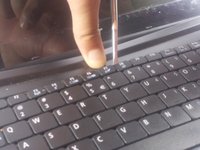
    2. Acer Aspire One D255E Keyboard Replacement: crwdns2935265:02crwdnd2935265:01crwdnd2935265:02crwdne2935265:0 Acer Aspire One D255E Keyboard Replacement: crwdns2935265:02crwdnd2935265:02crwdnd2935265:02crwdne2935265:0
      • Using plastic opening tools press down the 6 clips located around the keyboard.

      crwdns2952109:0crwdne2952109:0

      crwdns2917038:0crwdne2917038:0

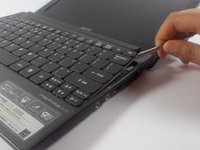
    3. Acer Aspire One D255E Keyboard Replacement: crwdns2935265:03crwdnd2935265:01crwdnd2935265:03crwdne2935265:0 Acer Aspire One D255E Keyboard Replacement: crwdns2935265:03crwdnd2935265:02crwdnd2935265:03crwdne2935265:0 Acer Aspire One D255E Keyboard Replacement: crwdns2935265:03crwdnd2935265:03crwdnd2935265:03crwdne2935265:0
      • Using a plastic opening tool or spudger move the keyboard out of position.

      • There is a thin cable on the backside of the keyboard. Make sure when you move the keyboard out of position you do so slowly to prevent damage to this cable.

      • If you use a spudger it is recommended that you use a plastic spudger to reduce the chance of damaging any internal parts.

      crwdns2952109:0crwdne2952109:0

      crwdns2917038:0crwdne2917038:0

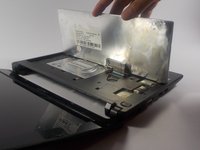
    4. Acer Aspire One D255E Keyboard Replacement: crwdns2935265:04crwdnd2935265:01crwdnd2935265:01crwdne2935265:0
      • Using a spudger gently push the tab on the port forward then pull out the cable.

      • Be careful to do so as gently as possible. You do not want to damage the port.

      crwdns2952109:0crwdne2952109:0

      crwdns2917038:0crwdne2917038:0

crwdns2915888:0crwdne2915888:0

To reassemble your device, follow these instructions in reverse order.

crwdns2935221:0crwdne2935221:0

crwdns2935229:03crwdne2935229:0

Brian

crwdns2935283:003/19/16crwdne2935283:0

1 329 crwdns2915208:0crwdne2915208:0

crwdns2935297:05crwdne2935297:0

crwdns2935287:0crwdne2935287:0

UMass Dartmouth, Team 16-8, Bhusal Spring 2016 crwdns2935289:0UMass Dartmouth, Team 16-8, Bhusal Spring 2016crwdne2935289:0

UMASSD-BHUSAL-S16S16G8

crwdns2931471:02crwdne2931471:0

crwdns2935297:059crwdne2935297:0

crwdns2947412:00crwdne2947412:0

crwdns2917038:0crwdne2917038:0

crwdns2936625:0crwdne2936625:0:

crwdns2936751:024crwdne2936751:0 3

crwdns2936753:07crwdne2936753:0 31

crwdns2936753:030crwdne2936753:0 82

crwdns2942667:0crwdne2942667:0 3,020