crwdns2933423:0crwdne2933423:0
crwdns2947577:0crwdnd2947577:0crwdne2947577:0

ASUS X44H-BBR4 Fan Replacement

crwdns2942213:0crwdne2942213:0

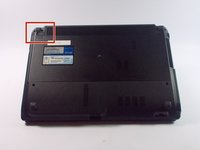
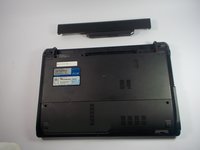
    1. ASUS X44H-BBR4 Fan Replacement, Battery: crwdns2935265:01crwdnd2935265:01crwdnd2935265:02crwdne2935265:0 ASUS X44H-BBR4 Fan Replacement, Battery: crwdns2935265:01crwdnd2935265:02crwdnd2935265:02crwdne2935265:0
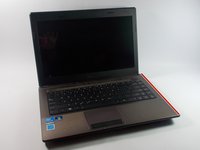
      • Flip the device over.

      crwdns2952109:0crwdne2952109:0

      crwdns2917038:0crwdne2917038:0

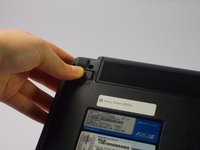
    2. ASUS X44H-BBR4 Fan Replacement: crwdns2935265:02crwdnd2935265:01crwdnd2935265:03crwdne2935265:0 ASUS X44H-BBR4 Fan Replacement: crwdns2935265:02crwdnd2935265:02crwdnd2935265:03crwdne2935265:0 ASUS X44H-BBR4 Fan Replacement: crwdns2935265:02crwdnd2935265:03crwdnd2935265:03crwdne2935265:0
      • Slide the right lock button to the unlock position.

      • After it is unlocked, a red line will be visible.

      crwdns2952109:0crwdne2952109:0

      crwdns2917038:0crwdne2917038:0

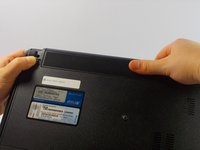
    3. ASUS X44H-BBR4 Fan Replacement: crwdns2935265:03crwdnd2935265:01crwdnd2935265:02crwdne2935265:0 ASUS X44H-BBR4 Fan Replacement: crwdns2935265:03crwdnd2935265:02crwdnd2935265:02crwdne2935265:0
      • Slide the left lock button into the unlock position and hold.

      crwdns2952109:0crwdne2952109:0

      crwdns2917038:0crwdne2917038:0

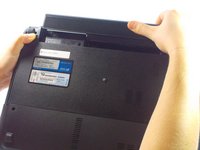
    4. ASUS X44H-BBR4 Fan Replacement: crwdns2935265:04crwdnd2935265:01crwdnd2935265:03crwdne2935265:0 ASUS X44H-BBR4 Fan Replacement: crwdns2935265:04crwdnd2935265:02crwdnd2935265:03crwdne2935265:0 ASUS X44H-BBR4 Fan Replacement: crwdns2935265:04crwdnd2935265:03crwdnd2935265:03crwdne2935265:0
      • While holding the left lock button in the unlock position, push the battery from the center away from you.

      crwdns2952109:0crwdne2952109:0

      crwdns2917038:0crwdne2917038:0

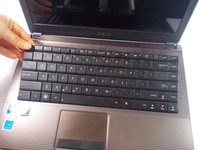
    1. ASUS X44H-BBR4 Fan Replacement, Keyboard: crwdns2935265:05crwdnd2935265:01crwdnd2935265:02crwdne2935265:0 ASUS X44H-BBR4 Fan Replacement, Keyboard: crwdns2935265:05crwdnd2935265:02crwdnd2935265:02crwdne2935265:0
      • Open the laptop to show the keyboard.

      crwdns2952109:0crwdne2952109:0

      crwdns2917038:0crwdne2917038:0

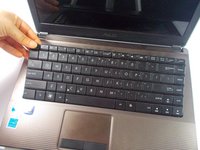
    2. ASUS X44H-BBR4 Fan Replacement: crwdns2935265:06crwdnd2935265:01crwdnd2935265:01crwdne2935265:0
      • Look at the top row of the keyboard, you will see a space that has four latches holding the keyboard down.

      • The latches are located above the Esc key, the F5 key, between the F10 and F11 key and the Delete key.

      crwdns2952109:0crwdne2952109:0

      crwdns2917038:0crwdne2917038:0

    3. ASUS X44H-BBR4 Fan Replacement: crwdns2935265:07crwdnd2935265:01crwdnd2935265:03crwdne2935265:0 ASUS X44H-BBR4 Fan Replacement: crwdns2935265:07crwdnd2935265:02crwdnd2935265:03crwdne2935265:0 ASUS X44H-BBR4 Fan Replacement: crwdns2935265:07crwdnd2935265:03crwdnd2935265:03crwdne2935265:0
      • Don't pull too hard on the keys otherwise they may fall off.

      • Push the latch away from the keyboard using the spudger point.

      • While pushing the latches use a plastic opening tool and pull up on a key near it.

      • Continue along the rest of the keyboard until it is released at all four latches.

      crwdns2952109:0crwdne2952109:0

      crwdns2917038:0crwdne2917038:0

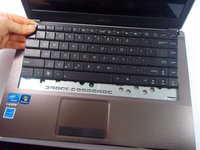
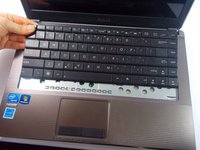
    4. ASUS X44H-BBR4 Fan Replacement: crwdns2935265:08crwdnd2935265:01crwdnd2935265:02crwdne2935265:0 ASUS X44H-BBR4 Fan Replacement: crwdns2935265:08crwdnd2935265:02crwdnd2935265:02crwdne2935265:0
      • Push the keyboard away from the mouse track pad to unlock the bottom from the base.

      • Do not pull too hard because there is a ribbon connecting to keyboard to the motherboard.

      crwdns2952109:0crwdne2952109:0

      crwdns2917038:0crwdne2917038:0

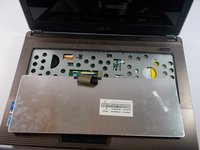
    5. ASUS X44H-BBR4 Fan Replacement: crwdns2935265:09crwdnd2935265:01crwdnd2935265:02crwdne2935265:0 ASUS X44H-BBR4 Fan Replacement: crwdns2935265:09crwdnd2935265:02crwdnd2935265:02crwdne2935265:0
      • Flip the keyboard over to reveal the back of it and what is underneath.

      crwdns2952109:0crwdne2952109:0

      crwdns2917038:0crwdne2917038:0

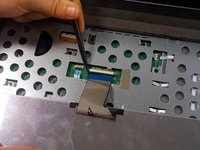
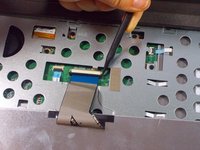
    6. ASUS X44H-BBR4 Fan Replacement: crwdns2935265:010crwdnd2935265:01crwdnd2935265:03crwdne2935265:0 ASUS X44H-BBR4 Fan Replacement: crwdns2935265:010crwdnd2935265:02crwdnd2935265:03crwdne2935265:0 ASUS X44H-BBR4 Fan Replacement: crwdns2935265:010crwdnd2935265:03crwdnd2935265:03crwdne2935265:0
      • Pull each end of the black ribbon cable piece towards the mouse track pad to unlock the ribbon connector piece.

      • Gently pull out the ribbon cable from the connector piece.

      crwdns2952109:0crwdne2952109:0

      crwdns2917038:0crwdne2917038:0

    7. ASUS X44H-BBR4 Fan Replacement: crwdns2935265:011crwdnd2935265:01crwdnd2935265:01crwdne2935265:0
      • Remove the keyboard completely.

      crwdns2952109:0crwdne2952109:0

      crwdns2917038:0crwdne2917038:0

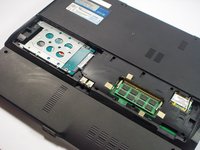
    1. ASUS X44H-BBR4 Fan Replacement, Hard Drive: crwdns2935265:012crwdnd2935265:01crwdnd2935265:02crwdne2935265:0 ASUS X44H-BBR4 Fan Replacement, Hard Drive: crwdns2935265:012crwdnd2935265:02crwdnd2935265:02crwdne2935265:0
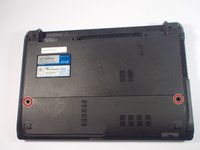
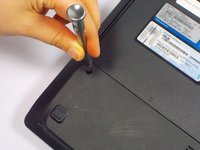
      • Remove the two 9 mm Phillips head screws with the PH0 bit indicated by the red circles in the picture.

      crwdns2952109:0crwdne2952109:0

      crwdns2917038:0crwdne2917038:0

    2. ASUS X44H-BBR4 Fan Replacement: crwdns2935265:013crwdnd2935265:01crwdnd2935265:02crwdne2935265:0 ASUS X44H-BBR4 Fan Replacement: crwdns2935265:013crwdnd2935265:02crwdnd2935265:02crwdne2935265:0
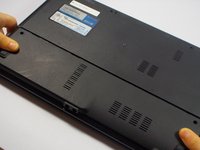
      • Once the screws are removed, slide the back panel away from the computer.

      crwdns2952109:0crwdne2952109:0

      crwdns2917038:0crwdne2917038:0

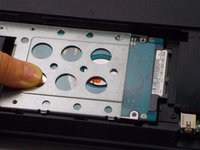
    3. ASUS X44H-BBR4 Fan Replacement: crwdns2935265:014crwdnd2935265:01crwdnd2935265:01crwdne2935265:0
      • Remove the 9mm Phillips head screw in the left bottom corner of the hard drive with the PH0 bit.

      crwdns2952109:0crwdne2952109:0

      crwdns2917038:0crwdne2917038:0

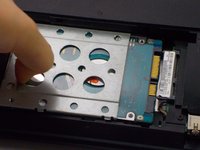
    4. ASUS X44H-BBR4 Fan Replacement: crwdns2935265:015crwdnd2935265:01crwdnd2935265:02crwdne2935265:0 ASUS X44H-BBR4 Fan Replacement: crwdns2935265:015crwdnd2935265:02crwdnd2935265:02crwdne2935265:0
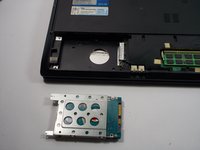
      • Slide the hard drive to the left, unlocking it from its default position.

      crwdns2952109:0crwdne2952109:0

      crwdns2917038:0crwdne2917038:0

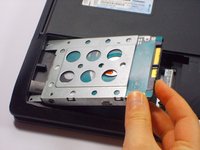
    5. ASUS X44H-BBR4 Fan Replacement: crwdns2935265:016crwdnd2935265:01crwdnd2935265:02crwdne2935265:0 ASUS X44H-BBR4 Fan Replacement: crwdns2935265:016crwdnd2935265:02crwdnd2935265:02crwdne2935265:0
      • Pull the hard drive upwards and take it out of its position.

      crwdns2952109:0crwdne2952109:0

      crwdns2917038:0crwdne2917038:0

    6. ASUS X44H-BBR4 Fan Replacement: crwdns2935265:017crwdnd2935265:01crwdnd2935265:03crwdne2935265:0 ASUS X44H-BBR4 Fan Replacement: crwdns2935265:017crwdnd2935265:02crwdnd2935265:03crwdne2935265:0 ASUS X44H-BBR4 Fan Replacement: crwdns2935265:017crwdnd2935265:03crwdnd2935265:03crwdne2935265:0
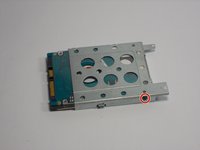
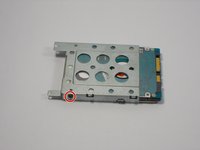
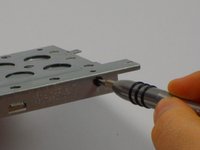
      • Remove two 3mm Phillips head screws, one located on each side of the metal casing holding the hard drive using the PH0 bit.

      crwdns2952109:0crwdne2952109:0

      crwdns2917038:0crwdne2917038:0

    7. ASUS X44H-BBR4 Fan Replacement: crwdns2935265:018crwdnd2935265:01crwdnd2935265:01crwdne2935265:0
      • Pull upwards on the metal casing and it will come off.

      crwdns2952109:0crwdne2952109:0

      crwdns2917038:0crwdne2917038:0

    1. ASUS X44H-BBR4 Fan Replacement, Front Panel: crwdns2935265:019crwdnd2935265:01crwdnd2935265:03crwdne2935265:0 ASUS X44H-BBR4 Fan Replacement, Front Panel: crwdns2935265:019crwdnd2935265:02crwdnd2935265:03crwdne2935265:0 ASUS X44H-BBR4 Fan Replacement, Front Panel: crwdns2935265:019crwdnd2935265:03crwdnd2935265:03crwdne2935265:0
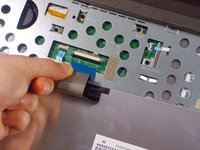
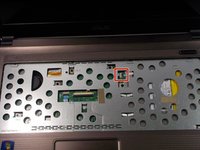
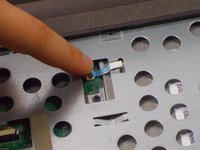
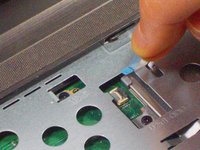
      • Lift up the black lock holding the ribbon.

      • Using the blue tab, pull out the ribbon.

      • Pull gently on the ribbon to remove the risk of damaging the ribbon.

      crwdns2952109:0crwdne2952109:0

      crwdns2917038:0crwdne2917038:0

    2. ASUS X44H-BBR4 Fan Replacement: crwdns2935265:020crwdnd2935265:01crwdnd2935265:01crwdne2935265:0
      • Lift up the black lock holding the ribbon.

      • Using the blue tab, pull out the ribbon.

      • Pull gently on the ribbon to remove the risk of damaging the ribbon.

      crwdns2952109:0crwdne2952109:0

      crwdns2917038:0crwdne2917038:0

    3. ASUS X44H-BBR4 Fan Replacement: crwdns2935265:021crwdnd2935265:01crwdnd2935265:02crwdne2935265:0 ASUS X44H-BBR4 Fan Replacement: crwdns2935265:021crwdnd2935265:02crwdnd2935265:02crwdne2935265:0
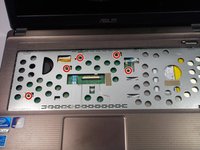
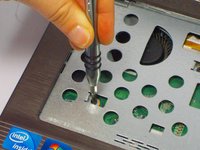
      • Remove the five 9 mm Phillips head screws with the PH0 bit.

      crwdns2952109:0crwdne2952109:0

      crwdns2917038:0crwdne2917038:0

    4. ASUS X44H-BBR4 Fan Replacement: crwdns2935265:022crwdnd2935265:01crwdnd2935265:02crwdne2935265:0 ASUS X44H-BBR4 Fan Replacement: crwdns2935265:022crwdnd2935265:02crwdnd2935265:02crwdne2935265:0
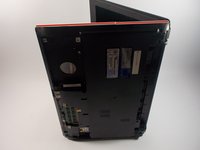
      • Flip the laptop on its side so that the red line indicated in the pictures is facing upwards.

      crwdns2952109:0crwdne2952109:0

      crwdns2917038:0crwdne2917038:0

    5. ASUS X44H-BBR4 Fan Replacement: crwdns2935265:023crwdnd2935265:01crwdnd2935265:02crwdne2935265:0 ASUS X44H-BBR4 Fan Replacement: crwdns2935265:023crwdnd2935265:02crwdnd2935265:02crwdne2935265:0
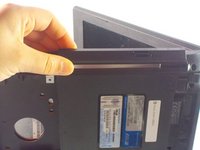
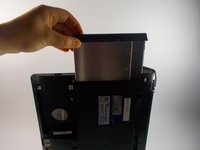
      • Pull up on the disk drive and remove.

      crwdns2952109:0crwdne2952109:0

      crwdns2917038:0crwdne2917038:0

    6. ASUS X44H-BBR4 Fan Replacement: crwdns2935265:024crwdnd2935265:01crwdnd2935265:02crwdne2935265:0 ASUS X44H-BBR4 Fan Replacement: crwdns2935265:024crwdnd2935265:02crwdnd2935265:02crwdne2935265:0
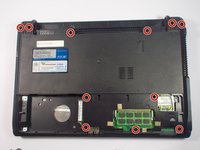
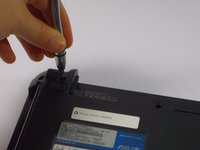
      • Close the laptop and flip it over.

      • Remove the six 12.5 mm screws Phillips head and the five 9 mm screws remaining with the PH0 bit.

      crwdns2952109:0crwdne2952109:0

      crwdns2917038:0crwdne2917038:0

    7. ASUS X44H-BBR4 Fan Replacement: crwdns2935265:025crwdnd2935265:01crwdnd2935265:03crwdne2935265:0 ASUS X44H-BBR4 Fan Replacement: crwdns2935265:025crwdnd2935265:02crwdnd2935265:03crwdne2935265:0 ASUS X44H-BBR4 Fan Replacement: crwdns2935265:025crwdnd2935265:03crwdnd2935265:03crwdne2935265:0
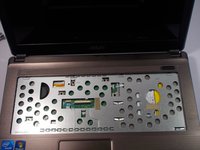
      • Flip the device back over and open the laptop.

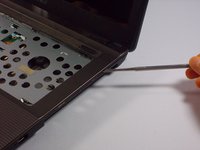
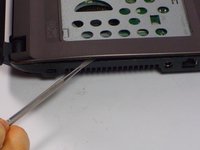
      • Using the nylon or metal spudger, gently pry off the panel by moving the spudger along the seam.

      • You should hear clicking sounds as the front panel is being removed from the base.

      crwdns2952109:0crwdne2952109:0

      crwdns2917038:0crwdne2917038:0

    8. ASUS X44H-BBR4 Fan Replacement: crwdns2935265:026crwdnd2935265:01crwdnd2935265:01crwdne2935265:0
      • Remove the panel.

      • The laptop will now become heavier to the front so it will tend to fall on the back side of the screen.

      crwdns2952109:0crwdne2952109:0

      crwdns2917038:0crwdne2917038:0

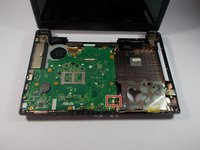
    1. ASUS X44H-BBR4 Fan Replacement, MotherBoard: crwdns2935265:027crwdnd2935265:01crwdnd2935265:02crwdne2935265:0 ASUS X44H-BBR4 Fan Replacement, MotherBoard: crwdns2935265:027crwdnd2935265:02crwdnd2935265:02crwdne2935265:0
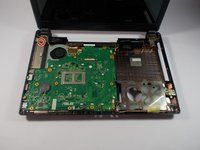
      • Remove the 5mm Phillips head screw using the PH0 bit.

      crwdns2952109:0crwdne2952109:0

      crwdns2917038:0crwdne2917038:0

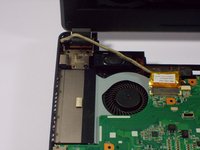
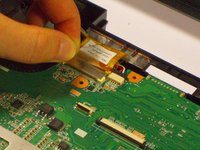
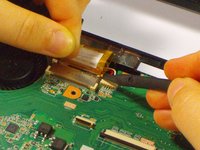
    2. ASUS X44H-BBR4 Fan Replacement: crwdns2935265:028crwdnd2935265:01crwdnd2935265:03crwdne2935265:0 ASUS X44H-BBR4 Fan Replacement: crwdns2935265:028crwdnd2935265:02crwdnd2935265:03crwdne2935265:0 ASUS X44H-BBR4 Fan Replacement: crwdns2935265:028crwdnd2935265:03crwdnd2935265:03crwdne2935265:0
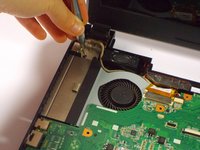
      • Pull up on the tape holding the tan cable in place.

      • While holding the tape push up on each side of the cable connector to disconnect it.

      crwdns2952109:0crwdne2952109:0

      crwdns2917038:0crwdne2917038:0

    3. ASUS X44H-BBR4 Fan Replacement: crwdns2935265:029crwdnd2935265:01crwdnd2935265:01crwdne2935265:0
      • Gently pull out the cable connector.

      crwdns2952109:0crwdne2952109:0

      crwdns2917038:0crwdne2917038:0

    4. ASUS X44H-BBR4 Fan Replacement: crwdns2935265:030crwdnd2935265:01crwdnd2935265:03crwdne2935265:0 ASUS X44H-BBR4 Fan Replacement: crwdns2935265:030crwdnd2935265:02crwdnd2935265:03crwdne2935265:0 ASUS X44H-BBR4 Fan Replacement: crwdns2935265:030crwdnd2935265:03crwdnd2935265:03crwdne2935265:0
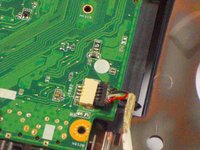
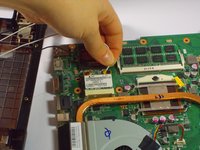
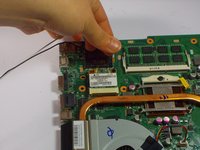
      • Gently pull out the USB connector attached to the motherboard.

      crwdns2952109:0crwdne2952109:0

      crwdns2917038:0crwdne2917038:0

    5. ASUS X44H-BBR4 Fan Replacement: crwdns2935265:031crwdnd2935265:01crwdnd2935265:02crwdne2935265:0 ASUS X44H-BBR4 Fan Replacement: crwdns2935265:031crwdnd2935265:02crwdnd2935265:02crwdne2935265:0
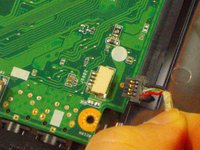
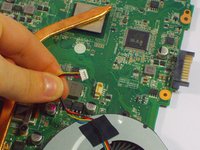
      • Remove the red and white wire connector next to the fan.

      crwdns2952109:0crwdne2952109:0

      crwdns2917038:0crwdne2917038:0

    6. ASUS X44H-BBR4 Fan Replacement: crwdns2935265:032crwdnd2935265:01crwdnd2935265:01crwdne2935265:0
      • Take out the motherboard

      • There are still two wires connected to the bottom of the motherboard so remove carefully.

      crwdns2952109:0crwdne2952109:0

      crwdns2917038:0crwdne2917038:0

    7. ASUS X44H-BBR4 Fan Replacement: crwdns2935265:033crwdnd2935265:01crwdnd2935265:01crwdne2935265:0
      • Flip the motherboard over next to the laptop base.

      crwdns2952109:0crwdne2952109:0

      crwdns2917038:0crwdne2917038:0

    8. ASUS X44H-BBR4 Fan Replacement: crwdns2935265:034crwdnd2935265:01crwdnd2935265:03crwdne2935265:0 ASUS X44H-BBR4 Fan Replacement: crwdns2935265:034crwdnd2935265:02crwdnd2935265:03crwdne2935265:0 ASUS X44H-BBR4 Fan Replacement: crwdns2935265:034crwdnd2935265:03crwdnd2935265:03crwdne2935265:0
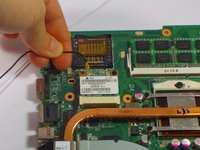
      • Remove the white and black wire.

      • The motherboard is not completely separated from the base of the computer.

      crwdns2952109:0crwdne2952109:0

      crwdns2917038:0crwdne2917038:0

    1. ASUS X44H-BBR4 Fan Replacement, Fan: crwdns2935265:035crwdnd2935265:01crwdnd2935265:03crwdne2935265:0 ASUS X44H-BBR4 Fan Replacement, Fan: crwdns2935265:035crwdnd2935265:02crwdnd2935265:03crwdne2935265:0 ASUS X44H-BBR4 Fan Replacement, Fan: crwdns2935265:035crwdnd2935265:03crwdnd2935265:03crwdne2935265:0
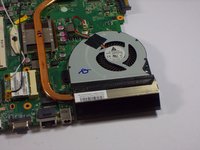
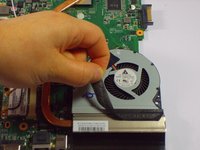
      • Remove the black piece of tape located on each side of the fan and vent, connecting the two components.

      crwdns2952109:0crwdne2952109:0

      crwdns2917038:0crwdne2917038:0

    2. ASUS X44H-BBR4 Fan Replacement: crwdns2935265:036crwdnd2935265:01crwdnd2935265:03crwdne2935265:0 ASUS X44H-BBR4 Fan Replacement: crwdns2935265:036crwdnd2935265:02crwdnd2935265:03crwdne2935265:0 ASUS X44H-BBR4 Fan Replacement: crwdns2935265:036crwdnd2935265:03crwdnd2935265:03crwdne2935265:0
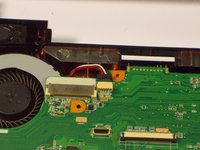
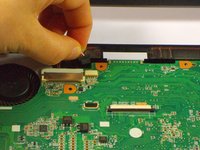
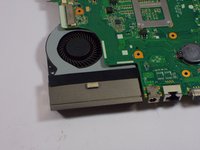
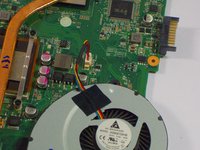
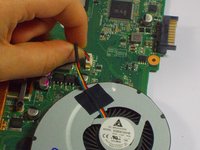
      • Pull up on the four wires (red, yellow, blue and black) connecting the fan to the motherboard.

      • Remove fan by pulling it upwards.

      crwdns2952109:0crwdne2952109:0

      crwdns2917038:0crwdne2917038:0

crwdns2915888:0crwdne2915888:0

To reassemble your device, follow these instructions in reverse order.

crwdns2935221:0crwdne2935221:0

crwdns2935227:0crwdne2935227:0

Devaj Ramsamooj

crwdns2935283:010/21/15crwdne2935283:0

824 crwdns2915208:0crwdne2915208:0

crwdns2935297:05crwdne2935297:0

crwdns2935287:0crwdne2935287:0

UMass Dartmouth, Team 4-3, Catania Fall 2015 crwdns2935289:0UMass Dartmouth, Team 4-3, Catania Fall 2015crwdne2935289:0

UMASSD-CATANIA-F15S4G3

crwdns2931471:04crwdne2931471:0

crwdns2935297:063crwdne2935297:0

crwdns2947412:00crwdne2947412:0

crwdns2917038:0crwdne2917038:0

crwdns2936625:0crwdne2936625:0:

crwdns2936751:024crwdne2936751:0 1

crwdns2936753:07crwdne2936753:0 8

crwdns2936753:030crwdne2936753:0 26

crwdns2942667:0crwdne2942667:0 955