
ASUS Transformer Book Flip TP500LA RAM Replacement

crwdns2959932:0crwdnd2959932:0Solomon Dovinhcrwdnd2959932:0crwdnd2959932:0crwdne2959932:0
crwdns2959936:0Mud 21, 2024crwdne2959936:0
crwdns2869540:0crwdne2869540:0: 3.5K
crwdns2959988:0crwdne2959988:0
- crwdns2959990:0crwdne2959990:0
- 1
- crwdns2959992:0crwdne2959992:0
- 18
- crwdns2959994:0crwdne2959994:0
- 85
- crwdns2959996:0crwdne2959996:0
- 3,460
crwdns2955950:0crwdne2955950:0: 1
crwdns2960006:01crwdne2960006:0
crwdns2960000:0crwdne2960000:0crwdns2959984:0crwdne2959984:0: 9 10
crwdns2959974:09crwdne2959974:0
crwdns2959970:010crwdne2959970:0
crwdns2959986:0crwdne2959986:0: 0 1
crwdns2959958:0crwdne2959958:0
crwdns2959976:01crwdne2959976:0
crwdns2915892:0crwdne2915892:0
crwdns2959928:0crwdne2959928:0 ↓RAM, or Random Access Memory is used by your computer to store frequently accessed or used information. Your computer then draws upon this storage when you perform an action that your computer recognizes as regular or normal. Having an insufficient amount of RAM can cause your computer to slow down. In this guide we will teach you how to disassemble your ASUS Transformer Book Flip TP500LA and to locate and remove your computer's RAM chip.
crwdns2959930:0crwdne2959930:0
crwdns2943215:0crwdne2943215:0


-
-
-
Remove the ten 10 mm Phillips #0 screws found on the computer's back case.
 crwdns2952109:0crwdne2952109:0
-
-
crwdns2935267:0crwdne2935267:0Heavy-Duty Spudger$4.99
-
'Slide a heavy-duty spudger in between the back case and the computer.
-
Slowly work around the edges to undo the clips to fully separate the back case from the computer.
-
Gently lift off the back case.
-
-
-
-
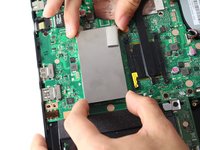
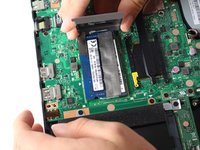
Grasp the edges of the RAM case with your fingers.
-
Slowly lift the case upwards to remove the RAM case.
-
-
-
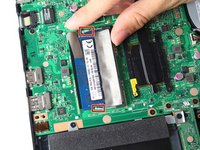
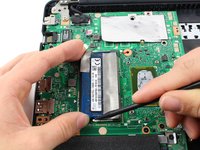
Loosen the RAM's fastener clips by lifting one of the clips as you grasp the RAM card.
-
Carefully lift it away from the motherboard.
-
-




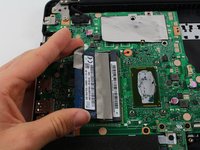
To reassemble your device, follow these instructions in reverse order.
crwdns2935221:0crwdne2935221:0
crwdns2935229:09crwdne2935229:0

crwdns2935287:0crwdne2935287:0

Cal Poly, Team S13-G5, Forte Spring 2017 crwdns2935289:0Cal Poly, Team S13-G5, Forte Spring 2017crwdne2935289:0
CPSU-FORTE-S17S13G5
crwdns2931471:03crwdne2931471:0
crwdns2935297:048crwdne2935297:0
crwdns2947410:01crwdne2947410:0
Thank you very much, easy to understand instruction. Where could I buy the parts like the RAM?
Marc LeBouthillier - crwdns2934203:0crwdne2934203:0 crwdns2950251:0crwdne2950251:0
