crwdns2933423:0crwdne2933423:0
crwdns2947577:0crwdnd2947577:0crwdne2947577:0

ASUS ROG G46VW Screen Replacement

crwdns2942213:0crwdne2942213:0

    1. ASUS ROG G46VW Screen Replacement, Speaker Cover: crwdns2935265:01crwdnd2935265:01crwdnd2935265:01crwdne2935265:0
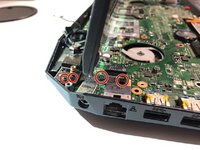
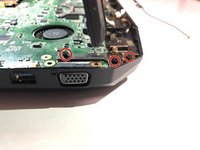
      • Gently pry the back hinge cover piece away from the device.

      crwdns2952109:0crwdne2952109:0

      crwdns2917038:0crwdne2917038:0

    2. ASUS ROG G46VW Screen Replacement: crwdns2935265:02crwdnd2935265:01crwdnd2935265:01crwdne2935265:0
      • Disconnect the speaker cable from the motherboard.

      crwdns2952109:0crwdne2952109:0

      crwdns2917038:0crwdne2917038:0

    1. ASUS ROG G46VW Screen Replacement, RAM: crwdns2935265:03crwdnd2935265:01crwdnd2935265:02crwdne2935265:0 ASUS ROG G46VW Screen Replacement, RAM: crwdns2935265:03crwdnd2935265:02crwdnd2935265:02crwdne2935265:0
      • Lift the screw cover and remove the screw using a Phillips #0 screwdriver.

      crwdns2952109:0crwdne2952109:0

      crwdns2917038:0crwdne2917038:0

    2. ASUS ROG G46VW Screen Replacement: crwdns2935265:04crwdnd2935265:01crwdnd2935265:01crwdne2935265:0
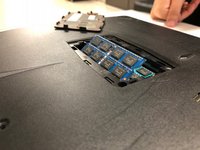
      • Remove the RAM cover by lifting the screw cover and pulling away firmly.

      crwdns2952109:0crwdne2952109:0

      crwdns2917038:0crwdne2917038:0

    3. ASUS ROG G46VW Screen Replacement: crwdns2935265:05crwdnd2935265:01crwdnd2935265:02crwdne2935265:0 ASUS ROG G46VW Screen Replacement: crwdns2935265:05crwdnd2935265:02crwdnd2935265:02crwdne2935265:0
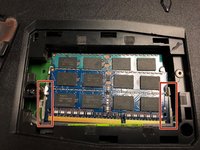
      • Push outwards on the clips to release the RAM stick. The stick should pop up at an angle.

      crwdns2952109:0crwdne2952109:0

      crwdns2917038:0crwdne2917038:0

    4. ASUS ROG G46VW Screen Replacement: crwdns2935265:06crwdnd2935265:01crwdnd2935265:01crwdne2935265:0
      • Pull out the RAM stick carefully.

      • Do not use a prying motion as this will damage the hardware. Be careful not to damage the gold section of the RAM stick.

      crwdns2952109:0crwdne2952109:0

      crwdns2917038:0crwdne2917038:0

    5. ASUS ROG G46VW Screen Replacement: crwdns2935265:07crwdnd2935265:01crwdnd2935265:01crwdne2935265:0
      • Repeat steps 3-4 to remove the second RAM stick.

      crwdns2952109:0crwdne2952109:0

      crwdns2917038:0crwdne2917038:0

    1. ASUS ROG G46VW Screen Replacement, Keyboard: crwdns2935265:08crwdnd2935265:01crwdnd2935265:01crwdne2935265:0
      • Remove the two screws from underneath the RAM cover.

      crwdns2952109:0crwdne2952109:0

      crwdns2917038:0crwdne2917038:0

    2. ASUS ROG G46VW Screen Replacement: crwdns2935265:09crwdnd2935265:01crwdnd2935265:01crwdne2935265:0
      • Remove all of the screws from the bottom of the case.

      • If replacing the screen, remove the rubber feet to reveal two more screws.

      crwdns2952109:0crwdne2952109:0

      crwdns2917038:0crwdne2917038:0

    3. ASUS ROG G46VW Screen Replacement: crwdns2935265:010crwdnd2935265:01crwdnd2935265:01crwdne2935265:0
      • Turn the laptop over and remove the screws as shown

      crwdns2952109:0crwdne2952109:0

      crwdns2917038:0crwdne2917038:0

    4. ASUS ROG G46VW Screen Replacement: crwdns2935265:011crwdnd2935265:01crwdnd2935265:01crwdne2935265:0
      • Carefully pry the keyboard away using your spudger and the opening tools.

      • Be sure not to damage the clips holding the keyboard to the bottom case.

      crwdns2952109:0crwdne2952109:0

      crwdns2917038:0crwdne2917038:0

    5. ASUS ROG G46VW Screen Replacement: crwdns2935265:012crwdnd2935265:01crwdnd2935265:02crwdne2935265:0 ASUS ROG G46VW Screen Replacement: crwdns2935265:012crwdnd2935265:02crwdnd2935265:02crwdne2935265:0
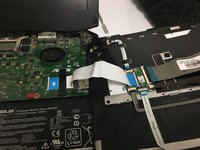
      • Detach the ribbon cable by releasing the clip

      crwdns2952109:0crwdne2952109:0

      crwdns2917038:0crwdne2917038:0

    1. ASUS ROG G46VW Screen Replacement, Screen: crwdns2935265:013crwdnd2935265:01crwdnd2935265:02crwdne2935265:0 ASUS ROG G46VW Screen Replacement, Screen: crwdns2935265:013crwdnd2935265:02crwdnd2935265:02crwdne2935265:0
      • Remove screws from silver braces.

      crwdns2952109:0crwdne2952109:0

      crwdns2917038:0crwdne2917038:0

    2. ASUS ROG G46VW Screen Replacement: crwdns2935265:014crwdnd2935265:01crwdnd2935265:01crwdne2935265:0
      crwdns2935267:0crwdne2935267:0
      Tweezers
      $4.99
      • Use tweezers to remove golden screw caps.

      crwdns2952109:0crwdne2952109:0

      crwdns2917038:0crwdne2917038:0

    3. ASUS ROG G46VW Screen Replacement: crwdns2935265:015crwdnd2935265:01crwdnd2935265:01crwdne2935265:0
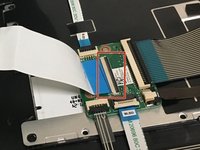
      • Remove tape and gently pull up on golden cap connectors to disconnect them.

      crwdns2952109:0crwdne2952109:0

      crwdns2917038:0crwdne2917038:0

    4. ASUS ROG G46VW Screen Replacement: crwdns2935265:016crwdnd2935265:01crwdnd2935265:01crwdne2935265:0
      • Gently pull the white connector until it comes loose.

      crwdns2952109:0crwdne2952109:0

      crwdns2917038:0crwdne2917038:0

crwdns2915888:0crwdne2915888:0

To reassemble your device, follow these instructions in reverse order.

crwdns2935221:0crwdne2935221:0

crwdns2935229:02crwdne2935229:0

Ryan Riley

crwdns2935283:009/21/18crwdne2935283:0

154 crwdns2915208:0crwdne2915208:0

crwdns2935295:0crwdne2935295:0

crwdns2935287:0crwdne2935287:0

University of North Texas, Team S6-G3, Thompson Fall 2018 crwdns2935289:0University of North Texas, Team S6-G3, Thompson Fall 2018crwdne2935289:0

UNT-THOMPSON-F18S6G3

crwdns2931471:04crwdne2931471:0

crwdns2935297:084crwdne2935297:0

crwdns2947412:00crwdne2947412:0

crwdns2917038:0crwdne2917038:0

crwdns2936625:0crwdne2936625:0:

crwdns2936751:024crwdne2936751:0 2

crwdns2936753:07crwdne2936753:0 19

crwdns2936753:030crwdne2936753:0 47

crwdns2942667:0crwdne2942667:0 983