crwdns2933423:0crwdne2933423:0
crwdns2947577:0crwdnd2947577:0crwdne2947577:0

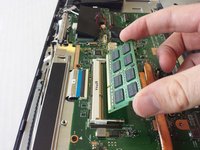
ASUS Portable AiO PT2001 RAM Replacement

crwdns2869540:0crwdne2869540:0: 1,9 mil

crwdns2959988:0crwdne2959988:0

crwdns2959990:0crwdne2959990:0
3
crwdns2959992:0crwdne2959992:0
20
crwdns2959994:0crwdne2959994:0
80
crwdns2959996:0crwdne2959996:0
1.866
crwdns2955950:0crwdne2955950:0: 1

crwdns2960002:01crwdne2960002:0.

crwdns2959984:0crwdne2959984:0: 3

crwdns2959974:03crwdne2959974:0

crwdns2959986:0crwdne2959986:0: 0

crwdns2959958:0crwdne2959958:0

crwdns2955944:0crwdne2955944:0: crwdns2931287:09crwdne2931287:0
crwdns2955970:0crwdne2955970:0: crwdns2937799:0crwdne2937799:0
ASUS Portable AiO PT2001 RAM Replacement

crwdns2915892:0crwdne2915892:0

crwdns2959928:0crwdne2959928:0 ↓

Replacing the RAM (Random-Access Memory) is one of the easiest operations to perform on this device. The only tools you need are plastic opening tools and a Phillips screwdriver to remove the back panel.

crwdns2959930:0crwdne2959930:0

crwdns2943215:0crwdne2943215:0

    1. ASUS Portable AiO PT2001 RAM Replacement, Back Panel: crwdns2935265:01crwdnd2935265:01crwdnd2935265:03crwdne2935265:0 ASUS Portable AiO PT2001 RAM Replacement, Back Panel: crwdns2935265:01crwdnd2935265:02crwdnd2935265:03crwdne2935265:0 ASUS Portable AiO PT2001 RAM Replacement, Back Panel: crwdns2935265:01crwdnd2935265:03crwdnd2935265:03crwdne2935265:0
      • Remove the grey scuff guard at the bottom of the PC by pressing down on it, and pulling it away.

      • Lift the hinge and remove the grey rubber tabs on either side of the PC’s model information.

      • Remove the two 7.62mm Phillips #1 screws beneath the rubber tabs under the hinge and the four 7.62mm Phillips #1 screws where the scuff guard was removed.

      • Remove the two 4.74mm Phillips #1 screws under the hinge (near the hinge joints) and a 4.74mm Phillips #1 screw under the handle.

      crwdns2952109:0crwdne2952109:0

      crwdns2917038:0crwdne2917038:0

    2. ASUS Portable AiO PT2001 RAM Replacement: crwdns2935265:02crwdnd2935265:01crwdnd2935265:03crwdne2935265:0 ASUS Portable AiO PT2001 RAM Replacement: crwdns2935265:02crwdnd2935265:02crwdnd2935265:03crwdne2935265:0 ASUS Portable AiO PT2001 RAM Replacement: crwdns2935265:02crwdnd2935265:03crwdnd2935265:03crwdne2935265:0
      • Use 1-2 plastic opening tools or nylon spudgers to firmly pry open the back panel.

      • We recommend that you start prying the panel where the scuff guard was removed.

      • Prying the back panel will cause loud popping noises. This is just the sound of the clips that hold the back panel to the PC popping off.

      • Using excess force while prying can break the clips that hold the back panel and can damage the ports on the side of the PC.

      crwdns2952109:0crwdne2952109:0

      crwdns2917038:0crwdne2917038:0

    3. ASUS Portable AiO PT2001 RAM Replacement: crwdns2935265:03crwdnd2935265:01crwdnd2935265:03crwdne2935265:0 ASUS Portable AiO PT2001 RAM Replacement: crwdns2935265:03crwdnd2935265:02crwdnd2935265:03crwdne2935265:0 ASUS Portable AiO PT2001 RAM Replacement: crwdns2935265:03crwdnd2935265:03crwdnd2935265:03crwdne2935265:0
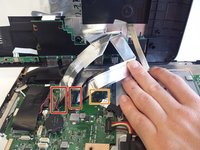
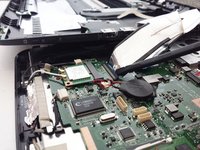
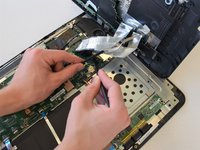
      • Disconnect the three cables connecting the back panel ports to the motherboard.

      • Flip up the locking latch holding the two ribbon cables with a plastic opening tool and pull the cables out.

      • Gently wiggle the third connector out of its socket.

      crwdns2952109:0crwdne2952109:0

      crwdns2917038:0crwdne2917038:0

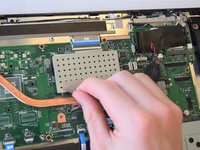
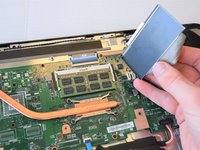
    1. ASUS Portable AiO PT2001 RAM Replacement, RAM: crwdns2935265:04crwdnd2935265:01crwdnd2935265:02crwdne2935265:0 ASUS Portable AiO PT2001 RAM Replacement, RAM: crwdns2935265:04crwdnd2935265:02crwdnd2935265:02crwdne2935265:0
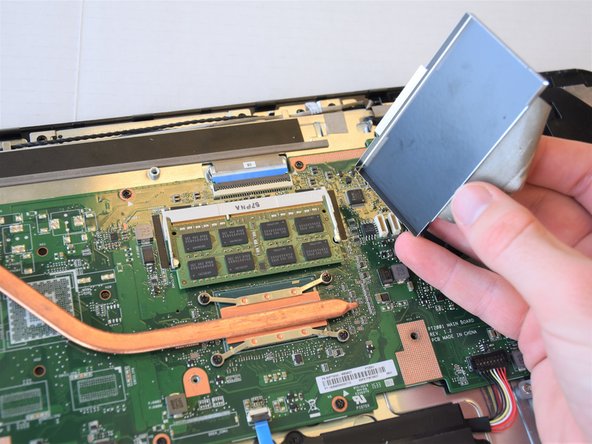
      • Peel off the tape attaching the metal enclosure to the heat sink.

      • Lift the metal enclosure off of the motherboard.

      crwdns2952109:0crwdne2952109:0

      crwdns2917038:0crwdne2917038:0

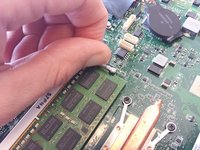
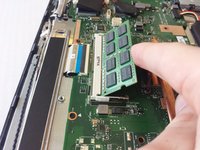
    2. ASUS Portable AiO PT2001 RAM Replacement: crwdns2935265:05crwdnd2935265:01crwdnd2935265:03crwdne2935265:0 ASUS Portable AiO PT2001 RAM Replacement: crwdns2935265:05crwdnd2935265:02crwdnd2935265:03crwdne2935265:0 ASUS Portable AiO PT2001 RAM Replacement: crwdns2935265:05crwdnd2935265:03crwdnd2935265:03crwdne2935265:0
      • Pull the jaws of the white plastic frame apart. This will pop the front of the RAM up.

      • Gently lift the front edge of the RAM.

      • Pull the RAM out and up.

      crwdns2952109:0crwdne2952109:0

      crwdns2917038:0crwdne2917038:0

crwdns2915888:0crwdne2915888:0

To reassemble your device, follow these instructions in reverse order.

crwdns2935221:0crwdne2935221:0

crwdns2935229:03crwdne2935229:0

Elliot Kane

crwdns2935283:004/17/18crwdne2935283:0

381 crwdns2915208:0crwdne2915208:0

crwdns2935297:02crwdne2935297:0

crwdns2935287:0crwdne2935287:0

Cal Poly, Team S17-G5, Livingston Spring 2018 crwdns2935289:0Cal Poly, Team S17-G5, Livingston Spring 2018crwdne2935289:0

CPSU-LIVINGSTON-S18S17G5

crwdns2931471:04crwdne2931471:0

crwdns2935297:096crwdne2935297:0

crwdns2947412:00crwdne2947412:0

crwdns2917038:0crwdne2917038:0

crwdns2936625:0crwdne2936625:0:

crwdns2936751:024crwdne2936751:0 3

crwdns2936753:07crwdne2936753:0 20

crwdns2936753:030crwdne2936753:0 80

crwdns2959996:0crwdne2959996:0 1,866