
ASUS K50IJ Battery Replacement

crwdns2959932:0crwdnd2959932:0Andrew Andersoncrwdnd2959932:0crwdnd2959932:0crwdne2959932:0
crwdns2959936:0N'w 15, 2017crwdne2959936:0
crwdns2869540:0crwdne2869540:0: 2K
crwdns2959988:0crwdne2959988:0
- crwdns2959990:0crwdne2959990:0
- 4
- crwdns2959992:0crwdne2959992:0
- 16
- crwdns2959994:0crwdne2959994:0
- 92
- crwdns2959996:0crwdne2959996:0
- 2,005
crwdns2955950:0crwdne2955950:0: 0
crwdns2959998:0crwdne2959998:0
crwdns2960000:0crwdne2960000:0crwdns2959984:0crwdne2959984:0: 1 2
crwdns2959972:01crwdne2959972:0
crwdns2959970:02crwdne2959970:0
crwdns2959986:0crwdne2959986:0: 2 3
crwdns2959982:02crwdne2959982:0
crwdns2959978:03crwdne2959978:0
crwdns2915892:0crwdne2915892:0
crwdns2959928:0crwdne2959928:0 ↓Batteries get old and stop holding a charge. This guide will show you how to remove and replace that bad battery.
crwdns2959930:0crwdne2959930:0
crwdns2943213:0crwdne2943213:0
-
-
-
Slide the tab over to unlock the battery cover located on the bottom-left corner of the laptop.
 crwdns2952109:0crwdne2952109:0
-
-
-
-
Lift the exposed lip and remove the battery cover.
-
-
-
Press the tabs on the battery and lift them. The battery should come out easily.
-
-


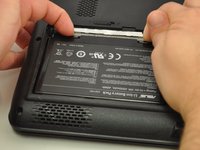
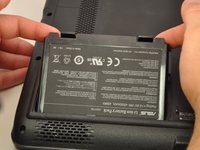
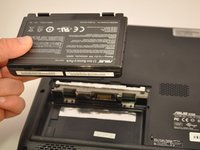
To reassemble your device, follow these instructions in reverse order.
crwdns2935221:0crwdne2935221:0
crwdns2935227:0crwdne2935227:0

crwdns2935287:0crwdne2935287:0

Eastern Washington University, Team S1-G3, Carnegie Fall 2017 crwdns2935289:0Eastern Washington University, Team S1-G3, Carnegie Fall 2017crwdne2935289:0
EWU-CARNEGIE-F17S1G3
crwdns2931471:04crwdne2931471:0
crwdns2935297:060crwdne2935297:0
