crwdns2933423:0crwdne2933423:0
crwdns2947577:0crwdnd2947577:0crwdne2947577:0

ASUS Eee PC 1018P RAM Replacement

crwdns2942213:0crwdne2942213:0

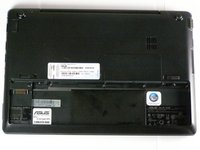
  1. ASUS Eee PC 1018P RAM Replacement, Battery: crwdns2935265:01crwdnd2935265:01crwdnd2935265:01crwdne2935265:0
    • Lay the laptop flat on a hard surface with the bottom facing up and the battery pack on the side closest to you.

    crwdns2952109:0crwdne2952109:0

    crwdns2917038:0crwdne2917038:0

  2. ASUS Eee PC 1018P RAM Replacement: crwdns2935265:02crwdnd2935265:01crwdnd2935265:02crwdne2935265:0 ASUS Eee PC 1018P RAM Replacement: crwdns2935265:02crwdnd2935265:02crwdnd2935265:02crwdne2935265:0
    • Use both index fingers to push both spring tabs inwards towards the center of the laptop.

    crwdns2952109:0crwdne2952109:0

    crwdns2917038:0crwdne2917038:0

  3. ASUS Eee PC 1018P RAM Replacement: crwdns2935265:03crwdnd2935265:01crwdnd2935265:03crwdne2935265:0 ASUS Eee PC 1018P RAM Replacement: crwdns2935265:03crwdnd2935265:02crwdnd2935265:03crwdne2935265:0 ASUS Eee PC 1018P RAM Replacement: crwdns2935265:03crwdnd2935265:03crwdnd2935265:03crwdne2935265:0
    • With the spring tabs pressed inward, use your fingernails to lift of the edge of the battery, pivoting it up and towards you.

    • Pull the battery pack up and away from you to completely free it from its recess in the case.

    crwdns2952109:0crwdne2952109:0

    crwdns2917038:0crwdne2917038:0

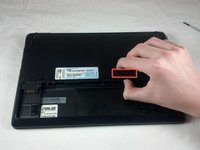
  4. ASUS Eee PC 1018P RAM Replacement, RAM: crwdns2935265:04crwdnd2935265:01crwdnd2935265:01crwdne2935265:0
    • With the battery removed, locate the RAM cover.

    crwdns2952109:0crwdne2952109:0

    crwdns2917038:0crwdne2917038:0

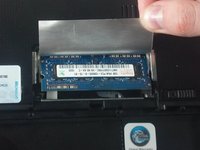
  5. ASUS Eee PC 1018P RAM Replacement: crwdns2935265:05crwdnd2935265:01crwdnd2935265:02crwdne2935265:0 ASUS Eee PC 1018P RAM Replacement: crwdns2935265:05crwdnd2935265:02crwdnd2935265:02crwdne2935265:0
    • Use your thumb to pry up the exposed edge of the RAM cover. Once this edge is lifted, the cover will come free.

    • With the RAM cover removed, carefully peel back the silver foil that protects the RAM.

    crwdns2952109:0crwdne2952109:0

    crwdns2917038:0crwdne2917038:0

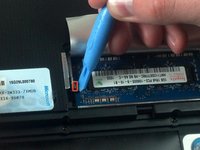
  6. ASUS Eee PC 1018P RAM Replacement: crwdns2935265:06crwdnd2935265:01crwdnd2935265:02crwdne2935265:0 ASUS Eee PC 1018P RAM Replacement: crwdns2935265:06crwdnd2935265:02crwdnd2935265:02crwdne2935265:0
    • Use the plastic opening tool to push aside the two silver tabs that hold down the RAM module.

    • In order to detach the tabs , use the plastic opening tool to pull the tab slightly toward the battery pack, then push outward away from the RAM module.

    • The RAM module will pop upward at a slight angle when both tabs are detached.

    crwdns2952109:0crwdne2952109:0

    crwdns2917038:0crwdne2917038:0

  7. ASUS Eee PC 1018P RAM Replacement: crwdns2935265:07crwdnd2935265:01crwdnd2935265:02crwdne2935265:0 ASUS Eee PC 1018P RAM Replacement: crwdns2935265:07crwdnd2935265:02crwdnd2935265:02crwdne2935265:0
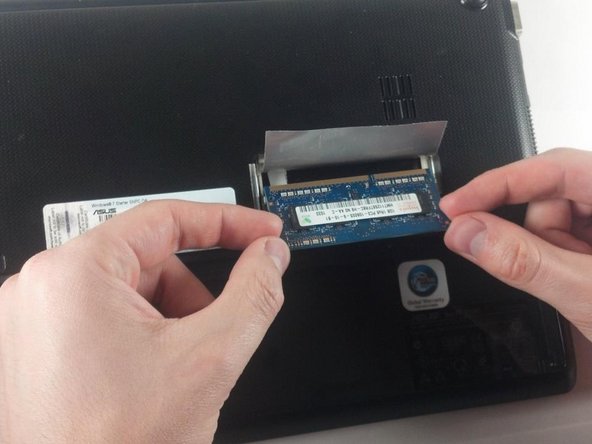
    • Carefully grasping the edges of the RAM module, slowly pull it free from the pin connectors underneath the edge of the foil.

    • Pull the RAM out at the same angle that it pops up naturally to. Ripping the RAM free at other angles can damage the fragile pins.

    crwdns2952109:0crwdne2952109:0

    crwdns2917038:0crwdne2917038:0

  8. ASUS Eee PC 1018P RAM Replacement: crwdns2935265:08crwdnd2935265:01crwdnd2935265:01crwdne2935265:0
    • Remove RAM module entirely for repair or replacement.

    crwdns2952109:0crwdne2952109:0

    crwdns2917038:0crwdne2917038:0

crwdns2915888:0crwdne2915888:0

To reassemble your device, follow these instructions in reverse order.

crwdns2935221:0crwdne2935221:0

crwdns2935227:0crwdne2935227:0

Patrick Hallahan

crwdns2935283:001/29/12crwdne2935283:0

38 crwdns2915208:0crwdne2915208:0

crwdns2935295:0crwdne2935295:0

crwdns2935287:0crwdne2935287:0

Cal Poly, Team 8-13, Maness Winter 2012 crwdns2935289:0Cal Poly, Team 8-13, Maness Winter 2012crwdne2935289:0

CPSU-MANESS-W12S8G13

crwdns2931471:04crwdne2931471:0

crwdns2935297:011crwdne2935297:0

crwdns2947412:00crwdne2947412:0

crwdns2917038:0crwdne2917038:0

crwdns2936625:0crwdne2936625:0:

crwdns2936751:024crwdne2936751:0 0

crwdns2936753:07crwdne2936753:0 8

crwdns2936753:030crwdne2936753:0 41

crwdns2942667:0crwdne2942667:0 3,781