crwdns2933423:0crwdne2933423:0
crwdns2947577:0crwdnd2947577:0crwdne2947577:0

crwdns2873744:0crwdne2873744:0

crwdns2933315:03crwdne2933315:0

crwdns2934263:00crwdne2934263:0

Identification

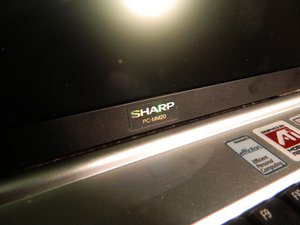
Determining that you're indeed using the Sharp PC-MM20 is very easy. When you open up your laptop, you will notice "Sharp PC-MM20" right below the screen.
crwdns2915344:0crwdne2915344:0

Also, if you turn the laptop over and look at the bottom, below the battery, there is a label. On the label, you can see the words "PC-MM20" above the barcode as well.

These two ways are great ways to verify that you are indeed working with the Sharp PC-MM20.

crwdns2915344:0crwdne2915344:0

Specifications

Operating System

  • Windows XP Home Edition

Processor

  • Transmeta Efficeon TM8600 1.0 GHz

Memory

  • Stardard 512.0 MB

Storage

  • 20.0 GB HDD

Graphics

  • AGP - ATI Mobility Radeon - 16.0 MB

Battery

  • Lithium Ion
  • Runtime : 3.0 hour(s)

Optical Drive

  • DVD-ROM/CD-RW

Display

  • 10.4" display

Troubleshooting

For help with common problems, visit the Sharp PC-MM20 Troubleshooting Page.

Additional Information

Logan Lindsey

crwdns2935283:009/11/13crwdne2935283:0

128 crwdns2915208:0crwdne2915208:0

crwdns2935295:0crwdne2935295:0

crwdns2935287:0crwdne2935287:0

Oakland University, Team 1-1, Ruszkiewicz Fall 2012 crwdns2935289:0Oakland University, Team 1-1, Ruszkiewicz Fall 2012crwdne2935289:0

OAK-RUSZKIEWICZ-F12S1G1

crwdns2934841:01crwdne2934841:0

crwdns2935297:012crwdne2935297:0

crwdns2936625:0crwdne2936625:0:

crwdns2936751:024crwdne2936751:0 2

crwdns2936753:07crwdne2936753:0 7

crwdns2936753:030crwdne2936753:0 55

crwdns2942667:0crwdne2942667:0 2,331
