|
crwdns2933313:01crwdne2933313:0 crwdns2934263:00crwdne2934263:0 |
Water damage of LogitechK710 keyboard |
Background
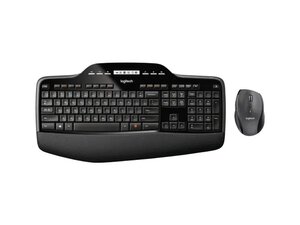
The Logitech Wireless Desktop MK710 is a full-size keyboard and contoured right-handed mouse combo designed for comfort and productivity. The keyboard includes an integrated LCD display, number pad, and palm rest, while the mouse offers precision tracking, programmable buttons and hyper-fast scrolling. The combo is a wireless desktop solution that pairs via a USB receiver and is built from durable materials for long-term everyday use. It targets office and home users who want a comfortable, full-featured wireless set.
Identification
The Logitech Wireless Desktop MK710 can be identified by the model number (M/N M-R0073). The model label is on the underside of the keyboard and on the mouse base; the USB receiver's model/serial markings are printed on the receiver housing. This label lists the model (M/N), part (P/N), and serial (S/N) numbers.
Specifications
- Product Name: MK710 Performance Wireless Keyboard and Mouse Combo
- Model / SKU / MPN: 920-002416 (MPN: 920-002416)
- Form Factor: Full-size keyboard with number pad + contoured right-handed mouse (combo)
- Connectivity: Wireless USB receiver (2.4 GHz; Unifying-compatible noted in support materials; exact receiver model not listed on product page)
- Keyboard Features: Full-size layout with integrated LCD display, number pad, and palm rest
- Key Switch Type: Membrane / scissor-style key mechanism (manufacturer not specified on product page)
- Mouse Features: Contoured ergonomic shape, programmable buttons, precision tracking and hyper-fast scroll
- In the Box: Keyboard, mouse, USB receiver (exact receiver model/part number not specified on product page)
- Software / Firmware: Logi Options+ recommended for device configuration; legacy Logitech utilities (Logitech Unifying, SetPoint, Firmware Update Tool) are deprecated per support documentation
- Product ID / URL: productID: mk710-desktop-keyboard-mouse — https://www.logitech.com/en-us/shop/p/mk...
Troubleshooting
Common repair-relevant faults include dead/weak batteries (device unresponsive), wireless connectivity/dropouts (receiver or pairing issues), and mouse scroll or button failures. Diagnose by swapping fresh batteries, moving or replugging the USB receiver (or testing on another PC), checking the keyboard/mouse power switches, and verifying configuration in Logi Options+; replace the receiver or battery compartment components if hardware faults are confirmed.
For additional troubleshooting help, visit: Visit https://support.logi.com for product support, downloads, and contact options; Logi Options+ is recommended for configuration.
Additional Information
Warranty Info
See Logitech warranty pages for region-specific warranty terms; check your purchase documentation or support site for claim filing.

