crwdns2944766:0crwdne2944766:0
crwdns2918718:0crwdne2918718:0crwdns2935091:0crwdnd2935091:0crwdne2935091:0
Background
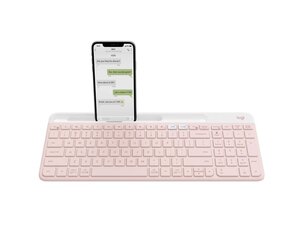
The Slim Multi-Device Wireless Keyboard K580 is a low-profile, full-size Bluetooth keyboard designed for productivity across multiple devices. It features Logitech Easy-Switch technology for seamless pairing with up to three devices and a slim, minimalist profile intended for modern workspaces. The chassis is made with durable materials and recycled plastics to balance longevity and sustainability. Key features include multi-device Bluetooth connectivity, a numeric keypad, and long battery life.
Identification
The Logitech Slim Multi-Device Wireless Keyboard K580 includes Keyboard (M/N YR0074) and USB receiver (M/N C-U0007). Model labels are located as follows — Keyboard: on the underside product label; USB Receiver: printed on the flat face or side of the receiver housing near the USB plug. Each component carries its own model (M/N) and serial (S/N) identifiers.
Specifications
- Form Factor: Full-size (100%), low-profile
- Layout: Standard QWERTY with numeric keypad
- Switch Type: Low-profile scissor dome switches (membrane) — manufacturer not specified by Logitech
- Connectivity: Bluetooth multi-device (Easy-Switch for up to 3 devices)
- Power: 2 × AAA batteries (user-replaceable)
- Battery Life: Up to 24 months (typical, depending on usage)
- Materials: Durable plastics with recycled plastic content; metal/bracket components in internal structure
- Model / SKU(s): Product ID: k580-multi-device-wireless-keyboard; SKUs: 920-011477 (Rose), 920-011479 (Graphite)
- Dimensions: Slim, low-profile desktop keyboard (manufacturer does not publish exact dimensions on provided page)
- Included Components: Keyboard unit; user-replaceable batteries (not preinstalled in all regions) — no external USB receiver listed (Bluetooth only)
Troubleshooting
Common faults include unresponsive or sticky keys (often caused by debris or spilled liquids) — diagnose by removing keycaps, inspecting/cleaning the membrane and scissor assemblies. Connectivity problems are commonly due to depleted batteries or pairing errors — check/replace batteries and re-pair via Bluetooth, and test with another host device. For suspected PCB or membrane damage after impact or liquid exposure, inspect the internal membrane/PCB after opening the case; replacement typically requires disassembly and board-level repair or replacement.
For additional troubleshooting help, visit: Visit https://support.logi.com for product support, troubleshooting, and contact options.
Additional Information
Warranty Info
Limited hardware warranty (varies by region); consult Logitech warranty information for specific coverage and period (typically 1 year).

