crwdns2944766:0crwdne2944766:0
crwdns2918718:0crwdne2918718:0crwdns2935091:0crwdnd2935091:0crwdne2935091:0
Background
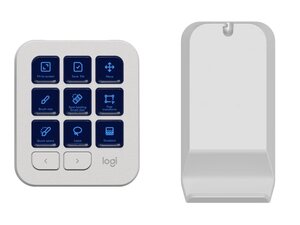
The MX Creative Console is a Logitech accessory positioned for creative workflows and presentation control. It combines physical controls and programmable inputs to streamline app-specific shortcuts and media control. The unit is constructed from durable materials, including reinforced plastics and metal accents, to withstand frequent desktop use. Key features include multi-device connectivity and integration with Logi Options+ for customization.
Identification
The Logitech MX CREATIVE CONSOLE can be identified by the model number (M/N YR0097). The model label is on the receiver housing. This label lists the model (M/N), part (P/N), and serial (S/N) numbers.
Specifications
- Form Factor: Standalone creative control console (desktop accessory)
- Connectivity: Bluetooth Low Energy; USB-A receiver (Logi Bolt/Unifying, if provided) — exact receiver model not listed
- Power / Battery: Rechargeable internal battery (capacity not specified by Logitech)
- Charging Port: USB-C (charging cable required; specific cable not listed)
- Materials: Reinforced plastic housing with metal accents/frame for durability
- Controls: Programmable buttons, dials/wheels, and touch controls (exact button switch type not listed)
- Key Switch Manufacturer/Model: Not listed by Logitech (device uses membrane/soft-switch style controls rather than discrete mechanical key switches)
- Compatibility: Windows and macOS supported; configurable via Logi Options+
- Dimensions: Not specified by Logitech
- Weight: Not specified by Logitech
Troubleshooting
Common repair-relevant faults include unresponsive controls, charging failures, and Bluetooth/receiver pairing issues. Diagnose by confirming Logi Options+ connectivity and firmware status, verifying USB-C cable and charging current, re-pairing Bluetooth or reseating the USB receiver, and inspecting the underside label for model/FCC IDs to locate service information.
For additional troubleshooting help, visit: See https://support.logi.com for product support, contact options, and Logi Options+ software.
Additional Information
Warranty Info
Standard Logitech limited hardware warranty — see Logitech warranty page for region-specific terms.

