crwdns2944766:0crwdne2944766:0
crwdns2918718:0crwdne2918718:0crwdns2935091:0crwdnd2935091:0crwdne2935091:0
Background
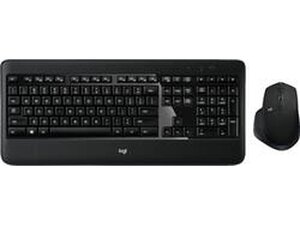
The MX900 PERFORMANCE is a full-size wireless scissor-keyboard and mouse bundle designed for productivity with a focus on comfort and long battery life. The keyboard uses a scissor-switch mechanism and includes sensor-enabled auto backlighting that activates when you approach and turns off when you leave. The set is built from durable plastics with reinforced keycaps and a sturdy mouse housing for everyday office use. Key features include multi-device wireless pairing, adjustable keyboard height, and an ergonomic, feature-rich mouse.
Identification
The Logitech MX900 PERFORMANCE can be identified by the model number (M/N M-R0066). The model label is on the underside of the keyboard. This label lists the model (M/N), part (P/N), and serial (S/N) numbers.
Specifications
- Form Factor: Full-size keyboard with numeric keypad
- Switch Type: Scissor-switch (membrane + scissor mechanism, low-profile)
- Key Switch Manufacturer: Logitech (proprietary scissor mechanism; exact internal part number not listed on product/support pages)
- Bundle Model Number: 920-008872 (bundle model as listed on product page); SKU 6290219
- Mouse Model: Included mouse model not separately listed on product/support pages; bundled under model 920-008872
- Backlighting: Sensor-enabled auto backlit keys (proximity sensor turns backlight on/off)
- Connectivity: Wireless via USB receiver (2.4 GHz); specific receiver model not listed. Software support recommended via Logi Options+; Unifying software/older utilities are deprecated per Logitech support.
- Battery / Power: Long battery life reported by customers; exact battery chemistry/types not specified on product/support pages
- Materials: Durable ABS/plastic housing and reinforced keycaps
- Compatibility: Windows and macOS compatible; configurable with Logi Options+ (Logitech support recommends Logi Options+)
Troubleshooting
Common repair-relevant faults include dead/weak batteries, wireless connectivity dropouts, backlight/proximity sensor failures, and broken/sticky scissor key clips. Diagnose by checking/ replacing batteries, re‑pairing the USB receiver on a different port or system, testing proximity/backlight behavior in a known-good environment, and inspecting keycaps and scissor clips for physical damage.
For additional troubleshooting help, visit: Logitech Support: https://support.logi.com (product-specific FAQ page for MX900 Performance available on Logitech support site).
Additional Information
Warranty Info
Limited hardware warranty — terms vary by region; check Logitech warranty page or contact Logitech Support for details and to file claims.

