crwdns2944766:0crwdne2944766:0
crwdns2918718:0crwdne2918718:0crwdns2935091:0crwdnd2935091:0crwdne2935091:0
Background
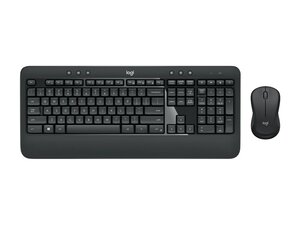
The MK540 Advanced is a full‑size wireless keyboard and contoured ambidextrous mouse combo designed for everyday productivity, offering a familiar key shape, size, and feel alongside a plug‑and‑play USB wireless receiver. The set is built with durable plastic housings designed for prolonged daily use and an emphasis on comfort and reliability. Key features highlighted by Logitech include a full‑size keyboard layout, contoured ergonomic mouse, and a simple plug‑and‑play wireless connection. The product listing also calls out sustainability considerations, including a published carbon footprint value.
Identification
The Logitech MK540 ADVANCED Wireless Keyboard and Mouse Combo includes Keyboard (M/N Y-R0012), Mouse (M/N M-R0050) and USB receiver (M/N C-U0007). Model labels are located as follows — Keyboard: on the underside product label; Mouse: on the underside product label; USB Receiver: printed on the flat face or side of the receiver housing near the USB plug. Each component carries its own model (M/N) and serial (S/N) identifiers.
Specifications
- Form Factor: Full‑size keyboard (with number pad) + contoured ambidextrous mouse
- Switch Type: Membrane / rubber‑dome keys (manufacturer/model not specified on product page)
- Connectivity: Plug‑and‑play 2.4 GHz USB nano receiver (wireless); product page describes plug‑and‑play wireless connection (receiver model not specified)
- Power: Battery‑powered keyboard and mouse (exact battery types and capacities not specified on product page)
- Material: Durable plastic housings with contoured mouse design; marketed for comfort and long‑term everyday use
- Sustainability: Documented carbon footprint: ~10.17 kg CO2e (value published on product page)
- Compatibility / Software: Works as a basic HID keyboard/mouse; Logitech recommends Logi Options+ for extended features (product/support pages reference Logi Options+)
- In the Box / Parts: Keyboard, mouse, USB wireless receiver — specific spare part numbers not listed on product/support pages
- Spare Parts Availability: Support page indicates no spare parts listed for this product on Logitech support (no part numbers provided)
- Other Features: Familiar key shape, size and feel; contoured comfort mouse; emphasis on plug‑and‑play ease and responsible manufacturing practices
Troubleshooting
Common repair‑relevant faults include unresponsive keys, sticky or intermittent key behavior, and wireless connectivity or receiver recognition failures. Diagnostic steps: check/replace batteries, try the receiver in a different USB port or PC, re‑pair or reinstall Logi Options+ (or test as basic HID device), and inspect keycaps/underlying membrane for debris or corrosion. For mouse issues, verify battery contacts and test on another surface or system to isolate sensor vs. RF problems.
For additional troubleshooting help, visit: Visit https://support.logi.com for product support, software (Logi Options+), and warranty contact information.
Additional Information
Warranty Info
Logitech provides regional limited hardware warranty information via its support site; see Logitech Warranty page for duration and terms.

