crwdns2944766:0crwdne2944766:0
crwdns2918718:0crwdne2918718:0crwdns2935091:0crwdnd2935091:0crwdne2935091:0
crwdns2916646:0crwdne2916646:0
Background
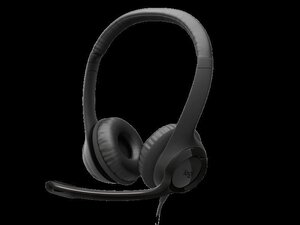
The Logitech H390 USB Headset is a wired USB headset designed for voice calls, webinars, and classroom or office deployments. It uses durable ABS plastic construction with a padded, adjustable headband and leatherette ear pads for extended comfort and longevity. Key features include a noise-cancelling boom microphone, in-line volume and mute controls, and plug-and-play USB-A connectivity for broad OS compatibility.
Identification
The Logitech H390 USB HEADSET can be identified by the model number (M/N A00086). The model label is on packaging and product labels. This label lists the model (M/N), part (P/N), and serial (S/N) numbers.
Specifications
- Product Name: Logitech H390 USB Headset
- Model / SKU: H390 / 981-001575
- Connectivity: USB-A (plug-and-play, USB 2.0) cable connection
- Microphone: Noise-cancelling boom microphone, adjustable/rotatable; flip-to-mute via inline control
- Inline Controls: Volume up/down and mute switch integrated on the cable housing
- Cable Length: Approximately 2 m (6.5 ft) PVC-jacketed cable
- Ear Cushions: Leatherette-padded on-ear cushions; padded adjustable headband
- Compatibility: Windows, macOS, Chrome OS — plug-and-play without drivers for basic audio and mic functions
- Packaging: Bulk 10-pack intended for business/education deployments (identical units individually labeled)
- Housing Materials: Durable ABS plastic construction with metal-reinforced internal headband components (where applicable)
Troubleshooting
Common repair-relevant faults include cable breaks/intermittent audio at the strain relief, failed inline controls, worn ear pads, and microphone failure. Diagnose by testing the headset on multiple USB ports or systems, performing a wiggle test along the cable and near the inline module, visually inspecting the cable and strain relief, and opening the earcup/inline module to check solder joints and continuity with a multimeter.
For additional troubleshooting help, visit: For setup, drivers, and support articles visit Logitech Support: https://support.logi.com/hc/en-us/articl...
Additional Information
Warranty Info
Limited hardware warranty (typically 1 year; terms vary by region). Contact Logitech support or reseller for warranty claims.
Logitech Business Audio Comparison Chart
Logitech USB Headset H390 Setup Guide (EN, FR)
Logitech H390 Complete Setup Guide (EN, FR)
Logitech H390 Complete Setup Guide
Logitech H390 Complete Setup Guide
Logicool USB Headset H390 取扱説明書
Logitech iPad Lösungen für den Bereich Education – Produktübersicht
Logitech H390 Complete Setup Guide
Logitech H390 Setup Guide (EN, FR)
Logitech iPad-oplossingen voor het onderwijs – Brochure
Logitech iPad Solutions for Education Catalog